
What if your local content calendar did more than fill publishing slots? A useful plan connects what nearby customers are searching for with the questions, seasons, and community moments that matter to them. If you’re wondering how to create a local content calendar without adding another overwhelming task to your week, start with a repeatable process, not a longer to-do list.
It’s easy to get stuck choosing between search-focused topics and content that feels genuinely local. You also need a publishing pace your team can maintain. A practical calendar brings those needs together: plan useful content around customer questions, your service area, and your business goals, then review whether it’s improving local visibility.
In this guide, you’ll learn how to find worthwhile topics, choose formats such as blog posts and community updates, and build a realistic schedule. You’ll also see how Wisconsin seasonality and local events can shape your plans, which performance signals to monitor, and how to use results to refine what comes next.
Key Takeaways
- Learn how to create a local content calendar by connecting business goals, customer questions, local topics, and realistic publishing dates.
- Prioritize content ideas that help Wisconsin customers discover your business and make informed decisions.
- Match blog posts, service pages, Google Business Profile updates, and press releases to the questions they’re best suited to answer.
- Use a simple monthly workflow to assign owners, review performance, and adjust upcoming topics based on results.
- See how local SEO, keyword analysis, content creation, and analytics can help turn a plan into consistent action.
Why Wisconsin Small Businesses Need a Local Content Calendar
A local content calendar turns publishing from a last-minute task into a working plan. It links each topic to an audience, channel, owner, and publishing date, so the team can see what’s being created, why it matters, and what needs to happen next. Learning how to create a local content calendar starts with this simple shift: plan around customer needs and business goals, not just an empty spot on the schedule.
An editorial calendar provides a framework for organizing and scheduling content. A local version adds a practical question to every idea: what does this audience need to know in this place? That might mean answering service questions before a customer chooses a business or sharing timely information as a seasonal need approaches. Planned content can support discovery and decision-making, but it can’t guarantee search rankings or leads.
What makes a content calendar local?
Local relevance goes deeper than adding “Watertown” or “Madison” to generic copy. A useful topic reflects the business’s actual service locations, the words customers use, and the questions they ask before taking action. For example, a Wisconsin home-services business might plan content around preparing for cold-weather needs, while a business near a busy summer destination could address visitor questions during tourism season. The details should fit the business and the community it serves.
Community context can also distinguish topics that seem similar at first. A business serving Milwaukee customers may hear different questions from one serving a smaller town. Review customer conversations, inquiries, and recurring service requests for specific language and concerns. Then use those insights to shape content that’s genuinely useful, rather than producing near-identical pages that only swap one city name for another.
How a calendar helps a small team stay consistent
When topic decisions happen at the last minute, planning competes with daily operations. A calendar helps a small team identify upcoming priorities, prepare materials ahead of time, and avoid assigning multiple pieces to answer the same question. It also makes ownership visible: one person can gather customer questions, another can draft, and a reviewer can approve content before it’s scheduled.
Consistency doesn’t mean publishing constantly. Set a rhythm the team can sustain alongside customer work, then leave room to adjust when priorities change. A seasonal topic may need to move forward, or a useful customer question may deserve attention sooner than a planned post.
- Record the topic, intended audience, channel, owner, and target date.
- Note the specific customer question the content should answer.
- Leave room to shift dates when operations or local needs change.
Treat the calendar as a flexible operating tool, not a promise to publish on a rigid schedule. Its value is in helping a Wisconsin business make deliberate choices, connect content with broader local SEO work, and identify what to improve as the plan develops.
How to Build a Wisconsin Local Content Calendar Step by Step
A useful calendar begins with business priorities, not a pile of keywords. Decide what the content should help the business accomplish, then connect that goal to the people you serve and the questions they ask. This keeps planning grounded in Wisconsin customer needs and makes it easier to select topics your team can produce.
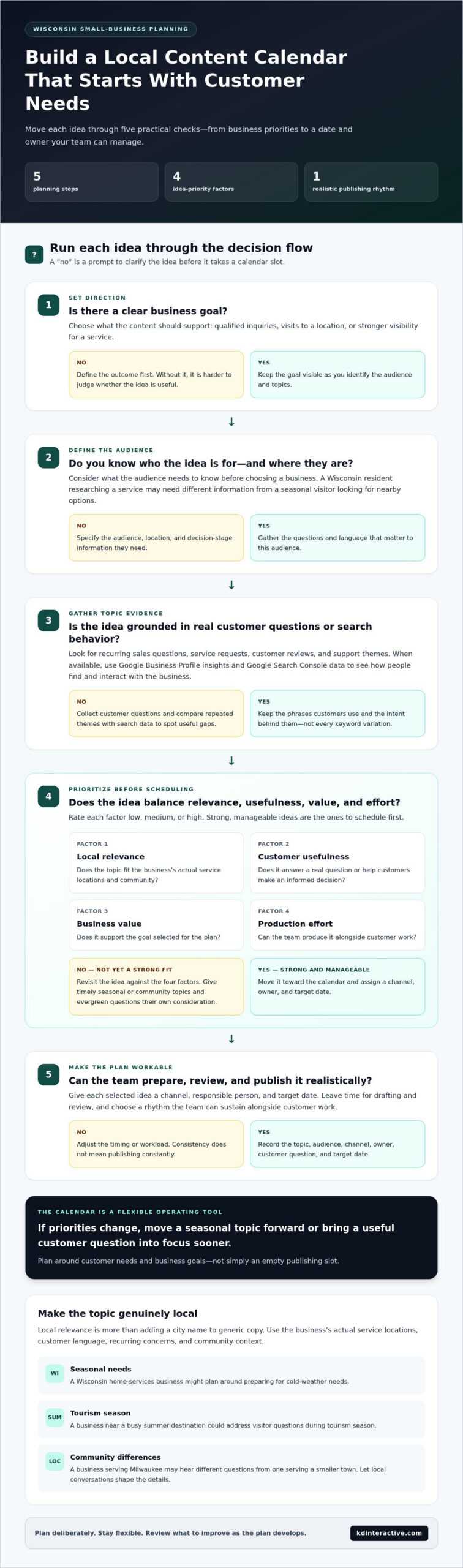
Set goals, define audiences, gather topics, prioritize ideas, and assign realistic publishing dates to build a local content calendar that supports business goals.
- Set a business goal. Choose an outcome to guide the plan, such as more qualified inquiries, visits to a location, or stronger visibility for a service. A clear goal helps you judge whether an idea is useful instead of publishing simply to stay active.
- Define the audience. Specify who you want to reach, where they’re located, and what they need to know before choosing a business. A Wisconsin resident researching a service may need different information from a seasonal visitor looking for nearby options.
- Gather topics. Collect recurring sales questions, service requests, customer reviews, and support themes. When available, Google Business Profile insights and Google Search Console data can show how people find and interact with your business.
- Prioritize the ideas. Compare each topic by local relevance, usefulness to customers, business value, and effort to produce. Schedule strong, manageable ideas first, and distinguish timely seasonal or community topics from evergreen questions.
- Assign dates and owners. Give each selected idea a channel, responsible person, and target date. Leave time for drafting and review so publishing fits around customer work rather than competing with it.
Gather topics from local customers and search behavior
Start with what customers already tell you. Group repeated questions by service, location, and stage of decision-making, then compare those themes with search data to spot useful gaps. Keep keyword discovery practical: note the phrases customers use and the intent behind them instead of chasing every variation. For a broader view of how content supports local visibility, explore this local SEO services guide.
Prioritize topics by value and effort
Use a simple rating, such as low, medium, or high, for each idea’s local relevance, customer usefulness, business value, and production effort. A timely Wisconsin topic belongs on the calendar only if it matters to your audience. A community event may be relevant to one business and a distraction for another. Balance seasonal opportunities with evergreen answers customers will need throughout the year.
As you learn how to create a local content calendar, remember that the first version is a working draft. Reorder it as customer needs or business priorities shift. If keyword selection or planning takes more time than your team has, Wisconsin-focused content support can help connect local SEO priorities with a coordinated publishing plan.
What to Put in a Local Content Calendar: Formats, Channels, and Cadence
A strong calendar doesn’t use every format just to look active. Choose the channel that best answers the customer’s question and supports the business goal. A person comparing services may need a detailed page, while someone looking for a timely update may need a short post on a business profile. Make the information easy to find and use by choosing a format that fits the message.
Choose content formats that match the customer journey
Think about what the customer needs at each stage. Educational blog posts can answer early questions and explain local considerations. Service pages speak to people seeking a specific solution and should make the offering and service area clear. Google Business Profile updates suit timely business news, offers, or community-relevant information. When planning an update, include the detail a customer needs to act, such as what’s happening and when.
Press releases serve a different purpose: sharing notable business news with a wider audience, such as an announcement or community milestone. They aren’t a substitute for an evergreen page or a routine profile update. Use the format that fits the message rather than forcing every topic into a blog post.
| Format | Best use | Local angle | Effort |
|---|---|---|---|
| Blog post | Explain a question or process | Address local needs, terminology, or seasonality | Medium to high |
| Service page | Describe a specific service | Clarify relevant service locations and customer fit | High |
| Profile update | Share timely business information | Connect an update to local customers or events | Low |
| Press release | Announce significant business news | Explain why the news matters to the community | Medium to high |
Set a cadence your team can sustain
There’s no universal publishing frequency that works for every small business. Start with the time and people available for research, writing, review, and posting. If your team can reliably produce one strong piece in a planning cycle, build around that capacity instead of scheduling more than you can finish. A realistic rhythm supports consistency without pulling staff away from core operations.
Leave room for timely local topics, but don’t let them crowd out evergreen content that answers recurring questions. Repurpose a useful core idea when a channel calls for a different treatment: for example, turn a blog’s key points into a concise profile update rather than copying the same text everywhere. Track each format, owner, and due date so you can see where production slows down and adjust the next cycle.
As you decide how to create a local content calendar, treat cadence as a practical commitment, not a competition. Choose formats based on customer intent, match effort to available capacity, and adjust as you learn what your audience uses.
How to Run and Measure Your Local Content Calendar Each Month
A calendar becomes more useful when your team reviews what happened and applies those lessons to the next cycle. Set aside time each month to check completed work, compare results with each item’s goal, and decide what deserves attention next. Keep the review focused. Look for practical signals, not proof that a single piece of content caused a specific customer action.
A useful content review compares planned work with observed customer actions, then uses the difference to shape the next month’s priorities.
Use a simple calendar template
Choose a shared spreadsheet or project board and add only the fields your team will maintain: topic, audience, location, intent, format, owner, status, publishing date, and result. Keep notes brief, such as “update service details” or “review inquiries,” so the calendar stays a working tool rather than a separate administrative project. For a wider view of how channels fit together, use this small-business digital marketing starter guide.
Run the calendar through a repeatable monthly sequence:
- Review results: Check recently published items against their intended purpose.
- Refresh priorities: Keep, revise, or defer topics based on customer needs and business goals.
- Assign owners: Confirm who will draft, review, and publish each item.
- Publish and monitor: Record when content goes live and note relevant customer responses.
- Document learnings: Capture one or two observations to guide the next planning cycle.
Review performance and update the next cycle
Choose measures that match each item’s goal. Organic impressions can show whether pages are appearing in search; Google Business Profile interactions can indicate engagement with the profile; engaged visits can help assess whether visitors are using website content; and qualified inquiries connect the review to a business outcome. Where configured, Google Search Console and Google Analytics 4 can help you examine search and website activity. Interpret each measure in context, not as automatic proof of attribution.
Compare results with your own baseline and with the content’s previous performance. A seasonal page may behave differently from an evergreen service page, and a newly published item may need more time to show a useful pattern. Traffic alone doesn’t tell the whole story. If a page attracts visits but few meaningful actions, consider whether it answers the customer’s question clearly, includes relevant local details, and makes the next step easy to find.
Use those observations to update, strengthen, or retire topics instead of repeating the same plan by default. If your team needs help connecting local SEO priorities with content and analytics, KD Interactive’s local SEO and content services bring those planning needs together.
How KD Interactive Can Help Turn Your Local Calendar Into Action
A calendar creates direction, but consistent execution takes time. Start by selecting topics tied to customer needs and business goals, assigning an owner to each, scheduling the work, and reviewing what happens after publication. If planning and production keep slipping behind daily operations, coordinated support can help turn that process into steady work.
What coordinated local content support looks like
KD Interactive helps Wisconsin small businesses shape content around their customers, service areas, and goals. Local SEO and keyword analysis help identify relevant search opportunities. Content creation turns selected topics into useful material, while on-page optimization and analytics tracking support visibility and performance reviews. KD Interactive also offers the Google Map Pack with AI Assistant. The work focuses on answering real questions and measuring progress, not promising specific rankings or leads.
Coordination matters because a calendar works best when its parts support one another. A keyword insight can inform a blog topic; that topic can clarify what a service page needs to answer; and performance data can help determine whether the page needs refinement. For a small team, managed blog writing can reduce the time spent researching, drafting, and organizing content. Your team can stay involved in priorities and expertise without carrying every production task alone.
- Set the direction: Identify the audience, service area, business objective, and customer questions the plan should address.
- Build the schedule: Select suitable content formats, assign responsibility, and set dates that fit the team’s capacity.
- Review and refine: Use available search and analytics information to guide updates and future topics.
Choose a practical next step for your business
Before changing your calendar, take stock of what’s already in motion. Which topics are still useful? Where does publishing stall: choosing ideas, writing, approvals, or reviewing results? Which local visibility priorities matter most right now? Clear answers help keep the plan tailored instead of adding work just to fill dates. A focused calendar can begin with a small set of relevant priorities and grow as your team establishes a workable process.
Learning how to create a local content calendar is only the first step. The lasting value comes from connecting planning, production, and measurement in a way your business can sustain. KD Interactive brings Wisconsin-focused local SEO, keyword analysis, content creation, and analytics together to support that process. The aim is useful content and measurable visibility aligned with your business, not a one-size-fits-all publishing schedule.
Start a conversation with KD Interactive about a tailored local growth plan that fits your goals and publishing capacity. Discuss your local content plan.
Make Your Next Content Cycle Count
Your next calendar doesn’t need to be perfect. Choose one priority that matters to your business, make room for the work, and use what you learn to shape the next cycle. That steady process turns how to create a local content calendar from a planning exercise into a practical habit your team can build on.
For Wisconsin small businesses, KD Interactive connects local SEO priorities with content creation and managed blog writing, then uses analytics tracking as part of local SEO services to help assess performance. The plan is tailored to your customers, service area, goals, and publishing capacity, so the next steps are clear and manageable.
Ready to build a local content plan around your business? Build a stronger local content plan with KD Interactive and take the next step toward consistent, measurable local visibility.
Frequently Asked Questions
What should a local content calendar include?
Include enough detail for someone to move each idea forward: topic, intended audience, target location, customer intent, format, owner, status, due date, and a way to record the result. Add a note about the next action, such as “confirm service details” or “review draft.” Keep the calendar easy to scan. If a field doesn’t help your team make or complete a decision, leave it out.
How often should a small business publish local content?
Publish at a pace your team can maintain without rushing research, review, or customer work. Instead of choosing a frequency based on another business’s schedule, try a manageable rhythm for a defined planning period, then check whether drafts and approvals are keeping up. If work repeatedly slips, scale back or simplify the format. A reliable schedule is more useful than an ambitious plan that quickly becomes difficult to follow.
How do I find local content ideas for my business?
Look for questions that come up during calls, estimates, appointments, and customer conversations. Note the exact wording, then group similar questions by service or decision point. You can also review customer feedback for recurring confusion. For example, if people often ask what information to prepare before requesting an estimate, a short checklist could make a practical topic. Keep a running idea list so useful questions aren’t lost.
Can one piece of content target multiple nearby cities?
Yes, if the content genuinely serves people across those locations. A regional guide may address shared needs and explain where a business operates. Don’t simply repeat a list of city names or swap place names in duplicate pages. If customer needs, services, or processes differ by location, provide meaningful details for each area. Readers should understand the local relevance without having to guess whether the information applies to them.
How do I measure whether a local content calendar is working?
Match each item to its intended outcome, then check suitable indicators over time. A visibility-focused article may be assessed through search impressions and visits, while a service page may also be judged by relevant inquiries. Keep notes about updates, seasonality, and page changes so you can interpret results fairly. Look for useful patterns across multiple review periods rather than treating one short-term change as proof of success.
Should a local content calendar include Google Business Profile posts?
Yes, if profile updates help communicate timely information to local customers. Schedule appropriate news, event participation, or service updates, and make sure the details remain accurate. Use the website for information customers may need to reference over time, such as fuller service explanations. A calendar can track both channels while giving each a distinct role. Don’t add profile posts simply to fill dates if there’s nothing useful to share.
What is the difference between a content calendar and an editorial calendar?
The terms are often used interchangeably. Some teams use “editorial calendar” for broader publishing plans that include campaigns, themes, or publication schedules, while “content calendar” may refer more directly to individual pieces and their channels. The label matters less than whether the plan helps your team coordinate work. Choose a name everyone understands, then record the information needed to create, approve, publish, and evaluate content.
Can a local business manage a content calendar without a marketing team?
Yes. One person can maintain a simple calendar, especially when the business limits the plan to a few high-priority topics and uses a repeatable review routine. Assign clear responsibilities even if the same person handles several steps. If writing and publishing compete with core operations, managed content creation or blog writing can help with production while the business remains involved in its expertise, priorities, and customer needs.