
A call from a Google Business Profile doesn’t necessarily go straight to your office number. With call history enabled, someone who taps the profile’s call button is routed through a Google forwarding number to your business. Tracking calls from a Google Business Profile can show call activity, but it can’t confirm that every call was answered or became a lead.
It’s reasonable to want a clear picture of which local searches prompt potential customers to call. This article explains what call history records, how forwarding affects the caller’s route, and what the Phone Calls metric can and can’t tell you. You’ll also learn to interpret the data alongside other local search activity, without treating a click as a completed conversation.
Key Takeaways
- Understand what call history captures, and why a recorded call doesn’t necessarily mean a customer reached your team.
- Learn how to interpret call-button activity in Search and Maps without confusing clicks with completed conversations.
- See what call data can tell you over time, including where its reporting has limits.
- Use phone activity as one signal of local lead interest, alongside other profile interactions.
Should You Turn On Call History in Your Google Business Profile?
Call history shows activity from people who tap your profile’s call button, but it doesn’t measure every call to your office. Its usefulness depends on how Google routes calls and what you want to learn from the data.
Google Forwarding Number Call Routing
A Google forwarding number routes a call from your Business Profile to the business phone number listed there. When possible, Google uses a forwarding number with the same area code or prefix. Otherwise, it uses a local number in your region, or a toll-free number if local options aren’t available. Call history records calls from the profile’s call button, not every call a customer makes to your business. The distinction matters because callers connect through the forwarding number before reaching your existing phone line.
Google Business Profile lets a business register two phone numbers. Keep a number customers can reach as the primary contact, and use a second number only if it also connects callers to your business. Measure Google Ads calls separately from Profile call history: configure tracking for the relevant ad interactions and ensure calls connect to your existing business number.
Tracking Numbers and Local SEO
Adding a call tracking number changes the displayed contact route, not the service your business provides. A tracking number alone can’t show whether a call became a lead, and it doesn’t guarantee a ranking effect. For local visibility, keep the number shown to customers accurate and able to connect them to your business. If you use another number for measurement, label its purpose internally so you can interpret call records correctly.
You can use a tracking number as your profile’s primary number only if it connects callers to your business. Keep the profile’s phone details accurate, and remember that it allows two numbers.
Dynamic Number Insertion Risks
Dynamic number insertion swaps a website phone number based on a visitor’s source. This can complicate attribution if the number shown differs from the one the visitor later dials. Google Profile call history covers taps on the profile’s call button, so it won’t capture every call that follows a website visit. Keep these call routes distinct when reviewing results.
Google forwarding calls can also present practical risks: carriers may block a forwarding number, callbacks from another phone may not reach your business, and calls can sometimes be routed incorrectly. Calls through call history begin with an automated Google announcement that businesses can’t turn off. Keep these limits in mind when judging whether the recorded activity reflects customer contact.
Tracking calls from Google Search and Maps
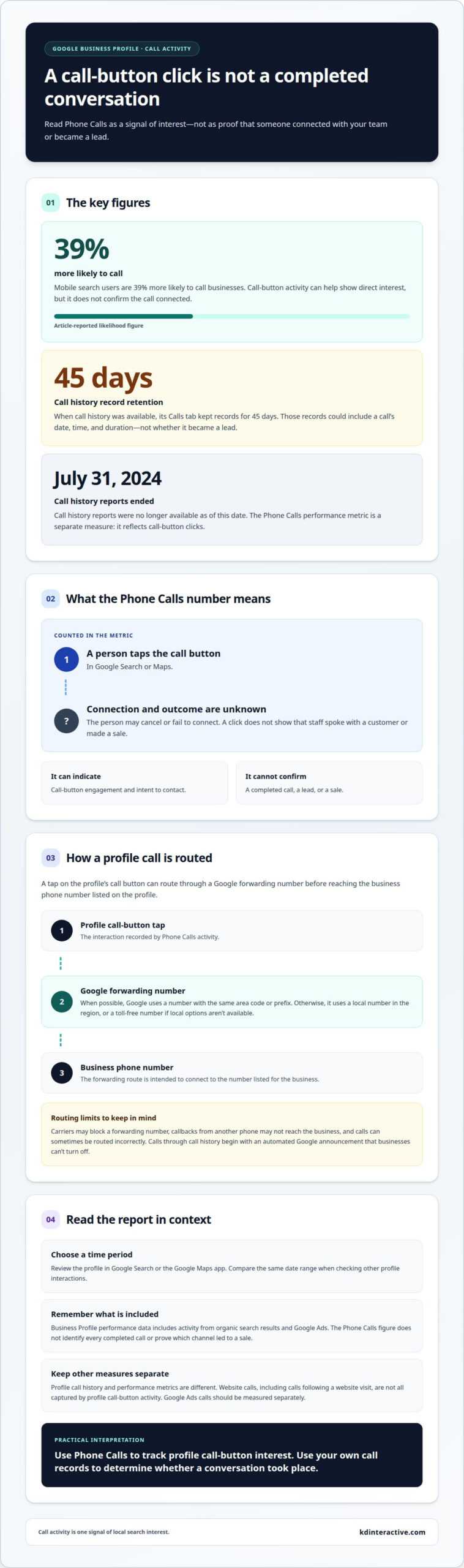
Google Business Profile reports Phone Calls activity, but this counts call-button clicks, not completed conversations. In Google Search or Maps, select a time period to see how often people chose to call.
Mobile Search Calls to Businesses
A mobile search call happens when someone taps a business’s call option in mobile search results. That action makes it easy for a nearby customer to contact a business without copying its phone number. Mobile search users are 39% more likely to call businesses, so call-button activity can help show whether a profile is prompting direct interest. It still doesn’t confirm that the call connected or became a lead.
Business Profile Call Counts
Yes, Business Profile reports call-button clicks as Phone Calls activity, but the count isn’t a tally of completed calls. Someone can tap the button and then cancel or fail to connect. Treat the figure as an engagement measure, not proof that staff spoke with that many customers. This distinction keeps local lead reporting realistic.
To review performance, open your Business Profile in Google Search or the Google Maps app, then select the period you want to examine. The report can help you compare call-button activity over time. Use the same date range when reviewing other profile interactions, so you don’t mistake a change in the reporting window for a change in calls.
Keep the reporting source in mind, too. Google Business Profile performance data includes activity from organic search results and Google Ads. The Phone Calls figure describes call-button interactions in the reporting view; it doesn’t identify every completed call or prove which channel led to a sale.
Call history and performance metrics are separate. Call history reports were no longer available as of July 31, 2024, while the Phone Calls performance metric reflects button clicks. Use that distinction when assessing local search activity: clicks indicate intent to contact, while your own call records show whether a conversation took place.
Metric granularity and data availability
Google Business Profile metrics vary in what they measure and when they update. Knowing what each figure represents helps you compare activity without treating every interaction as a completed lead.
Call Reporting Accuracy and Counted Calls
Profile call reporting counts calls made when users tap the profile’s call button, not every call to your business. It can show the date, time, and duration of each call in call history, but those details don’t prove a conversation produced a lead. Call history keeps records in its Calls tab for 45 days. For tracking calls from Google Business Profile, treat the figures as tracked activity, not a complete tally of customer calls.
Other profile metrics have their own definitions. Google counts a person once per day in Business Profile view metrics, even if that person visits repeatedly. Views represent unique visitors, though one visitor may be counted a limited number of times across devices and platforms. Views and calls therefore describe different actions. Compare each metric with the behavior it measures.
Timing matters, too. Google Business Profile searches data may take up to 5 days at the start of each month to appear after its monthly update. A recent search trend may look incomplete while that data is still appearing. Compare the same reporting periods and account for the update window before interpreting a change.
Measuring Calls in GA4 or a CRM
GA4 can measure clicks on phone links on your website, while a CRM can organize call records and lead outcomes. A tap on the Business Profile call button doesn’t necessarily create a website visit, so it won’t automatically appear as a website phone-link event in GA4. Keep these activity sources separate when tracking calls from Google Business Profile.
For a clearer picture, compare Profile call activity with website call-link events and CRM records of calls that became leads. Match date ranges and label each source consistently. This separates a profile interaction from a website click and a recorded business outcome.
Phone calls as leads for local and multi-location businesses
Phone calls can reveal strong local intent, but a call count alone doesn’t show which inquiries became customers. Each month, search results showing local businesses drive over 2 billion connections to US businesses, including calls, website clicks, and direction requests. For a local business, that makes calls one useful signal among several, not a complete measure of marketing results.
Calls can also be valuable because phone inquiries convert to customers 3 times more than web clicks. That comparison highlights why it’s useful to distinguish a call from a click, then assess what happened after the customer reached your team. A call may involve a purchase inquiry, a service question, or an existing customer. Count outcomes consistently to understand the value of incoming calls.
For a business with multiple locations, keep each location’s activity separate. A combined total can hide differences: one office may receive more calls, while another turns a higher share into customers. Compare call activity with recorded outcomes by location and time period. This shows managers where local search is generating useful conversations without mistaking higher call volume for better results.
Missed calls deserve attention, too. Google’s Missed Call Text Back can automatically text a caller when nobody answers, if the feature is enabled in the location settings. This creates a follow-up opportunity, but it doesn’t show whether the caller replied or became a customer. Track those outcomes separately so a text-back event isn’t counted as a completed lead.
Use a simple lead record for each location: note the call source, whether the call was answered, the inquiry type, and its outcome. Then compare those records with Google Business Profile activity. This connects visibility to real business results and helps identify where local search performance may need attention. For a stronger local presence that supports lead generation, improve your local search visibility.
KD Interactive: Google Map Pack with AI Assistant
KD Interactive helps businesses strengthen local visibility with its Google Map Pack with AI Assistant. If profile activity is difficult to connect with local search performance, Local SEO Services can support a broader strategy for helping nearby customers find your business. Content Creation can also provide useful information that supports your online presence.
These services are a practical next step if you want to build on call data and improve how your business appears in local search. The right focus depends on whether you need stronger visibility, relevant content, or both. Contact KD Interactive to discuss your local search goals.
Turn Local Call Insights Into a Stronger Search Plan
Use local call insights to decide what to focus on next. A practical measurement plan for tracking calls from your Google Business Profile connects customer inquiries with your business priorities, rather than treating every interaction as equally valuable. Define what makes an inquiry useful to your team, then use that definition to guide future marketing decisions.
KD Interactive offers Local SEO Services, Content Creation, and Press Release Distribution to help businesses build their local search presence. These services can align your visibility strategy and business communications with the audiences you want to reach. The right next step depends on your challenge, whether that’s improving local search visibility or creating relevant content.
Bring your goals and the questions raised by your call data into a conversation about your next move. Contact KD Interactive to discuss a focused path forward and keep building momentum in local search.
Frequently Asked Questions
Do Customers Call My Office Directly When Call History is Turned On?
Calls tracked through call history are forwarded to the business phone number on the profile rather than dialling it directly. The caller first reaches a Google forwarding number, and the call may begin with an automated message identifying Google. This matters if a customer later calls back from another phone, because the callback may not connect to your office.
What Is a Google Forwarding Number?
A Google forwarding number is an intermediary used to route and identify calls associated with a Business Profile. Its area code or prefix can vary based on where it’s dialled. If a customer sees an unfamiliar incoming number, the forwarding system may also play Google’s automated announcement. Businesses can’t turn off that announcement when call history is enabled.
How does call tracking work for Google Business Profile?
Google Business Profile call tracking records activity from a customer tapping the call button, rather than every call connected to the business. Call history was an experimental feature for a select group of US businesses, and its reports were no longer available as of July 31, 2024. Profile performance counts call-button clicks, while ordinary text messages aren’t included in call tracking.
How to track calls from a Google Business Profile listing?
Review the Phone Calls metric in your Business Profile performance data through Google Search or the Google Maps app, and select the period you want to assess. The metric shows call-button activity, not verified conversations. To understand lead outcomes, compare this activity with your business’s call records or CRM entries. Keep profile calls distinct from calls generated through your website.