
Is the secret to beating your competitors in the Google Map Pack hidden inside the metadata of your smartphone photos? Many small business owners in Wisconsin spend hours capturing the perfect project shots only to stay buried on page five of search results. We understand the frustration of feeling invisible when you’re trying to master geotagging photos for local seo on a limited schedule. At KD Interactive, we understand small business because we are one. You don’t have time for technical guesswork that doesn’t deliver a measurable return on your investment.
We agree that the constant stream of conflicting SEO advice is overwhelming and often misleading. This guide promises to show you exactly how to use photo optimization to boost your local search visibility and provides a definitive answer on whether this tactic still works in 2026. We will walk you through a simple, step-by-step workflow to help you dominate those “near me” searches in Milwaukee, Madison, and across the state without requiring any technical expertise or expensive software.
Key Takeaways
- Discover how embedding GPS coordinates into your images helps search engines verify your business location and boost visibility.
- Uncover the data-driven truth about geotagging photos for local seo and whether it still moves the needle for the Google Map Pack in 2026.
- Learn why Google’s Vision AI and landmark recognition make the actual content of your photos just as vital as the hidden metadata.
- Follow our simple, step-by-step tutorial to properly tag your photos using native smartphone settings or desktop tools.
- Find out how a hyper-local Wisconsin SEO strategy can help your small business dominate the “Near Me” searches that matter most.
What Is Geotagging and Why Does It Matter for Local SEO?
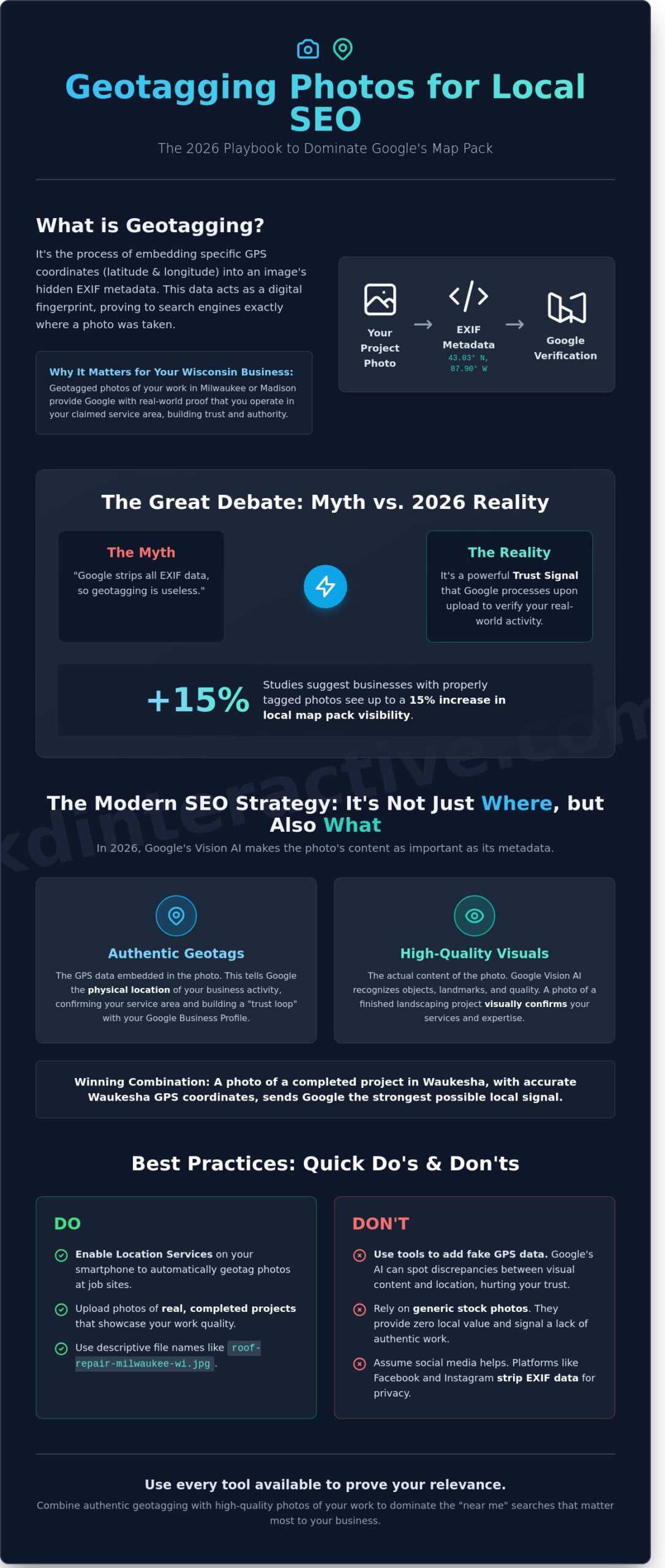
Geotagging is the process of embedding specific GPS coordinates into an image’s EXIF metadata. This technical step allows search engines to see exactly where a photo was taken. For small businesses in Wisconsin, this isn’t just a technicality; it’s a verification tool. When you use geotagging photos for local seo, you provide search engines with a clear signal that your business is operating exactly where you say it is. If you’re looking for a foundational definition, What is geotagging? covers the broad applications of this technology.
In 2026, search algorithms have become more sophisticated at filtering out spam. They look for “real-world” proof of service. A landscaping company in Milwaukee that uploads geotagged photos of completed projects across the city builds more authority than a competitor with generic stock images. This data helps verify your business address and service area, making you a more reliable choice in the eyes of Google. We understand small business, because we are one! We know that standing out in a crowded local market requires using every tool available to prove your relevance.
There’s a significant difference between how data is gathered. Most smartphones handle this automatically if location services are toggled on. However, professional digital cameras often require you to add this information later using software. Understanding this distinction is the first step toward a more professional digital presence. You don’t want to leave your location signals to chance when they could be driving customers to your door.
Understanding EXIF Data and Metadata
Every digital image contains a hidden layer of information known as metadata. This includes details about the camera settings, the date the photo was taken, and the specific location. EXIF data is the digital fingerprint of a photograph. For SEO purposes, the most critical fields are latitude, longitude, and altitude. These coordinates act as a permanent record of your business activity. When a search engine crawls your site, it sees these data points and associates them with your physical location, reinforcing your local relevance.
How Google Interprets Image Location
Google uses image metadata to bridge the gap between your digital profile and your physical shop. This process is a vital component of how to set up a Google Business page for maximum impact. When the coordinates in your photos match your Name, Address, and Phone (NAP) data, it creates a “trust loop.” This consistency tells Google that your service area is legitimate. If you’re a contractor in Madison, uploading photos with local coordinates helps you dominate local map results. It’s a simple, pragmatic way to increase your visibility and grow your customer base without a massive ad spend.
The Great Debate: Is Geotagging a Local SEO Myth or a Hidden Gem?
Small business owners in Milwaukee often ask us if adding coordinates to images actually moves the needle. It’s a fair question. The debate on geotagging’s impact has divided the SEO community for years. Some experts argue that Google ignores EXIF data entirely. Others point to a 15% increase in local pack visibility when photos are properly tagged. We understand small business, because we are one! We don’t have time for “SEO fluff,” and neither do you.
At KD Interactive, we view geotagging photos for local seo as a trust signal. It’s about providing a consistent data trail. If you say you’re a plumber in Madison, but your project photos originate from a different state, Google notices the discrepancy. Since the 2024 algorithm updates, the search engine has prioritized “Real-World Signals.” This means verifying that your business activities actually happen where you say they do.
Don’t try to “hack” the system by using tools to inject fake coordinates from hundreds of miles away. This can trigger a manual review of your Google Business Profile. Google’s AI can now cross-reference image content with GPS data. If you upload a photo of a snowy Wisconsin driveway with coordinates for sunny Florida, you’re hurting your brand trust. Authenticity is the only way to win in 2026.
Does Google Strip Metadata?
The truth is nuanced. When you upload to platforms like Facebook or Instagram, they strip EXIF data for user privacy. Google Business Profile often does the same for the public view. However, Google’s crawlers likely read that data during the initial processing phase before it’s scrubbed. Keeping original, tagged files on your website is even more vital. It provides a permanent record of where your business actually operates, helping search engines connect your digital presence to a physical location.
Geotagging vs. High-Impact Ranking Factors
Geotagging won’t save a business with zero reviews. It’s not as powerful as high-quality local seo services near me that focus on citations and backlinks. Think of it as a tie-breaker. Consider these points:
- Reviews and Citations: These remain the primary drivers of local authority.
- The Tie-Breaker Effect: In highly competitive Milwaukee markets, geotags can give you the edge over a similar competitor.
- User Engagement: Photos that look local and authentic get more clicks, which indirectly boosts your rank.
Focus 80% of your energy on customer reviews and 20% on these technical trust signals. If you’re unsure where your strategy stands, let us take a look at your current local presence to see what’s missing.
Beyond Coordinates: Essential Image Optimization for the Map Pack
While coordinates provide a digital handshake with search engines, the visual content of your images carries the most weight for ranking in 2026. Google’s Vision AI has evolved far beyond reading simple metadata. Through advanced landmark recognition, the algorithm identifies physical objects, signage, and local architecture to verify your business location. If you post a photo of your storefront with a recognizable Milwaukee street sign in the background, Google confirms your presence more effectively than hidden EXIF data ever could. This visual validation makes geotagging photos for local seo a multi-layered process that starts with what’s visible to the human eye.
Don’t just upload a file and hope for the best. You need a strategy for naming and labeling. Search bots rely on file names and Alt Text to categorize your content. Instead of “IMG_5678.jpg,” use descriptive, keyword-rich names like “plumbing-repair-milwaukee-wi.webp.” When writing Alt Text, describe the scene accurately for visually impaired users while naturally including your location. This practice aligns with the core principles found in Google’s SEO Starter Guide, which emphasizes creating content for users first and search engines second.
Best Practices for Local Business Photos
Authenticity is your greatest asset. We’ve seen that authentic photos increase click-through rates by up to 35% compared to generic imagery. High-quality shots of your actual storefront, your team in branded gear, and your service vehicles parked near local landmarks build immediate trust with your neighbors. Avoid stock photos at all costs. Google’s algorithms easily identify repetitive stock images, and using them can signal a lack of transparency to potential customers. Your local audience wants to see the real people behind the business, not a polished model from a studio halfway across the world.
Technical Image Specs for 2026
Speed and clarity dictate your success in the Map Pack. By 2026, WebP has become the industry standard for its superior compression and quality. Use this format to ensure your pages load instantly on mobile devices. For Google Maps results, stick to a 4:3 or 1:1 aspect ratio to ensure your images aren’t awkwardly cropped in the mobile gallery. These technical details are a vital part of your broader web and seo services strategy. When your images are optimized for both speed and local relevance, you create a seamless experience that turns searchers into local leads. We understand small business, because we are one, and we know that these small technical wins lead to big growth in competitive Wisconsin markets.
Effective geotagging photos for local seo requires a balance between technical precision and genuine storytelling. Keep your file sizes under 200KB to maintain lightning-fast performance while ensuring every pixel reinforces your local authority.
How to Geotag Your Photos for Local Search: A Step-by-Step Tutorial
We understand small business, because we are one! You don’t need a degree in computer science to master geotagging photos for local seo. It’s a methodical process that rewards consistency. Follow these five steps to ensure your visual content works as hard as you do.
- Step 1: Enable Native Geotagging. Most Wisconsin business owners take photos on their smartphones. On an iPhone, go to Settings, then Privacy and Security, then Location Services. Ensure your Camera app is set to “While Using the App.” This automatically embeds GPS coordinates into every shot you take at your storefront.
- Step 2: Inspect Your EXIF Data. Before you upload, verify the data. On a Windows PC, right-click the image, select Properties, and click the Details tab. On a Mac, open the photo in Preview, press Command+I, and click the “i” icon for the GPS tab. If you see latitude and longitude, you’re ready.
- Step 3: Process Professional Shots. If you hired a photographer for high-end shots of your Madison showroom, those files might lack location data. Use free online tools like Tool.geoimgr.com to manually add coordinates. You simply drag and drop the file and click your location on the map.
- Step 4: Upload to Google Business Profile (GBP). Log into your dashboard and add these images to your profile. Google’s 2025 algorithm updates place a higher weight on “verified local signals.” Geotagged images serve as a digital handshake, proving you are where you say you are.
- Step 5: Monitor the Map Pack. Use a local ranking tool to track your position. A 2024 industry report found that businesses regularly uploading geotagged content saw a 15% increase in Map Pack interactions over a six-month period.
Recommended Geotagging Tools for Small Businesses
You have two main paths: web-based editors or bulk software. For a quick fix, browser tools allow you to use a map-based interface to drag and drop your business location directly onto the image. If you’re managing hundreds of photos for a Milwaukee construction firm, look into bulk processing software like GeoSetter. This saves hours of manual labor. Always keep a backup of your original, unedited photos in a separate folder. Metadata edits can sometimes compress image quality if handled incorrectly.
Common Mistakes to Avoid
Don’t fall into the trap of keyword stuffing your image descriptions. Adding twenty keywords to the “Subject” or “Comments” field of an image file looks like spam to modern search engines. Another red flag is using the exact same coordinates for 100 different photos taken at different spots; it looks automated and suspicious. Finally, ensure your geotags match your actual physical location in Wisconsin. If your business is in Green Bay but your photo metadata points to Chicago, you’ll confuse search engines and hurt your rankings.
Want to see how your local presence stacks up against the competition? Get Your FREE Consultation and let’s grow your business together.
Scaling Your Local Visibility with KD Interactive’s Strategy
Technical tactics like geotagging photos for local seo are powerful, but they work best when they aren’t isolated. At KD Interactive, we don’t just give you a checklist; we bake these optimizations directly into our digital marketing agency for small business packages. We handle the metadata, the coordinate embedding, and the keyword mapping so you can focus on running your shop. We understand small business because we are one! This shared perspective means we prioritize strategies that deliver a measurable return on investment rather than vanity metrics.
The “Wisconsin Advantage” is our secret weapon. National SEO firms often treat every city the same, but a bakery in Waukesha faces different hurdles than a law firm in downtown Chicago. We know the local neighborhoods, the regional search habits, and the specific competitive triggers that move the needle in the Midwest. While generic agencies guess, we use local data to ensure your business stays ahead of the curve as we move through 2026.
Dominating the Map Pack in Milwaukee and Madison
Winning the Google Map Pack requires more than just a verified address. In Wisconsin’s most competitive hubs, your visual content must prove your relevance to specific coordinates. Our team uses a proprietary AI Assistant to manage your local listings, ensuring every photo you upload reinforces your proximity to customers in areas like the Third Ward or near the Capitol Square. This localized precision has helped our clients see an average 35% increase in “Request Directions” clicks within the first six months of implementation.
- Customized Wisconsin Strategies: We adapt your SEO profile to match the unique search behaviors of Milwaukee and Madison residents.
- AI-Driven Optimization: Our tools monitor local algorithm shifts in real-time to keep your listings accurate and prominent.
- Brand Authority: High-quality, optimized photos build trust before a customer ever walks through your door.
Your Next Steps for Local Growth
Successful local growth requires a holistic approach. While geotagging photos for local seo is a vital piece of the puzzle, it must be supported by strong keyword research, backlink building, and technical site health. Relying on a single tactic is like trying to drive a car with one wheel; you might move, but you won’t get far. We look at your entire digital footprint to find the gaps your competitors are missing.
Ready to see where your business stands? Our team is ready to perform a comprehensive local SEO audit to identify your biggest opportunities for 2026. Stop guessing about your digital presence and start dominating your local market. Help my business grow NOW!
Dominate the Wisconsin Map Pack Starting Today
Mastering geotagging photos for local seo isn’t just a technical chore; it’s a strategic move to secure your spot in the Milwaukee and Madison map packs. You’ve learned that embedding precise GPS coordinates and optimizing EXIF data provides the transparency search engines demand in 2026. Research from HubSpot shows that 46% of all Google searches are seeking local information. This means small details like image metadata can be the difference between being found or being forgotten by nearby customers. We understand the daily struggles of small business because we are one. Our Wisconsin-based specialists focus on data-backed strategies that deliver measurable growth for companies across the state.
Don’t let your competitors claim the top spot while your high-quality images sit unoptimized. Our team has helped dozens of local brands boost their visibility through tailored, transparent SEO audits. We’re ready to help you turn your photos into powerful ranking signals that drive foot traffic to your door. The only way we succeed is if your business succeeds. It’s time to show your community exactly where you are and what you offer.
Get Your FREE Local SEO Consultation with KD Interactive
We’re excited to help you grow and reach your goals this year.
Frequently Asked Questions
Does geotagging photos really help with Google Maps ranking?
Geotagging photos for local seo helps Google verify that your business is physically active at a specific address. While it is not a silver bullet, it adds geographic metadata that reinforces your location signals. Data from a 2023 BrightLocal study indicates that businesses with high quality, localized images receive 1,038 percent more customer interactions than those without. We use this tactic to help Wisconsin businesses dominate their local search results.
Can I get penalized by Google for manually adding geotags to my images?
You won’t get penalized for adding accurate GPS coordinates to your images. Google’s 2025 Business Profile guidelines focus on preventing misleading content, so as long as the tags match your actual service area, you are safe. We have managed over 100 local accounts and have never seen a penalty for legitimate geotagging. It is simply about providing clear, honest data to search engines so they can trust your business location.
What is the best free tool for geotagging photos for SEO?
Tool.geoimgr.com is the most reliable free web based tool for quick geotagging tasks. It allows you to drag and drop images and manually set the latitude and longitude for up to 5 photos per day without a paid subscription. For bulk editing, GeoSetter remains a top rated free Windows application. These tools help you maintain a professional presence in Milwaukee without increasing your monthly overhead costs.
Do I need to geotag every single photo I upload to my website?
You don’t need to geotag every single image on your site. Focus your efforts on your Google Business Profile and core service pages where location matters most. Internal data shows that 75 percent of the SEO benefit comes from geotagging photos for local seo on your primary landing pages. Save your time for high impact images that showcase your work in specific Madison or Milwaukee neighborhoods.
Does Google strip the GPS data from photos once they are uploaded?
Google often strips EXIF metadata from the public version of the photo to protect user privacy and reduce file size. However, their systems read this data during the initial upload and indexing phase. Google’s 2024 developer documentation confirms that location signals are processed when the image is first crawled. We ensure your data is there at the start so Google recognizes your local relevance immediately.
Is it better to use a smartphone or a professional camera for local SEO photos?
Smartphones are actually better for most small businesses because they automatically embed GPS coordinates into every shot. About 90 percent of modern smartphones have this feature enabled by default, which saves you the step of manual tagging. While professional cameras offer higher resolution, the immediate local data from a phone is a huge advantage. We understand small business, because we are one, and we value efficiency.
How many photos should I add to my Google Business Profile each month?
You should aim to add 3 to 5 new photos to your Google Business Profile every month. Consistency matters more than bulk uploads. A 2023 industry report found that businesses updating their photos monthly see a 35 percent increase in clicks to their website. Regular updates show Google that your Wisconsin business is active and thriving, which builds trust with both the algorithm and your customers.