
What if the questions your customers ask on Google aren’t being answered by you, but by an AI that’s scanning your competitors’ websites instead? Since Google discontinued the traditional public Q&A feature in late 2025, the local search environment has shifted. You need to know how to use google business profile q&a strategies to stay ahead when the old manual buttons are gone. At KD Interactive, we understand small business because we are one. We know it’s frustrating to see random data or outdated snippets define your brand while competitors climb the rankings in Milwaukee or Madison.
You want a clean, professional profile that dominates the Map Pack without wasting hours on another social-like feature. We agree that your time is your most valuable asset. This guide promises to show you how to leverage the “Ask Maps” conversational AI, which launched in March 2026, to act as your silent lead generator. We will preview how to structure your website content to feed this AI the right information. This ensures you get fewer repetitive phone calls and more high-value customers who already have the answers they need.
Key Takeaways
- Understand how Google’s Gemini AI now scans your entire digital footprint to provide conversational answers through the new “Ask Maps” feature launched in March 2026.
- Discover how to use google business profile q&a strategies to build a “Seed List” that feeds accurate, helpful information directly to potential customers.
- Learn why asking and answering your own common customer questions is a recommended practice that prevents inaccurate data from spreading.
- Get a clear, step-by-step walkthrough for managing your profile updates to maintain “freshness” and boost your visibility in the local Map Pack.
- Explore how partnering with a local expert like KD Interactive can help you automate this process and grow your business in the Milwaukee or Madison markets.
What is Google Business Profile Q&A and Why Does It Matter?
Your Google Business Profile is your digital storefront. Within that storefront, the Q&A section serves as the information desk. While reviews focus on past customer satisfaction, the Q&A section is built for immediate, factual inquiries. It is a community-driven feature where, historically, anyone could ask a question and anyone could provide an answer. Even as Google shifts toward AI-driven responses in 2026, the data within this section remains a primary source for the Google Maps platform. It appears prominently in your Knowledge Panel. This means it’s often the very first thing a customer sees after reading your business name.
Don’t confuse this feature with your review section. Reviews are subjective feedback about an experience. Q&A is for information. If a customer in Milwaukee wants to know if you offer 24-hour emergency service, they look here. Learning how to use google business profile q&a effectively ensures that these potential leads get the facts from you, not a random user or a “troll” looking to post inaccurate data. We understand small business, because we are one! We know that controlling your narrative is the only way to protect your brand’s reputation in local search.
The “Silent Killer” of Local Conversions
Neglecting your Q&A section is a recipe for lost revenue. Outdated information acts as a silent killer for your conversion rates. If a user sees a three-year-old answer stating you offer a specific price or service that no longer exists, they’ll be frustrated before they even step foot in your shop. There’s also a psychological barrier to consider. Seeing a profile with “0 questions answered” tells a customer that the owner is disconnected or potentially out of business. This makes it vital to know how to set up a Google Business page properly and maintain it with fresh, accurate data. A neglected profile drives customers straight to your competitors in Madison or Milwaukee who are more responsive.
How Q&A Influences the Local Map Pack
Google uses Q&A text to create “Local Justifications.” These are small snippets of text that appear under your business name in search results to prove you’re relevant to a specific query. For example, if someone searches for “emergency leak repair,” Google might highlight an answer from your Q&A section that mentions your 24/7 availability. When you provide keyword-rich, helpful answers, you signal to the algorithm that your business is a perfect match for local searches. These answers help the AI recommend you over a competitor who has left their profile to gather dust. In 2026, your GBP Q&A is the interactive front door of your digital storefront.
The New Era of “Ask Maps”: How AI Uses Your Q&A Data
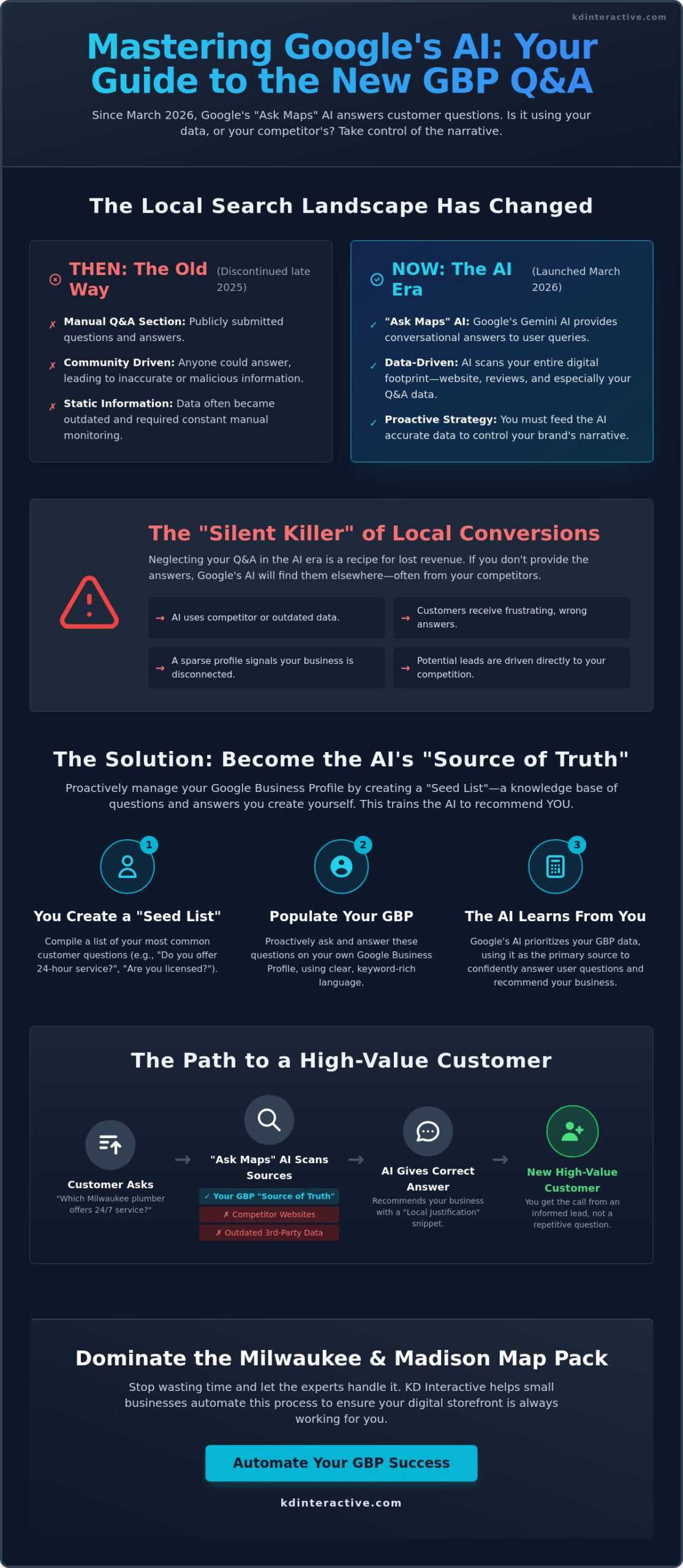
Google Maps is used by more than two billion people every month. In March 2026, Google fundamentally changed the search experience with the launch of “Ask Maps,” a conversational AI feature powered by Gemini. This tool allows customers to ask complex, natural language questions rather than just typing in basic keywords. If you want to know how to use google business profile q&a to stay ahead of the competition, you must view this section as a training manual for Google’s AI. When a potential lead asks a specific question, Gemini scans your Q&A data to provide an immediate answer.
Think of your Q&A section as a knowledge base for the algorithm. If a customer asks, “Which Milwaukee plumber handles emergency 24/7 leaks?” the AI looks for that specific confirmation in your profile. If the answer isn’t there, Gemini might pull data from a third-party directory or, even worse, recommend a competitor who was more thorough. You can’t leave your reputation up to an algorithm’s best guess. To take control, you should proactively add your own questions and then answer them. This ensures the AI has the exact facts it needs to recommend your business.
GBP as a “Source of Truth” for Gemini
Google trusts its own ecosystem more than almost any other data source. Your Google Business Profile is the primary source of truth for the local Map Pack. It’s vital that your Q&A content aligns with your broader web and seo services strategy. If your website lists a specific service, your Q&A should echo that information. Use your profile’s “Attributes” and “Services” sections to back up your claims. This consistency builds trust with both the AI and the customer. If managing these technical details feels like a full-time job, our local SEO experts can handle the heavy lifting for you.
Optimizing for Natural Language Queries
Modern customers search the way they speak. They don’t just want a link to a menu; they want to know, “Do you have gluten-free options for kids?” Answering these specific, conversational questions is much more effective than providing generic information. Use the local dialect and phrasing that real Wisconsin residents use when they search. Every Q&A pair you publish acts as a potential snippet for an AI search result. We understand small business, because we are one! We know that providing clear, direct answers is the best way to turn a searcher into a loyal customer.
Proactive Management: Why You Should Ask (and Answer) Your Own Questions
Many business owners feel hesitant to post their own questions. They worry it seems “spammy” or like they’re trying to game the system. In reality, Google wants you to provide verified data to train its conversational AI. We understand small business, because we are one! We know that accuracy is your top priority. Learning how to use google business profile q&a strategies in 2026 means being the primary source of truth for Gemini. You should build a “Seed List” by looking at your actual customer emails and phone inquiries. When you document these answers on your profile and website, you ensure the AI doesn’t have to guess about your availability or specific service areas.
This proactive approach prevents “hallucinations” where the AI might misinterpret your services based on outdated third-party data. By seeding the right information, you control the narrative before a customer even clicks your website link. It’s a pragmatic, results-oriented way to boost your local search presence and ensure that customers in Milwaukee or Madison get the right details the first time they ask. You aren’t just filling out a profile; you’re building a knowledge base that drives growth.
Creating a Strategic FAQ for Your Profile
Monitoring and Reporting Inaccurate Content
Inaccurate information is a major threat to your conversion rates. You must stay vigilant for “Local Guide” answers or AI-generated snippets that are misleading. If you spot incorrect data or spam, report it immediately through the Google Business interface. Consistent monitoring is a vital part of a larger reputation management strategy. Since Google Maps draws on data from over 500 million contributors as of March 2026, you can’t assume every piece of information is correct. Regular audits protect your brand and ensure your business remains a trusted local expert in the eyes of both Google and your customers.
Step-by-Step: Managing Your Business Q&A Like a Pro
Taking control of your profile doesn’t require a degree in computer science. It requires a consistent, methodical approach. To master how to use google business profile q&a, you must first understand that the interface has moved directly into Google Search and Maps. You no longer need a separate dashboard to manage these interactions. As of March 31, 2026, the Ask Maps feature is fully integrated into the mobile experience for Android and iOS users. This makes real-time management easier than ever for busy Wisconsin business owners.
Follow these five pragmatic steps to secure your profile and feed the AI accurate data:
- Step 1: Access the Interface. Search for your business name on Google or open the Google Maps app. Look for the “Ask a Question” button within your business knowledge panel.
- Step 2: Craft the Question. Keep your questions short and customer-focused. Instead of long-winded paragraphs, use clear language like, “Does this Milwaukee location offer same-day emergency repairs?”
- Step 3: Answer as the Owner. Log into the Gmail account associated with your GBP. When you answer, Google rewards you with the “Owner (Business Name)” badge. This badge provides instant authority and trust.
- Step 4: Upvote for Visibility. Click the “Helpful” (thumbs up) icon on your most important Q&A pairs. This signals to Google that this specific information is high-value, increasing its chances of appearing in AI snippets.
- Step 5: Enable Notifications. Open your Google Maps settings and turn on real-time notifications for “Community Content.” This allows you to respond to new inquiries instantly, before a competitor can jump in.
Tools for Efficient Management
We understand small business, because we are one! We know you don’t have hours to sit at a desk. Use the Google Maps app to handle responses between service calls or meetings. If your schedule is too packed, consider delegating these tasks to a trusted staff member or a local digital marketing partner who can maintain your “freshness” score. Set a weekly GBP audit schedule. Spending just 15 minutes every Tuesday ensures no “troll” answers or outdated pricing slips through the cracks.
Advanced Tips: Links and Media
Avoid using URLs in your answers. Google’s automated filters often flag answers containing external links as spam, which can lead to your response being hidden. Instead, refer users to your “Products” or “Services” tab within the profile. Brevity is your best friend on mobile. Short, punchy answers are easier for the Gemini AI to parse and display as “Know Before You Go” insights. If you want to dominate the local Map Pack and stop losing leads to inaccurate info, get your free SEO consultation today.
Scaling Your Local Presence with KD Interactive’s Map Pack Mastery
Local SEO has evolved into a high-stakes data management game. In 2026, simply knowing how to use google business profile q&a isn’t enough to stay at the top of the Map Pack. The technical requirements for maintaining profile “freshness” and feeding Gemini accurate data are demanding. Most Wisconsin business owners are already stretched thin running their daily operations. They don’t have the hours required to monitor 500 million potential contributors or adjust content for conversational AI queries. We understand small business, because we are one! We know that your time is better spent serving your customers in Milwaukee and Madison than fighting with an algorithm.
That is why we developed our “Google Map Pack with AI Assistant” service. We take over the technical heavy lifting by managing your Q&A, updating service attributes, and ensuring your profile remains active. Our team ensures that every piece of information on your profile acts as a verified “Source of Truth” for Google. This proactive management prevents inaccurate information from killing your conversions. We project an air of confidence because our methods are data-driven and transparent. Our commitment is simple: the only way we succeed is if your business succeeds.
Beyond Q&A: A Holistic Local SEO Strategy
Success in local search requires more than just answering questions. We integrate Q&A management into a broader strategy that includes intense keyword research and on-page optimization. By aligning your website content with your Google Business Profile, we create a unified digital presence that AI assistants love to recommend. Choosing a digital marketing agency for small business that understands the specific landscape of Wisconsin gives you a competitive edge. One of our local clients recently saw a 40 percent increase in Map Pack visibility within 90 days by implementing these exact holistic strategies. We don’t just guess; we use analytics to prove your growth.
Get Your Free Consultation Today
You deserve to know exactly how much potential revenue is sitting on the table. We invite you to use our interactive SEO Calculator to see your potential growth in real-time. Our approach is pragmatic, tailored, and focused entirely on your bottom line. Don’t let your competitors dominate the Milwaukee or Madison markets while your profile sits neglected. We are ready to be your partner in success. Help my business grow NOW! Get your free consultation today and let us transform your Google profile into a powerful lead-generation tool.
Take Control of Your Local Search Future Today
Google’s March 2026 update changed local search forever. You now know that mastering how to use google business profile q&a is about more than just answering random users; it’s about training the “Ask Maps” AI to recommend your specific services. By seeding your own FAQs and providing accurate, conversational answers, you prevent bad data from driving customers to your competitors. We understand small business, because we are one! We know that managing these technical details while running a company in Milwaukee or Madison is a massive challenge.
Our team of Google Map Pack with AI Assistant specialists is ready to handle the heavy lifting for you. We provide the tailored, transparent support you need to succeed in the 2026 search landscape. The only way we succeed is if your business succeeds. Don’t let your profile sit stagnant while your neighbors grow. Our local expertise ensures your business stays visible and trusted across the entire state.
Get Your FREE Consultation and Dominate the Map Pack Now!
Your growth is our priority. Let’s make your business the first choice for locals across Wisconsin. We are ready to help you thrive.
Frequently Asked Questions
Can I answer questions on my own Google Business Profile?
Yes, you can and should answer your own questions. Google encourages business owners to proactively seed their profiles with frequently asked questions to help users. This is a critical step in 2026 because your answers act as the primary training data for the Gemini AI. When you provide owner-verified information, you ensure that customers in Milwaukee or Madison get the right facts immediately. We understand small business, because we are one!
How do I delete a question someone else asked on my profile?
You don’t have the power to directly delete questions asked by other users. If a question is inaccurate, offensive, or violates Google’s policies, you must flag it for review. Click the three dots next to the question and select “Report question.” Google’s moderation team typically reviews these requests within 72 hours. While you wait, provide a professional owner response to ensure searchers see the correct information first.
Does answering questions on Google Business Profile help with SEO rankings?
Yes, answering questions is a powerful way to improve your visibility in the local Map Pack. When you know how to use google business profile q&a effectively, you create “Local Justifications” that Google highlights in search results. These keyword-rich snippets signal to the algorithm that your business is highly relevant to specific local queries. This data-driven approach helps you dominate the rankings in Madison and across Wisconsin while building trust.
What happens if a customer gives a wrong answer to a question on my listing?
If a customer provides an incorrect answer, your best defense is a fast and authoritative owner response. Google places a “Business Owner” badge on your answers, which gives them more weight in the eyes of searchers and the AI. If the user’s answer is dangerously misleading, flag it for a policy violation. Maintaining a clean profile is part of a methodical local SEO strategy that protects your reputation from contributor errors.
Can I put my phone number or website link in a GBP Q&A answer?
You should avoid placing active website links or phone numbers directly in your answers. Google’s automated filters often flag these as spam, which can lead to your response being hidden from public view. Instead, use your answer to direct the customer to your “Call” button or the “Website” link already on your profile. This keeps your profile compliant while guiding Milwaukee customers toward the next step in your sales funnel.
How long does it take for a new question to appear on my Google listing?
Most questions and answers appear almost instantly on your profile. However, Google’s automated moderation system can sometimes delay a post for up to 24 hours if it triggers a content filter. If your update doesn’t show up after a full day, check to ensure you haven’t included prohibited content like links or excessive punctuation. We recommend checking your profile freshness weekly to ensure all new interactions are live and accurate.
Is there a limit to how many questions I can ask my own business?
There is no official limit to the number of questions you can post to your own business. We suggest focusing on quality over quantity by addressing the 10 most common inquiries your staff receives. Excessive posting in a short period can sometimes trigger spam filters. A pragmatic approach involves adding one or two new FAQs each month to keep your profile active and helpful for users throughout Wisconsin.
How do I get notifications when someone asks a question on Google Maps?
You can receive instant alerts by enabling notifications within the Google Maps app. Open your settings, navigate to “Notifications,” and then select “Your Community” to turn on alerts for new questions. This allows you to respond to potential leads in Milwaukee or Madison before they move on to a competitor. Fast responses are a hallmark of a supportive, client-focused business that values transparent and customized communication.