
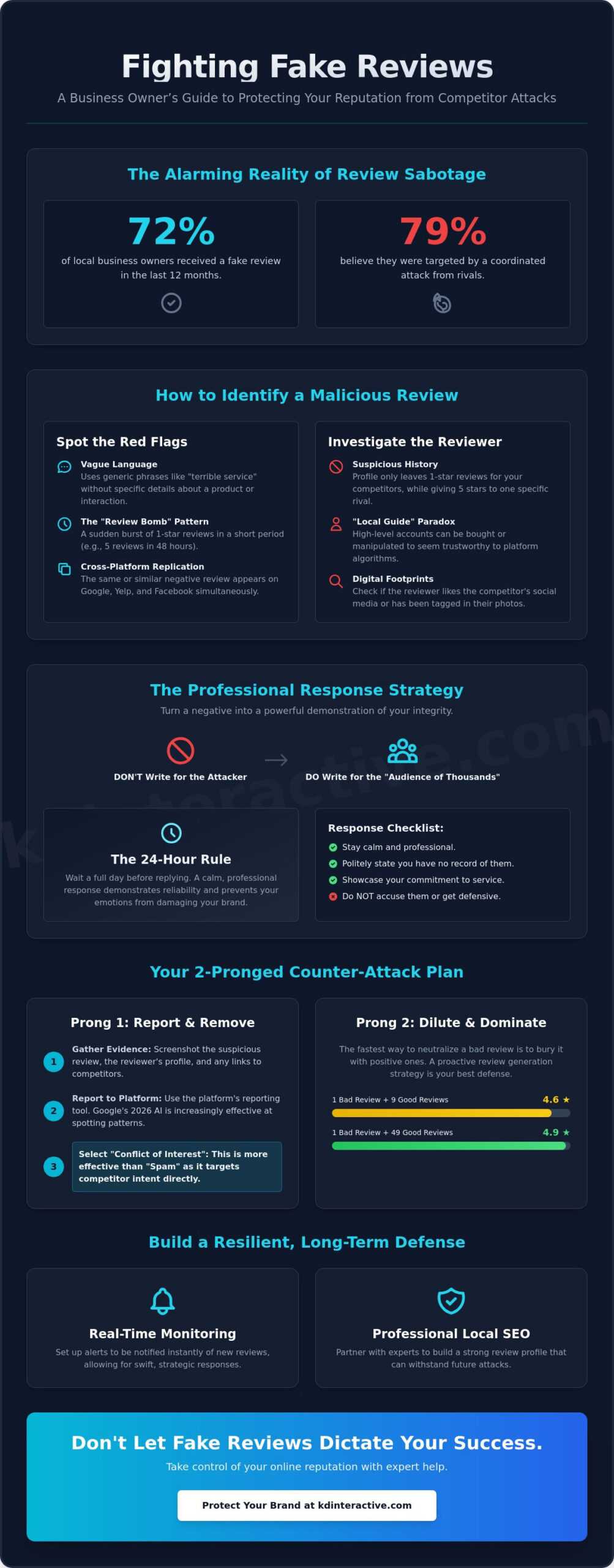
Did you know that a 2026 survey found 72% of local business owners received a fake review in the last 12 months? It’s an alarming reality, especially when 79% of entrepreneurs believe they’ve been the target of a coordinated attack from rivals. Seeing your hard-earned star rating drop because of a dishonest post is incredibly frustrating, and it’s natural to worry about losing local customers to a smear campaign. When you’re wondering what to do when a competitor leaves a bad review, the first step is to stay calm and focus on a data-driven recovery plan.
We understand how it feels to face unfair tactics from competitors. You’ve built your reputation through hard work, and one malicious comment shouldn’t be allowed to jeopardize your growth. This guide will show you exactly how to identify, report, and neutralize these reviews to protect your local business reputation. We’ll walk through leveraging Google’s 2026 AI-driven reporting tools, crafting professional responses that build reader trust, and setting up a system to prevent future damage.
Key Takeaways
- Learn how to distinguish between a genuine customer complaint and a malicious attack by focusing on competitor intent rather than just reporting for spam.
- Master the “Audience of Thousands” mindset to craft professional responses that turn a negative situation into a powerful demonstration of your integrity.
- Discover exactly what to do when a competitor leaves a bad review by navigating the 2026 AI moderation landscape and using the “Conflict of Interest” reporting category.
- Understand the math behind star ratings and why a dilution strategy is often a faster, more effective way to protect your local reputation than fighting for deletion.
- Explore how real-time monitoring and professional Local SEO services can build a resilient reputation that withstands future coordinated attacks.
How to Identify Malicious Reviews from Competitors
Malicious reviews aren’t just annoying; they’re calculated attempts to sabotage your local business. By definition, these are fake testimonials designed to tank your rankings and drive customers toward a rival. While many business owners simply report these as “spam,” proving competitor intent is a far more effective way to get them removed. Google’s AI moderation in 2026 is increasingly sensitive to patterns of what is astroturfing, where a competitor creates a false impression of poor service to manipulate local search results. Understanding what to do when a competitor leaves a bad review starts with a methodical investigation of the evidence.
The impact on your Google Map Pack visibility is direct and measurable. Because local search relies heavily on average star ratings and review velocity, a sudden influx of negative feedback can drop you from the top three spots to the second page overnight. This isn’t just a blow to your pride; it’s a significant loss in lead volume. Legally, these actions often fall under defamation or trade libel. However, platform-based moderation usually handles them under “conflict of interest” policies, which are often faster to resolve than legal threats. Proving that a review came from a competitor rather than a disgruntled customer is the key to a successful appeal.
Spotting the Red Flags of a Fake Review
Fake reviews usually share several DNA markers that differentiate them from genuine customer complaints. Look for these specific signals:
- Vague language: A real customer usually mentions a specific service, like “clogged drain repair” or “monthly bookkeeping.” Malicious reviews often stick to generic phrases like “terrible experience” or “unprofessional staff” without naming a single detail.
- The Review Bomb pattern: If you usually receive two reviews a month and suddenly receive five 1-star ratings in 48 hours, you’re likely under attack.
- Cross-platform replication: Check for the same text appearing on your Google Business Profile, Yelp, and Facebook within a short window. This signals a coordinated effort to damage your local reputation.
Investigating the Reviewer Profile
Don’t take a reviewer’s profile at face value. Digging into their history can reveal a pattern of behavior that algorithms might miss. Analyzing the reviewer’s history is vital; do they only leave 1-star reviews for businesses in your niche while praising one specific competitor? This pattern is a smoking gun for moderators.
Be wary of the “Local Guide” status paradox. High-level accounts are often used as cover because they seem more trustworthy to algorithms, but these accounts can still be bought or manipulated. You can often connect a reviewer to a competing local business by looking for digital footprints. This might include a reviewer who “likes” the competitor’s social media pages or has been tagged in photos at their office. Collecting this data is the first step in knowing what to do when a competitor leaves a bad review and successfully advocating for its removal with platform support.
The Professional Response: Turning a Negative into a Positive
Your first instinct when seeing a fake 1-star rating is likely anger. However, the most effective strategy starts with silence. We recommend the 24-hour rule. Wait a full day before hitting “reply” to ensure your emotions don’t cloud your professional judgment. A heated response triggers high-conflict flags for AI moderators and can permanently damage your brand’s reputation. When you’re deciding what to do when a competitor leaves a bad review, remember that your response is a public marketing tool. You aren’t writing for the attacker; you’re writing for the “Audience of Thousands” who will research your business in the coming months.
A calm, methodical response can actually increase your conversion rate. Potential customers often look at negative reviews to see how a business handles conflict. If you remain professional while a reviewer appears unhinged or vague, you demonstrate reliability and integrity. This is your chance to showcase your commitment to excellence. Following FTC regulations on fake reviews, platforms are becoming stricter about removing deceptive content, but a great response protects you while the moderation process unfolds. If you need help monitoring these situations in real-time, our Local SEO services provide the alerts you need to stay ahead of the curve.
A 3-Step Response Framework for Suspected Fake Reviews
Use this structured approach to signal to both the platform and your future customers that the review is fraudulent:
- Step 1: State the lack of record. Clearly mention that you’ve searched your customer database and have no record of a transaction or service matching their name or description.
- Step 2: Offer a professional path to resolution. Invite them to contact your office directly to provide more details. A fake reviewer will never take this step because they were never a customer.
- Step 3: Highlight your standard of care. Briefly mention your typical process for ensuring satisfaction and invite genuine feedback from your real community.
What Never to Do When Responding to Malice
Avoid the “Retaliation Trap” at all costs. Never leave a fake review on a competitor’s page in return. This creates a “review war” that can lead to both businesses being suspended from the Google Map Pack. Aggressive language or personal attacks against the reviewer will make you look just as unprofessional as they are. Additionally, never share personal details or attempt to “dox” the suspected competitor. Stick to the facts of the transaction. By staying grounded and data-driven, you maintain the high ground and protect your local search performance.
How to Report and Remove Malicious Reviews in 2026
Google’s AI moderation in 2026 is faster than ever, but it isn’t perfect. It often misses the nuance of a local rivalry. If you’re figuring out what to do when a competitor leaves a bad review, simply clicking the “flag” button and selecting “spam” rarely works. AI sees “spam” as automated bot text. When a human competitor writes a coherent but false review, you must categorize it as a “Conflict of Interest.” This category signals to Google that the reviewer has a vested interest in damaging your business, which is a direct violation of their 2026 updated policies.
To start this process effectively, you need a fully claimed profile. If you haven’t done this yet, follow our checklist on How to Set Up a Google Business Page to ensure you have the administrative rights to file disputes. While the SBA’s guide to handling negative reviews provides excellent foundational advice for general customer service, a malicious attack requires a more technical, evidence-based approach.
Using the Google Business Profile Content Violation Tool
The formal dispute process has changed significantly in 2026. You should use the dedicated Content Violation Tool rather than the standard “Report” link in the review map view. This tool provides a dashboard where you can track the status of your report in real-time. If your initial request is rejected, don’t give up. You’ll likely enter the “Check Status” loop, where you can appeal the decision. When writing your appeal statement for a human moderator, keep it fact-dense. Avoid emotional pleas. Instead, state: “Reviewer [Name] has no record in our CRM for the date mentioned. We believe this is a conflict of interest from a local competitor.”
Gathering Evidence for Platform Escalation
Platform moderators need concrete proof to override their AI’s initial decision. We recommend documenting your lack of customer records with redacted CRM screenshots that show no matches for the reviewer’s name or service date. If you suspect the reviewer is an employee of a rival, look for “Common Ownership” evidence. This could include LinkedIn profiles linking the reviewer to the competitor’s company or social media posts showing them at the competitor’s place of business. Proving this connection is the fastest way to get a review scrubbed. If the situation feels overwhelming or you’re facing a coordinated attack, it might be time to consult a local SEO expert for reputation intervention. Professional management can often navigate these moderation hurdles more efficiently than a busy business owner.
Dilution Strategy: Protecting Your Local Reputation Long-Term
The math of star ratings is simple but unforgiving. If you have ten 5-star reviews and receive one malicious 1-star attack, your average drops to 4.6. To pull that average back up to a rounded 4.9, you’ll need approximately thirty more 5-star reviews. It’s a numbers game that requires a proactive stance. This approach is a cornerstone of effective Digital Marketing for Small Business. By diversifying your presence across multiple channels, you ensure that your brand’s integrity isn’t tied to a single platform’s moderation speed.
Implementing an Automated Review Generation System
Ethical review generation is about timing and ease. You should ask happy customers for feedback at the moment of peak satisfaction, such as immediately after a successful service call or purchase. Use QR codes on physical invoices or automated follow-up emails to streamline the process. A steady, consistent flow of reviews is far better for your SEO than a sudden burst of activity. Google’s 2026 algorithms are trained to spot “review spikes,” which can sometimes trigger false spam filters. We help our clients build sustainable systems that grow their reputation naturally over time.
Leveraging Social Proof Beyond Google
Don’t let your positive feedback live only on your Google Business Profile. You can turn those 5-star testimonials into engaging social media content or featured sections on your homepage. Press releases also play a significant role in “owning” the first page of search results for your brand name. When a customer searches for you, they should see a wall of positive, authoritative content that pushes any negative outliers off the first page. Our web and seo services integrate these social proof elements directly into your site design to maximize conversion rates.
Ready to secure your business against malicious attacks? Explore our Local SEO solutions to build a resilient online reputation today.
Professional Reputation Management with KD Interactive
Managing a local business in Wisconsin comes with unique challenges. While our communities are built on trust, the digital landscape is increasingly competitive. Your online reputation is the engine behind your Local SEO performance. If your star rating falls, your visibility in search results follows. At KD Interactive, we don’t just wait for problems to arise. We provide proactive Local SEO Services that monitor your presence across all major platforms. Understanding what to do when a competitor leaves a bad review is easier when you have a partner who sees the attack the moment it happens. A proactive strategy is always more cost-effective than a reactive crisis. Recovering from a tanked reputation takes months of effort, whereas preventing damage takes only minutes of vigilance.
Our Google Map Pack with AI Assistant is the core of our reputation solution. This tool provides real-time alerts that notify you the second a new review is posted. This allows for an immediate response based on the frameworks we discussed in previous sections. By catching a malicious review early, you can flag it before it has the chance to influence hundreds of potential customers. This technology doesn’t just alert you; it helps analyze patterns in feedback to ensure your business stays ahead of local rivals. We believe that professional achievement is built on a foundation of data-driven decisions and consistent visibility.
Bespoke Reputation Strategies for Niche Businesses
Every industry requires a different touch. A home services contractor faces different review risks than a medical clinic or a law firm. We tailor our responses and monitoring strategies to fit your specific niche. For instance, medical and legal professionals must navigate strict privacy and ethical guidelines when responding to feedback. We help you maintain your “Trustworthy Local Expert” persona while blocking coordinated review attacks before they can damage your rankings. Measuring the ROI of a clean reputation is straightforward. Businesses with a 4.5-star rating or higher see significantly lower customer acquisition costs and higher conversion rates than those struggling with negative outliers.
Take Control of Your Brand Today
Protecting your business requires a consistent commitment to the “Identify, Respond, Dilute” framework. You must stay alert to red flags, maintain a professional public face, and constantly invite genuine feedback from your loyal customers. This isn’t just about deleting a single comment. It’s about building a brand that is resilient enough to withstand any local rivalry. We’re here to act as your collaborator, ensuring your success is protected by the best tools and expertise available in the region. Don’t let a single dishonest actor dictate your future growth.
Ready to see where your business stands? Get a Professional Reputation Assessment from KD Interactive and start building your reputation moat today.
Secure Your Local Standing Today
Navigating a malicious attack doesn’t have to be a solo effort. You now have a clear roadmap for what to do when a competitor leaves a bad review, from spotting the initial red flags to leveraging 2026 reporting tools. Remember that your public response is a marketing opportunity to prove your integrity to thousands of future customers. Proactive dilution through consistent, high-quality reviews will always be your strongest shield against local rivals. By focusing on a data-driven approach, you turn a potential crisis into a demonstration of professional excellence.
At KD Interactive, we specialize in Wisconsin small business SEO and pragmatic reputation monitoring. Our Google Map Pack with AI Assistant provides the real-time alerts you need to stay ahead of coordinated attacks. We focus on results-oriented strategies that protect your visibility and drive professional achievement. It’s time to stop reacting to crises and start building a resilient digital presence. Protect Your Reputation with KD Interactive’s Local SEO Packages and ensure your hard-earned star rating remains secure. Your business deserves a partner as dedicated to your progress as you are. Together, we’ll make sure your local reputation remains a powerful asset for growth.
Frequently Asked Questions
Can I sue a competitor for leaving a bad review?
Yes, you have legal recourse for defamation or trade libel, but it’s often a last resort. Pursuing legal action is a costly and time-consuming process that can take months to resolve. Most businesses find faster success by reporting violations under platform policies. You should consult a legal professional only after you’ve exhausted the formal dispute tools provided by Google or Facebook.
How long does Google take to remove a reported review in 2026?
In 2026, Google typically processes an initial review report within 72 hours. However, if the AI moderation rejects your first claim, the manual appeal process can take five to ten business days. Persistence is key during this window. You must stay active in the “Check Status” loop to ensure a human moderator eventually reviews your evidence.
Will a fake review affect my ranking in the Google Map Pack?
A fake review absolutely impacts your Google Map Pack visibility. Google’s algorithm prioritizes businesses with high average ratings and positive sentiment. A single 1-star attack can lower your score enough to push you out of the top three spots. This drop in ranking leads to a direct and measurable loss in local lead volume and phone calls.
Should I reply to a review if I know it’s fake?
You should always reply to a suspected fake review to maintain your professional image. This demonstrates to future customers that you’re attentive and committed to excellence. Use the 3-step framework we covered earlier to state you have no record of their service. When you’re deciding what to do when a competitor leaves a bad review, remember that the reply is for your future customers, not the attacker.
What if the competitor used a ‘Verified Purchase’ to leave the review?
Proving a review is fake is more difficult with a “Verified Purchase” tag, but it isn’t impossible. Focus your report on “Conflict of Interest” rather than “Spam” to get better results. If you can link the reviewer’s digital footprint to a competitor’s staff or family, Google’s 2026 AI is much more likely to intervene and remove the content.
Can I hide my Google reviews temporarily?
No, Google doesn’t provide an option to hide or pause reviews temporarily. Your profile is always live once it’s claimed and verified. The only way to manage the impact of a negative outlier is through a proactive dilution strategy. Consistently generating new, positive feedback is the only way to protect your score while waiting for a report to be processed.
How do I prove a reviewer is actually a competitor?
You can prove a reviewer is a competitor by analyzing their public review history for specific patterns. Check if they’ve left 5-star reviews for a specific rival while leaving 1-star reviews for everyone else in your niche. Cross-referencing names with LinkedIn or local business filings often provides the “Common Ownership” evidence that platform moderators need to take action.
Does reporting a review multiple times help it get deleted faster?
Reporting the same review multiple times doesn’t speed up the process and can actually backfire. It may trigger Google’s internal spam filters against your own business account. It’s much more effective to use the Google Business Profile Content Violation Tool once. Provide a concise, fact-dense appeal statement that clearly outlines the violation of platform policies.