
What if the verification option you’re waiting for isn’t the real problem? Google Business Profile verification issues can stem from mismatched business details, unclear evidence, an ineligible address, or a verification method that isn’t available for your profile. When an attempt fails or a review stalls, changing your name, address, or category in a rush may add complications instead of resolving the cause.
It’s frustrating when you can’t tell whether to try again, wait, or contact Google. The right next step depends on the status and message shown in your profile, and on what happened during your last attempt. Video verification is a common option in 2026, but the method offered can vary by business and profile.
This guide helps you identify likely causes, match each problem to a careful, policy-conscious next step, and avoid profile edits that could disrupt a review. We’ll cover common video and postcard issues, address and evidence mismatches, duplicate or ownership conflicts, and when to use Google’s Help Center. If you need help reviewing profile accuracy and local visibility, a local SEO professional can provide guidance, but Google makes the verification decision.
Key Takeaways
- Not all Google Business Profile verification issues mean the same thing. Identify whether you’re dealing with an unfinished attempt, a failed check, a pending review, a suspension, or an access problem.
- Compare your profile details with your verification evidence. Check the business name, address or service area, phone number, website, and operating information for mismatches.
- Decide whether to wait, retry, or contact Google based on the status and message shown, rather than making hurried profile changes.
- Before taking action, save the message, review the current instructions, and make sure you’re using a business account with appropriate access.
- Local SEO support can help review profile consistency and local search presence, but Google alone decides verification outcomes.
Google Business Profile verification issues: what the problem can mean
A Google Business Profile verification issue means you can’t complete or manage the profile because Google hasn’t confirmed the business, an attempt needs attention, or there’s a separate account or policy problem. Start with the exact message in your profile. It helps distinguish a verification step from an access issue or policy restriction, and can show what Google expects you to do next. Avoid changing profile details until you know which problem you’re addressing.
The Google Business Profile is a Google service that lets eligible businesses manage how their information appears across Google. Verification confirms eligibility to manage a profile; it isn’t a ranking guarantee. Google decides which verification methods are available for each profile, so a business can’t assume it will be offered video, phone, email, or postcard verification.
How to tell which Google Business Profile issue you have
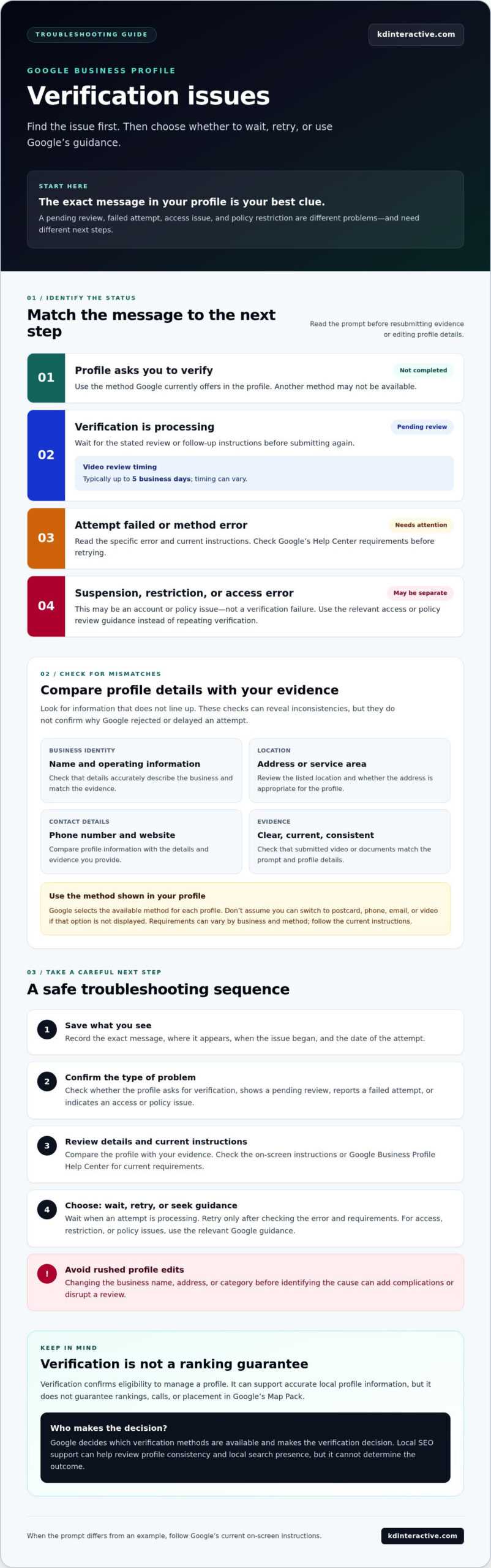
Record the exact message, where it appears, and when the issue began. Then check whether the profile is asking you to verify, showing a review status, reporting a restriction, or preventing account access. A pending review means an attempt is being processed; a failed attempt means the result needs attention. These statuses call for different responses, so don’t resubmit evidence or edit details until you’ve checked the prompt.
| What you see | What it may mean | Careful next step |
|---|---|---|
| Profile asks you to verify | The profile hasn’t completed verification. | Follow the method Google currently offers in the profile. Don’t assume another method is available. |
| Verification is processing | Google is reviewing a submitted attempt. Video reviews typically take up to five business days, but timing can vary. | Wait for the stated review or follow-up instructions before submitting again. |
| Attempt failed or method error appears | The evidence may not have met the prompt, or the method may have encountered a problem. | Read the specific error and current instructions before retrying. Confirm requirements in Google’s Help Center. |
| Suspension, restriction, or access error | This may be a policy or account issue, not a verification failure. | Use the relevant account-access or policy review guidance rather than repeating verification. |
Why verification matters to local visibility
Once verified, eligible business owners can manage profile information, such as business details and updates. That supports an accurate local search presence, but verification alone doesn’t guarantee rankings, calls, or placement in Google’s Map Pack. If a message or option in your account doesn’t match the examples above, treat Google’s current on-screen instructions as authoritative and confirm the right route before taking action.
Common Google Business Profile verification failures and what to check
A failed attempt doesn’t always reveal the cause. Look at what happened, then compare your information and evidence with the instructions shown in your profile. These checks can help you spot inconsistencies, but they don’t confirm why Google rejected or delayed a particular attempt. Follow current Google guidance for your profile before retrying or changing important details.
When the available verification method does not work
Use the verification method currently offered in your profile. Google selects which options are available, so don’t assume you can switch to a postcard, phone call, or video if that choice isn’t displayed. If the method fails, note the attempt date and copy the exact error message before taking another step.
Compare your evidence with the prompt. If you submit a video or documents, for example, check that they’re clear, current, and consistent with the profile’s business name and location. Google’s evidence requirements can vary by business and method. Check the current instructions in your profile or Google Business Profile Help Center for details about what to show, provide, or submit. Don’t rely on an old checklist if the instructions have changed.
When business details or eligibility may be causing friction
Review the profile as a customer or reviewer might. Do the listed details accurately describe how the business operates? Check these areas:
- Business name: Compare it with the name used on permanent signs and business materials. Unexplained differences may make submitted evidence harder to match to the profile.
- Address or service area: Confirm the setup reflects whether customers visit your location or you travel to them. Don’t present a location as customer-facing if it isn’t.
- Phone and website: Check that the contact information is current and clearly associated with the same business.
- Operating details: Make sure the profile reflects the business’s actual services, hours, and location setup.
For a service-area business, represent its operating model accurately and avoid using an address in a way that could mislead customers. If you’re unsure whether your location or business type is eligible, consult Google’s current eligibility guidance before making consequential edits.
During a review, avoid changing core details just to test whether a different version works. Keep relevant records, including the original profile information and Google’s messages. A consistency check can also support broader local search work. If you’d like help reviewing profile accuracy as part of your local SEO, learn about local SEO support.
Choose the right next step: retry, wait, or contact Google
The safest response to Google Business Profile verification issues depends on the status and exact message in your account. Use this decision table as a starting point, then follow the current instructions Google displays for your profile. Don’t repeat attempts or edit profile details unless the instructions call for it.
| Status or message | Recommended next step |
|---|---|
| Verification hasn’t been completed | Return to the profile and follow the verification prompt. If you haven’t submitted evidence, there’s nothing to wait for yet. |
| Verification is processing or under review | Allow the review to continue. Check for a status update or request for more information rather than submitting another attempt. |
| The method failed or an error appeared | Save the error message, check the method’s current instructions, and address the specific problem before retrying. |
| The profile shows a suspension or restriction | Review the relevant policy notice and current appeal instructions. Don’t treat a suspension as a routine verification error. |
| You can’t access the business account or profile | Resolve the access or ownership issue through Google’s current account or profile guidance before attempting verification. |
When to follow the prompt or allow a review to continue
Google’s displayed instructions take priority over generic advice. Review periods can vary by method and case, so don’t rely on a universal wait time. For example, Google’s video verification review typically takes up to five business days, but your profile’s status and instructions should guide your next step. Keep a simple record of submission dates, materials provided, and status messages. If you’re still setting up a profile, the guide How to Set Up a Google Business Page: A Step-by-Step Guide can help you review the setup process.
When to use Google support or an appeal process
Use Google’s Business Profile Help Center and the contact or appeal route relevant to your issue. Check current documentation first, because verification troubleshooting and suspension appeals are different processes. A support request is easier to assess when it clearly states the profile’s business name and location, the issue and exact message, what steps you’ve taken, and any relevant evidence. Keep your explanation factual and consistent with the profile.
A local SEO professional can help review profile consistency and local search presence, but can’t control Google’s decision or guarantee verification. For a broader review, consider working with a provider of local SEO services.
A safe troubleshooting checklist for Google Business Profile verification
A steady process helps you avoid turning one unresolved prompt into several new problems. Before acting on Google Business Profile verification issues, capture what Google is showing, check the profile against the business’s real operations, confirm the current instructions, and then choose the next step. Use the business account with appropriate access, and keep records of the issue and any action you take.
What to prepare before taking another verification step
Collect the information you’ll need to check the profile or explain the issue. Don’t send anyone your account password. If you need another person to help, use Google’s current access-management options rather than sharing login details.
- Save the prompt: Record the exact message, where it appears, the date, and any error details. Keep relevant status updates together.
- Review profile details: Check that the business name, address or service area, phone, website, and operating information accurately reflect the business.
- Gather relevant records: Keep materials that may support the business details or operations. Use only genuine, current documentation and evidence.
- Confirm Google’s instructions: In the business account, check which verification method is currently offered and what evidence it asks for. Requirements can depend on the profile and method.
- Match evidence to the prompt: Check that what you plan to submit is clear and consistent with the profile. Don’t add unrelated material or assume a particular document will be accepted.
Before you retry or contact support, make sure you can describe what you tried and what happened next. A clear record helps you avoid repeating steps and explain the issue accurately.
Changes to avoid while the issue is unresolved
Don’t create a duplicate profile to get around verification, use an address that misrepresents how the business operates, or submit altered or fabricated evidence. These shortcuts can create more confusion and won’t guarantee approval. Avoid changing the business name, address, category, or other details just to test a theory. Make a correction only when it reflects the real business and is relevant to the issue, then follow Google’s current instructions.
Before contacting Google, have the profile details, exact message, attempt dates, and relevant evidence ready. Use the support route that fits the issue shown in your account. Google makes verification decisions. A local SEO professional can help review profile accuracy and related local visibility, but can’t control the outcome.
Wisconsin business owner looking for broader profile and local visibility guidance? Review local SEO support options.
How local SEO support can help after a verification problem
Google alone decides whether a Business Profile meets its verification requirements. An SEO agency can’t override that decision or guarantee approval. It can help you understand how the profile fits into your wider local search presence and identify inconsistencies worth reviewing before you take another step.
For Wisconsin businesses, local SEO support can connect profile accuracy with the information customers find elsewhere online. That broader view is useful after Google Business Profile verification issues because the profile is only one part of a business’s local presence. Any verification action still needs to follow Google’s instructions, and Google’s support channels remain the route for decisions about its platform.
What an SEO professional can review
A local SEO professional can compare the profile’s public details with the business website and other public business information. For example, they can flag differences in the business name, contact details, service descriptions, or location information for you to confirm against how the business actually operates. This is a consistency review, not a substitute for Google’s evidence requirements.
They can also assess related local search work, such as whether the website clearly communicates the business’s services and where it operates. KD Interactive provides local SEO support for small businesses in Wisconsin, including the Watertown area. Visibility work can be tracked and reviewed over time, but rankings and Map Pack placement depend on Google and aren’t guaranteed. Reputation management may also support a business’s broader local presence, separate from the verification process.
If you want more context about improving local search presence beyond a verification problem, consult a local SEO services guide. Keep that work distinct from any pending verification, support request, or appeal.
When to request help and what to bring
Consider getting professional input if you’ve reviewed the instructions in your Google account and still can’t identify what’s causing the problem, or if you want a broader check of your profile and local visibility. Before discussing it, gather the exact error message, the current profile status, the dates of your attempts, and a brief record of what you’ve already tried. Don’t share your account password.
With that information, an SEO professional can help review the surrounding profile and local search context. Google remains responsible for verification and support decisions, so keep following its current guidance for the platform issue.
Learn about KD Interactive’s local SEO support for guidance on your profile and local visibility.
Take the next step with confidence
Google Business Profile verification issues are easier to address when you match your next move to the status and instructions Google shows. First, distinguish a pending review or incomplete attempt from a failed method, account-access problem, or policy restriction. Then check that your profile information and submitted evidence accurately reflect how your business operates.
A careful approach matters. Avoid unnecessary edits, duplicate profiles, or unsupported evidence, and keep a record of messages and steps taken. If the issue remains unclear, use the Google support or appeal route that applies to your situation. Google makes the verification decision, but you don’t have to assess your broader local presence alone.
KD Interactive provides local SEO services tailored to small businesses, along with online reputation management and content creation. Wisconsin businesses, including those in the Watertown area, can get support reviewing profile consistency and local visibility without promises of approval or specific rankings.
To discuss your local visibility goals, contact KD Interactive. With a clear plan and accurate information, you can move forward with greater confidence.
Frequently Asked Questions
Why is my Google Business Profile verification not working?
Your Google Business Profile verification may not work because the evidence doesn’t match the profile, the method encountered an error, or Google needs more information. Check the exact message before changing details. For example, signage showing a different business name may be difficult to match to the listing. Also confirm your business and location meet current eligibility guidance. Record the message and attempt date, then follow the instructions shown in your account.
How long does Google Business Profile verification take?
Video verification review typically takes up to five business days, though it can be faster. If Google offers postcard verification, delivery is expected within 14 business days, followed by a review that can take up to five more business days after you enter the code. Phone and email options are generally instant when available. These are typical timelines, not guarantees, so follow the status and timing shown in your Google account.
Can I verify my Google Business Profile without a video?
Yes, you may be able to verify without video if Google displays another method for your profile. Available options can include postcard, phone, or email, while some eligible businesses may qualify for instant verification. These choices aren’t guaranteed or interchangeable, so don’t assume you can select a method that isn’t shown. Open your profile and follow its current prompt; check Google’s Help Center if the offered method isn’t working.
What should I do if Google Business Profile verification keeps failing?
Stop repeating the same attempt and check the exact failure message first. Compare your profile details with the evidence you submitted, then review the current instructions for the method Google offered. Keep a record of attempt dates, messages, and submitted materials. If the issue remains unresolved, use the relevant support route in the Google Business Profile Help Center. Avoid unnecessary profile edits, duplicate listings, or evidence that doesn’t reflect the real business.
Can changing my business address cause Google Business Profile verification issues?
Yes, an address change can lead Google to request verification or review the profile again. Before editing it, confirm that the address accurately reflects how the business operates and check Google’s current eligibility guidance. If verification is already in progress, avoid changing the address unless Google’s instructions require it. Keep a record of the original details and any messages so you can explain what changed and when if you need support.
Is a suspended Google Business Profile the same as a verification problem?
No. A verification issue means Google hasn’t confirmed the profile or an attempt needs attention. A suspension or restriction is a separate policy matter, even if it appears while you’re trying to verify. Read the notice carefully and use the current policy review or appeal instructions that match it. Repeating verification steps won’t necessarily address a suspension. Keep your explanation and any supporting evidence relevant to the specific notice.
Can an SEO agency fix Google Business Profile verification issues?
An SEO agency can’t control Google’s verification decisions or guarantee approval. It may help review whether your profile information is consistent with your website and other public business details, and assess broader local search visibility. KD Interactive provides local SEO services, online reputation management, and content creation for small businesses in Wisconsin, including the Watertown area. For verification decisions, follow Google’s instructions and contact its support channels when needed.