
A sudden drop in organic traffic is a signal to investigate, not a reason to rewrite your website overnight. If you’re searching for how to recover from a google algorithm update, first check whether an update is actually behind the change. Seasonality, technical problems, or a recent site change can cause similar drops in clicks, impressions, and leads.
It’s understandable to feel pressure when search visibility falls and advice online conflicts. But rushed edits can make it harder to identify the cause. A measured diagnosis gives you a clearer basis for deciding what to fix, what to monitor, and what to leave alone.
This 2026 guide explains how to verify the timing and scope of a decline, distinguish an algorithmic change from other causes, and prioritize improvements based on evidence. You’ll also learn how to track meaningful search and business outcomes instead of reacting to every fluctuation in a traffic graph.
Key Takeaways
- Use Search Console and performance data to check whether a decline aligns with an update and identify the affected pages or queries.
- Compare update timing with technical errors, seasonality, recent site changes, and tracking issues before choosing a fix.
- Learn how to recover from a google algorithm update by prioritizing pages according to business value, search evidence, user needs, and the scale of the impact.
- Make focused improvements, then monitor search performance and business outcomes instead of reacting to every fluctuation.
- If the cause remains unclear or losses are widespread, look for expert support that offers transparent diagnosis and measurable reporting, not ranking guarantees.
How to tell whether a Google algorithm update affected your site
A traffic drop is stressful, but it doesn’t by itself prove that a Google algorithm update caused it. An update-related impact is a change in search performance that aligns with an announced rollout and appears in the visibility of affected queries or pages. Timing is a useful clue, not proof. Before deciding how to recover from a google algorithm update, check whether a site, tracking, or market change better explains the decline.
Start with Search Console’s Manual Actions report. A manual action is confirmed by a Search Console notification; an algorithmic ranking-system impact is a suspected explanation based on performance evidence, not a penalty notification. This distinction matters because the causes and next steps differ. For a high-level introduction to search engine optimization, keep in mind that updates operate within a broader field shaped by many signals, not one universal ranking rule.
What evidence suggests a Google update may be involved?
Compare the first sustained change in your data with verified announcements from Google Search Central. For example, Google’s 2026 announcements included a core update that ran from May 21 to June 2, and a spam update released on September 24. A drop that begins near a rollout deserves investigation, but timing alone doesn’t establish the cause.
In Search Console, compare clicks and impressions across equivalent date ranges, then break the data down by query and page. Look for a pattern: did visibility fall across many pages, or mainly for one topic or group of searches? A clicks decline with steady impressions may point to a different issue than falling impressions. Allow recent reporting to settle, and compare similar periods to account for seasonality rather than looking only at adjacent weeks.
What else can cause a sudden organic traffic drop?
Check for technical or site changes around the same time. Confirm that important pages are indexed and crawlable, the site was available, and no migration, redirect, template update, or accidental content change affected the URLs. A page that disappeared from search because it was blocked or redirected needs a different response from one that remains indexed but earns fewer impressions.
- Tracking: Confirm that analytics configuration and conversion tracking still work before treating fewer recorded leads as fewer actual leads.
- Demand: Compare impressions and query patterns across equivalent seasonal periods. Search interest can change even when your pages don’t.
- Competition and search results: Check whether competitors gained visibility or search features changed what users see and click.
Build a short timeline of the traffic change, Google announcements, site releases, and tracking changes. If the evidence points in different directions, keep investigating before editing pages. A clear diagnosis makes the next steps more focused and less risky.
How Google algorithm updates can affect rankings and organic traffic
Google Search uses many automated systems and signals to determine which results are most relevant. An update can change how those systems assess and rank pages, so visibility may shift even when you haven’t changed your site. There isn’t one universal ranking factor that explains every movement. As Google’s guidance on Debugging drops in Google Search traffic emphasizes, examine a traffic change in context before deciding what to do.
An update’s rollout date is a clue to investigate, not proof that it caused your traffic loss. Search performance can also shift because of technical problems, changing demand, competitors, or changes in search results. That’s why how to recover from a google algorithm update starts with identifying the likely type of change, not treating every decline as a penalty.
Core updates, spam updates, and manual actions are not the same
A broad core update changes Google’s ranking systems and can alter how content is assessed across many types of searches. A page that loses visibility after a core update hasn’t necessarily violated a policy. Spam updates relate to Google’s spam-prevention systems and policies. A manual action is different: it’s a specific action taken after a human review, with details available in Search Console. Check Google Search Central for current terminology and guidance, then match your investigation to the type of change indicated.
Why the same update can affect pages differently
Search visibility isn’t one sitewide position. A business may gain visibility for one query and lose it for another, while results can also vary by location, device, and the search results shown. A local service page, for example, may perform differently for a nearby search than for the same service searched from another area.
Keep performance measures separate. They describe different points in the journey:
- Rankings describe where a page appears for a particular search in a specific context.
- Impressions count how often a result is shown, while clicks count visits from those results.
- Conversions track meaningful actions on your site, such as an enquiry or purchase.
A decline in clicks doesn’t automatically mean rankings fell. Impressions, search result presentation, and user choices can also affect visits. Likewise, fewer conversions may reflect what happens after the visit rather than a ranking shift. Track these measures separately so your response fits the evidence, not an assumed ranking factor or expected recovery timeline.
If local visibility is central to your business and you need help assessing it, explore KD Interactive’s local SEO services for Wisconsin businesses.
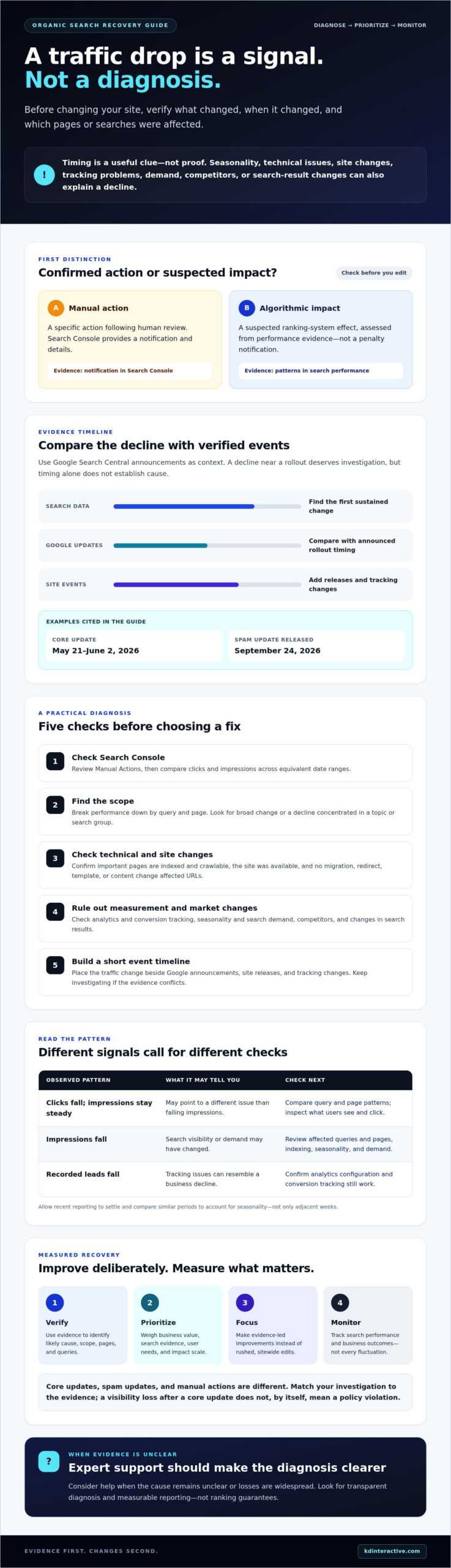
Algorithm update or another problem? Compare the evidence before changing your site
A useful diagnosis looks for a pattern, not just a date. Check whether the decline is sitewide or concentrated in particular pages, queries, or sections. Then compare it with technical records, business changes, and search demand. The clues below can help you choose what to investigate next.
| Possible cause | Signal to inspect | Evidence that supports it |
|---|---|---|
| Google update | Search Console clicks and impressions by page and query, alongside Google Search Central announcements | A sustained visibility change begins around a confirmed rollout and affects a related group of searches or pages, without a matching site issue. |
| Technical error | Indexing reports, crawl issues, server availability, and important URLs | Pages disappear from search after becoming unavailable, blocked, redirected, or otherwise difficult for Google to access. |
| Seasonality or demand | Impressions and query patterns compared with relevant seasonal periods | Search visibility or demand changes across the topic, while the site’s technical and content setup remains stable. |
| Site changes | Release logs, redesigns, migrations, redirects, and content edits | The decline follows a change affecting the same URLs, templates, or sections that lost visibility. |
| Tracking issue | Analytics configuration, conversion tracking, and reporting consistency | Recorded visits or conversions drop after a tracking change, while Search Console clicks or other independent signals don’t show the same decline. |
Compare Search Console and analytics data
Use Google Search Console to examine search impressions, clicks, queries, and landing pages. Analytics data helps assess visits and on-site outcomes, but first confirm that tags, filters, and conversion tracking remained consistent across the periods you’re comparing. A mismatch can point to measurement trouble rather than lost search visibility.
Where the available data supports it, segment by page, query, device, and country. A sitewide decline looks different from losses limited to one location, device type, or a handful of URLs. Keep date ranges comparable and allow for reporting delays before drawing conclusions.
Rule out technical, seasonal, and site-change causes
Review indexing and crawl reports, server availability, and changes to important URLs. Check release records for redesigns, migrations, redirects, major content edits, and analytics updates. Then compare relevant seasonal periods and query demand. If the evidence doesn’t point clearly to one cause, document what you’ve checked and continue monitoring before making broad edits. For anyone assessing how to recover from a google algorithm update, measured investigation is safer than changing pages based on an uncertain diagnosis.
How to recover from a Google algorithm update with a measured action plan
There’s no reliable shortcut for reversing an update-related decline. A practical recovery plan starts with the evidence you’ve gathered, then focuses effort on the pages and issues most likely to matter to your business. Work through these steps in order:
- Document the drop. Record when performance changed, which pages and queries were affected, and how clicks, impressions, visits, and conversions moved. Save a baseline for comparison.
- Confirm likely causes. Check for technical issues, tracking changes, seasonality, site releases, and relevant Google announcements. Don’t assume an update is responsible until the evidence supports that explanation.
- Prioritize affected pages. Group URLs by topic, search intent, template, and business importance. Start with pages that have meaningful business value and clear evidence of lost visibility, rather than treating every URL as equally urgent.
- Improve with a specific purpose. Review whether each priority page answers the searcher’s need clearly and accurately. Strengthen usefulness, clarity, and relevant first-hand expertise. Check internal links, page experience, and content quality as part of the full picture, not as isolated signals to chase.
- Monitor the results. Track changes in Search Console and analytics, using the same segments and measures as your baseline. Evaluate trends over time rather than expecting a fixed recovery date.
Prioritize pages and improvements
For each group of affected pages, ask what visitors are trying to accomplish and whether the content helps them do it. A page may need clearer explanations, more accurate details, or examples grounded in genuine experience. Check whether important pages are easy to reach through internal links and whether each page works well for its audience. Make changes that address an observed weakness, not a checklist of supposed ranking signals.
Implement changes and measure recovery
Keep a change log with the date, URLs changed, and reason for each update. Avoid mass deletion, superficial rewrites, or repeated edits made before you can assess the previous changes. Those actions can obscure what helped and what didn’t. Compare search performance and on-site outcomes consistently, allowing enough time for meaningful patterns to emerge without promising a particular timeline.
For a broader view of how online visibility fits together, read KD Interactive’s web and SEO services guide. If you want support turning your findings into focused priorities, explore KD Interactive’s SEO services.
When to get expert help with Google update recovery
Some traffic declines are straightforward to investigate. Others have several possible causes, and the cost of guessing can grow when important pages or leads are affected. Consider outside SEO support if you can’t establish why performance changed, losses span much of your site, a migration or redesign is involved, or your team lacks time to examine the evidence and make careful improvements.
Choose a partner who explains what the data does and doesn’t show. Look for a transparent diagnosis, documented priorities, measurable reporting, and a clear distinction between confirmed issues and working theories. Be cautious of anyone promising specific rankings or guaranteed recovery. Google update recovery requires evidence-led decisions, not certainty that no one can responsibly offer.
What should an SEO recovery assessment include?
A useful assessment should review Search Console and analytics data, technical health, affected pages, and your site’s change history. Ask how the consultant will separate confirmed problems from hypotheses, and what evidence would support each recommendation. Proposed work should have clear priorities, owners, documentation, and agreed measures of progress, such as search visibility and relevant business outcomes.
You should understand why each action is recommended before approving it. If the diagnosis is uncertain, a responsible next step may be further investigation or a measured test, rather than a broad sitewide rewrite.
How KD Interactive can support a Wisconsin small business
For Wisconsin businesses, recovery planning may need to consider local visibility alongside broader organic search performance. If customers find you through local searches, include those pages and queries in the diagnosis. KD Interactive works with small businesses in Wisconsin on local SEO, content creation, and SEO keyword analysis. The right support depends on what the evidence shows, not a preset package of changes.
If local search visibility is part of the problem, this local SEO services guide offers more context. As you decide how to recover from a google algorithm update, look for a partner who explains the reasoning, tracks meaningful outcomes, and avoids promises of a guaranteed result.
Discuss your SEO recovery needs with KD Interactive and outline what your data shows, what remains unclear, and which business outcomes matter most.
Move forward with a measured recovery plan
A traffic decline is a reason to investigate, not proof that a Google update is responsible. Compare search data with technical health, site changes, seasonality, and tracking before deciding what to change. Then prioritize the pages that matter most to your business, make focused improvements, and monitor search and business outcomes consistently.
That’s the practical answer to how to recover from a google algorithm update: follow the evidence, improve the experience for visitors, and avoid rushed fixes or promises of guaranteed recovery. If you’d like support interpreting your data and setting priorities, KD Interactive provides analytics tracking and keyword research alongside tailored local SEO, content creation, and reputation management.
Discuss a measured SEO recovery plan with KD Interactive. With a clear diagnosis and steady next steps, you can move forward with greater confidence.
Frequently Asked Questions
How do I know if a Google algorithm update affected my website?
Look for a sustained change in Google Search performance that aligns with a confirmed update rollout, then check which queries and pages lost visibility. In Search Console, compare clicks and impressions across equivalent date ranges. Timing is a clue, not proof: also investigate technical problems, seasonality, site changes, and tracking. Check the Manual Actions report too, since a manual action is different from a suspected ranking-system impact.
How long does it take to recover from a Google algorithm update?
There’s no reliable recovery timetable, and Google doesn’t guarantee that a site will recover after an update. The time needed to diagnose and address an issue depends on its cause and scope, while changes in search performance may take time to become clear. Avoid anyone promising a specific recovery date. Track the changes you make and assess trends in search visibility and business outcomes consistently.
Can a website recover after losing rankings in a Google core update?
Yes, a site can regain visibility, but recovery isn’t guaranteed. A core update can change how Google’s systems assess results without meaning every affected page violated a policy. Review the pages and queries that lost visibility, then address real weaknesses in usefulness, accuracy, clarity, or user experience. Measure results over time, and don’t treat a ranking change alone as proof that a particular edit worked.
Should I delete content after a Google algorithm update?
No, don’t delete pages simply because traffic fell after an update. First assess whether each page serves a clear purpose, answers visitors’ needs, and contains accurate, useful information. If content is outdated, improve it; if pages overlap, evaluate whether consolidating them would better serve users. Remove content only when there’s a sound reason beyond a temporary traffic decline, and record the change so you can interpret later performance.
What should I check first after a sudden drop in Google traffic?
Start by checking the Manual Actions report in Google Search Console, then compare Search Console clicks and impressions by page and query. Confirm that important pages remain indexed and accessible, and review recent site changes. Check analytics and conversion tracking before concluding that visits or leads have truly fallen. Compare equivalent time periods to account for reporting delays and seasonal demand, and avoid broad edits until you understand the pattern.
Can technical SEO problems look like an algorithm update?
Yes. Pages blocked from crawling, accidental noindex settings, broken redirects, server outages, or migration errors can reduce search visibility and resemble an update-related decline. Look for affected URLs in indexing reports and compare the timing with releases or infrastructure changes. Search Console clicks and impressions can also help distinguish a search visibility change from an analytics tracking issue. Fix confirmed technical problems before attributing the loss to Google’s ranking systems.
What happens if my website does not recover after an update?
If performance doesn’t improve, don’t assume the decline is permanent or keep repeating the same edits. Revisit your diagnosis, check for unresolved technical issues, and assess content quality and other relevant site factors. Consider whether losses are limited to certain pages, queries, or sections, and review business outcomes as well as rankings. If the cause remains unclear or the impact is widespread, seek an evidence-led assessment with clear priorities and reporting.