What if every online interaction gave a nearby customer a clear next step toward your store? Learning how to drive online traffic to a physical store isn’t just about getting more clicks. It’s about helping people find you, trust you, and quickly see how to visit. If your marketing brings attention but you can’t tell whether it leads to visits, it’s understandable to question where your time and budget should go.
A practical plan connects local search, useful content, customer reviews, and accurate store details. It helps people find what they need before they leave home, and gives you ways to track meaningful actions and improve based on evidence rather than clicks alone.
This 2026 guide explains which online marketing activities can help nearby customers discover your store, how to make hours and directions easy to find, and what to measure. You’ll get a clear path from online discovery to an in-store visit, with local SEO, content, and reputation working together.
Key Takeaways
- Map the steps between a customer’s initial need and an in-person visit to see where useful information can remove friction.
- Choose local channels based on customer intent, your store type, and the actions you can support consistently.
- Give each online touchpoint a clear next step, such as getting directions or checking store information.
- Measure visibility, visit intent, and business outcomes separately to understand how to drive online traffic to a physical store.
- Build a manageable local plan that connects search visibility, helpful content, customer confidence, and performance tracking.
How online discovery can turn nearby searches into store visits
A store visit often begins before a customer leaves home. Someone recognizes a need, searches for a nearby option, checks whether the business seems trustworthy and relevant, then looks for directions or another way to take the next step. Each online touchpoint can make that journey easier or give the customer a reason to choose somewhere else.
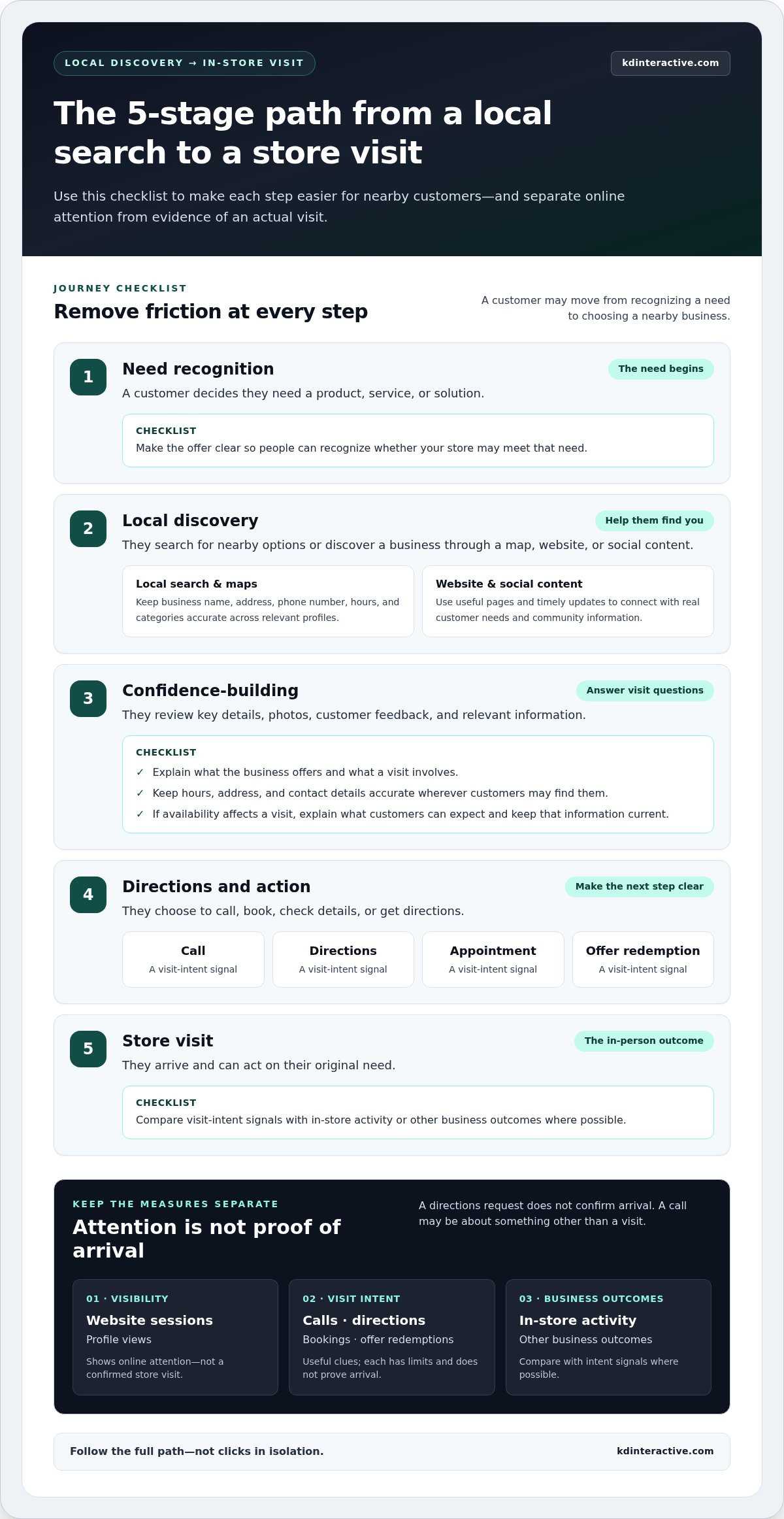
Online-to-store traffic is the journey from digital discovery to an in-person visit. Online attention alone is not proof that a visit happened. Website sessions and profile views show visibility, but they don’t confirm that someone walked through the door. Keep those measures separate when deciding whether your marketing is working.
What counts as online traffic to a physical store?
Calls, requests for directions, appointment bookings, and offer redemptions are useful visit-intent signals. Each has limits: a directions request doesn’t confirm arrival, and a call may be about something other than a visit. Treat these actions as clues, then compare them with in-store activity or other business outcomes where possible.
To understand how to drive online traffic to a physical store, follow the full path rather than counting clicks in isolation:
- Need recognition: A customer decides they need a product, service, or solution.
- Local discovery: They search for nearby options or find a business through a map, website, or social content.
- Confidence-building: They review key details, photos, customer feedback, and relevant information.
- Directions and action: They choose to call, book, check details, or get directions.
- Store visit: They arrive and can act on their original need.
Why local intent matters before someone visits
Searches that include a place name, “near me,” or an immediate need can indicate local intent. Someone searching for a nearby shop or a specific service in their town is likely comparing options they can visit, not just browsing general information. Make it easy for them to decide whether your location is a practical fit.
Keep your address, contact details, and hours accurate wherever customers may find them. If product availability affects a visit, explain what customers can expect and keep that information current rather than implying every item is in stock. Clear details help prevent avoidable problems, such as arriving after closing or traveling to the wrong location. For broader guidance on earning local visibility, explore our local SEO services guide.
Which online channels help customers find a Wisconsin store?
The strongest channel mix isn’t the longest one. It’s the set of places where nearby customers look for your kind of business, paired with clear next steps that fit how your store serves them. A Wisconsin retailer may need map visibility and accurate product information, while a service-based storefront may need pages that explain what it does and how to book or call.
Choose each channel for a distinct customer action: search helps people find you, your profile helps them evaluate a visit, your website answers detailed questions, social content keeps your business visible, and local partnerships introduce you to community audiences. This makes it easier to decide where to focus your time.
Make local search and Google Maps useful to potential visitors
Local search and map listings can connect your business with people actively looking nearby. Keep your business name, address, phone number, hours, and categories accurate across relevant profiles. A complete Google Business Profile helps customers understand where you are and what you offer, but it can’t guarantee rankings or foot traffic. Use this Google Business Page setup guide for practical profile setup details.
Use website content and community signals to build local relevance
Your website can answer questions that a short profile can’t. Build useful service or location pages around real customer needs, such as what a visit involves, what the business offers, or which areas it serves. Avoid near-identical pages that only swap in Wisconsin place names. Each page should offer meaningful information for that community, not just repeat a location keyword.
Social posts can highlight seasonal offerings, store updates, or community events. Local partnerships can introduce your business to nearby audiences when both organizations have a clear reason to share useful information. Connect each effort to a practical next step, such as checking current details or contacting the store.
- Local search: Focus on discovery by nearby customers.
- Website pages: Answer specific questions and explain what to expect.
- Social content: Share timely updates and relevant community information.
- Local partnerships: Reach people through trusted community connections.
How to turn online interest into a confident store visit
Online attention doesn’t automatically become a completed store visit. A person can view a profile, read a page, or tap for directions and still decide not to go. Make the decision easier by answering practical questions, providing accurate information, and offering a clear action that matches what the customer wants to do.
Use the customer’s question to choose the right page detail and call to action. Avoid a generic prompt like “Learn more” when a visitor is ready for directions or needs to know whether an appointment is required.
| Customer question | Helpful detail or action |
|---|---|
| Where is the store? | Show the full address and a clear “Get directions” action. |
| Are you open today? | Display current hours and update temporary closures across your website and business profiles. |
| Can I get help with my specific need? | Explain relevant services, products, or service boundaries, then offer a suitable way to call or book. |
| What should I expect before arriving? | Share relevant details about parking, accessibility, or appointment requirements. |
Remove the small uncertainties that can stop a visit
Keep visit details easy to find, especially on mobile. If parking, accessibility, or appointments affect the experience, state the relevant information plainly. Make service boundaries clear so customers can tell whether your business is the right fit before traveling. Keep hours accurate, and update your website and business profiles when hours change or a temporary closure affects visits.
Match the call to action to the customer’s next step. “Get directions” suits someone ready to travel; “Call” works when a quick question remains; “Book an appointment” fits a scheduled visit. Use “Check current store information” when details may change. This makes how to drive online traffic to a physical store more about completed actions and less about attention alone.
Build confidence with useful content and reviews
Current photos help visitors recognize the storefront and understand what they’ll find. Clear policies set expectations, while concise answers to common pre-visit questions reduce the need to search elsewhere. Reviews can offer perspective from past customers, but they don’t guarantee a future visit. Invite genuine feedback without scripting it or offering fabricated testimonials, and respond professionally to positive and negative comments. A calm, helpful reply shows that the business pays attention.
For a small team, prioritize the details that remove the biggest barriers: accurate hours and location first, then the visit information customers ask about most. Add trust-building content and refine calls to action as you learn which questions keep coming up.
How to measure online marketing’s impact on store visits
Clicks can show that a campaign attracted attention, but they don’t tell the whole story. Someone might find your business online, visit days later, and arrive without using a tracked link or requesting directions. Multiple signals give a more useful view of store marketing than any single metric because they connect visibility, visit intent, and in-store outcomes.
Use this routine to make measurement manageable and guide your next decision:
- 1. Record a baseline. Note current website and location-page engagement, profile activity, calls, bookings, offer redemptions, and relevant in-store outcomes. Use a consistent period for comparison.
- 2. Choose actions to measure. Select signals that fit your campaign and store. A booking-focused promotion should track bookings; a local awareness effort may start with impressions and profile interactions.
- 3. Tag campaigns. Use consistent campaign names and UTM parameters on website links so visits and actions from different campaigns are easier to distinguish in analytics.
- 4. Review results. Compare visibility metrics, such as impressions, with intent signals like calls and direction requests, then check available business outcomes. Google Analytics 4 and business profile data can help where configured; confirm current reporting options in each platform.
- 5. Adjust one step at a time. Keep what appears useful, revise weak points, and continue tracking with the same definitions so comparisons remain meaningful.
Choose a review rhythm that fits your business
Set a review cadence your team can maintain. A store with frequent promotions may review campaign activity regularly, while a business with a longer decision cycle may need a broader comparison period. Avoid reacting to a brief spike or dip without considering what else changed. Consistent campaign names, action definitions, and reporting periods make results easier to interpret.
Use customer feedback to interpret the numbers
Tracking won’t capture every path to a visit. A customer might discover you through search, return later by typing your address into a map, or hear about you from someone else. Ask, “How did you hear about us?” when it feels natural, and let customers answer without pressure. Compare their feedback with campaign activity, promotions, seasonal demand, local events, and changes to store operations. A rise in visits during a promotion may have several contributing factors, so treat the data as evidence to investigate, not automatic proof of cause.
For a clearer way to evaluate local search activity and customer actions, explore KD Interactive’s analytics and local SEO support.
Build a practical local traffic plan with KD Interactive
A useful local traffic plan starts with your store’s goal, not a checklist of every available channel. Decide what you want nearby customers to do, who you want to reach, and what your team can maintain. For one Wisconsin business, the priority may be appearing for relevant local searches; for another, it may be helping prospective customers understand a service before they visit.
To put how to drive online traffic to a physical store into practice, begin with a manageable foundation:
- Make location information reliable. Keep your address, hours, contact details, and relevant visit information accurate.
- Choose one clear customer action. Decide whether the next step should be calling, getting directions, booking, or viewing current store details.
- Focus on a small number of channels. Select the channels that match your audience and that your team can keep useful and up to date.
- Review signals before expanding. Compare customer feedback and tracked activity with your goal, then refine the plan based on what you learn.
This approach gives a small-store team a practical way to start without spreading time too thin. Add channels or new content when you can maintain the current plan consistently and have evidence about what customers need next.
Connect local visibility work to a measurable business goal
Local SEO, tailored content, reputation management, and analytics can support different stages of the customer journey. Keyword research helps identify how nearby customers describe their needs. Content can answer real questions about your services and what to expect before visiting. Reputation management supports a thoughtful review process, while analytics tracking helps you evaluate activity and adjust the plan. These efforts can improve visibility and provide useful evidence, but they can’t guarantee store visits.
KD Interactive works with small businesses in Wisconsin, including Watertown, to develop local SEO plans that connect search visibility with relevant content and performance tracking. The work is aligned with your services, local audience, available resources, and business goals, rather than relying on location pages without useful local information.
Ready to strengthen local visibility and set clearer goals for store visits? Talk with KD Interactive about local SEO.
Turn local discovery into your next growth opportunity
Learning how to drive online traffic to a physical store starts with connecting discovery to a useful next step. Make it easy for nearby customers to find accurate store information, understand what to expect, and choose an action such as calling, booking, or getting directions.
Then measure more than visibility. Compare search and profile activity with visit-intent signals, customer feedback, and in-store outcomes to see where your marketing is helping and where the journey needs work. A focused plan is easier to maintain: prioritize the channels your team can support, then build on what the evidence shows.
KD Interactive provides Wisconsin-focused local SEO services for small businesses. Keyword research, tailored content, reputation management, and analytics tracking can work together to support local discovery and help evaluate progress. Talk with KD Interactive about your local visibility goals and take the next step toward making your online presence more useful to nearby customers. With a clear plan and steady improvements, a store visit can begin with a better online experience.
Frequently Asked Questions
How do I drive online traffic to a physical store?
To learn how to drive online traffic to a physical store, connect local discovery with a clear next step. Keep your business information accurate, create useful website pages for nearby customers, and make actions like calling, booking, or getting directions easy to find. Choose channels your team can maintain, then track intent signals and in-store outcomes. Use customer feedback alongside analytics to refine the plan rather than relying on clicks alone.
Does Google Business Profile help bring customers to a store?
Yes, a complete and current Google Business Profile can help nearby customers discover and evaluate your store. Add accurate hours, address, phone number, categories, and other relevant visit details. Photos and thoughtful review responses can help people understand what to expect. Profile views and direction requests are useful indicators of visibility or intent, but they don’t confirm that someone visited, and a complete profile can’t guarantee rankings or foot traffic.
How can I measure whether online marketing brings people into my store?
Combine online activity with visit-intent signals and in-store outcomes. Track website or location-page engagement, calls, direction requests, bookings, and offer redemptions, then compare campaign trends with store activity and customer feedback. Use consistent campaign names and UTM parameters for tagged links, and review analytics and profile data where available. Attribution won’t be perfect because customers may visit later or use another route, so interpret several signals together.
Can social media help increase in-store visits?
Yes, social media can help local customers notice your store and decide whether to visit. Share useful updates, relevant seasonal information, community activities, or details about what customers can expect. Include a clear next step, such as checking current store information or getting directions. Track engagement and visit-intent actions where possible, but remember that likes and views show attention, not confirmed visits. Focus on content your team can keep accurate and consistent.
What should a store website include to attract local customers?
A store website should make it easy to confirm the basics and decide whether a visit makes sense. Include your address, current hours, phone number, relevant services or products, and clear actions such as calling, booking, or getting directions. Add useful location or service information that answers real customer questions. If relevant, explain parking, accessibility, appointment requirements, and current availability. Keep details accurate so customers aren’t left guessing before they travel.
How much should a small business spend on online marketing to increase store traffic?
Set an online marketing budget based on your goals, available resources, and ability to measure results. The U.S. Small Business Administration recommends businesses with under $5 million in annual revenue allocate 7% to 8% of gross revenue to marketing overall. That’s a broad planning reference, not a required online-only allocation or a guarantee of store visits. Start with manageable channels, measure relevant actions, and adjust spending as you learn what supports your goals.
How long does it take for local SEO to bring store traffic?
There isn’t one reliable timeline for local SEO to produce store visits. Progress depends on factors such as your current online presence, local competition, the accuracy of business information, and how consistently useful content and reputation management are maintained. Track visibility and visit-intent signals over time, then compare them with customer feedback and business outcomes. Treat analytics as a way to evaluate progress and guide improvements, not as a promise of a specific result.