
A marketing budget shows what you plan to spend, where the money will go, and how actual spending compares with your plan. A small business marketing budget template makes this easier by grouping costs by activity and time period, then tracking the budgeted, spent, and remaining amounts.
A simple spreadsheet can make marketing costs easier to manage because expenses are spread across different activities and can be difficult to track without a clear structure. This guide explains what to include in a marketing budget plan, how to compare planned and actual spending in Excel, and what to consider when choosing a template. You’ll also learn how different formats can support monthly reviews or an annual overview, helping you align spending with business goals and spot areas that need attention.
Key Takeaways
- Organize spending by activity and time period so you can see how plans and actual costs compare.
- Connect each budget category to a marketing goal, and include both online and offline customer acquisition activities.
- Account for creative production needs alongside campaign spending to build a more complete plan.
- Choose a spreadsheet format that makes totals easy to update, then explore how targeted SEO and content support local visibility.
How to compare planned and actual budget amounts in Excel?
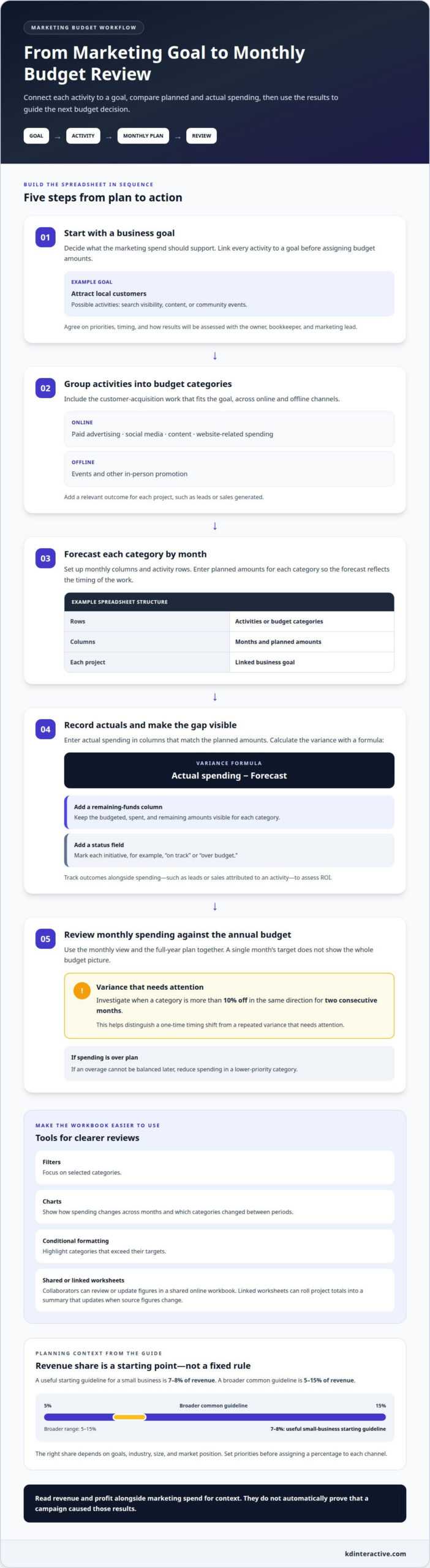
Start with a business goal, then link each marketing activity to a budget category. For example, attracting local customers could involve search visibility, content, or community events. Forecast each category by month and enter actual spending in matching columns. A marketing budget plan is more useful when the owner, bookkeeper, and marketing lead agree on priorities, timing, and how results will be assessed.
How can small businesses track marketing spend, ROI, and budget overruns? Use Excel to record planned and actual amounts by category and month, then calculate the difference with a formula. Track outcomes alongside spending, such as leads or sales attributed to an activity, to assess ROI. Conditional formatting can highlight categories that exceed their targets.
- Set up columns for each month, with rows for activities such as paid advertising, events, and content creation.
- Add planned and actual amounts for every category, then use a formula to calculate actual spending minus the forecast.
- Add a remaining-funds column and a status field, such as on track or over budget, for each initiative.
- Use Excel filters to focus on selected categories, and charts to show how spending changes across months.
Review monthly spending against the annual budget, not just the current month’s target. If an overage cannot be balanced later, reduce spending in a lower-priority category. Investigate a category when it is more than 10% off in the same direction for two consecutive months. This helps distinguish a one-time timing shift from a repeated variance that needs attention.
For a project budget, estimate the costs of completing the work within its defined timeframe. During planning, collaborators can identify activities, timing, and expected costs before adding them to the forecast. Excel works well for monthly columns, formulas, filters, and conditional formatting. A shared online workbook lets collaborators review or update figures in real time, while linked worksheets can roll project totals into a summary that updates when source figures change.
What is a marketing budget plan?
A marketing budget plan sets out expected spending across a defined period, such as a month, quarter, or year. It connects each activity to a business goal and records the forecast, actual spending, and results. For a small business, a useful starting guideline is 7-8% of revenue, while the right share depends on goals, industry, size, and market position. A broader common guideline is 5-15% of revenue.
What should a small business marketing budget template include? Add time periods, spending categories, planned and actual amounts, and a way to connect each project to its goal. Include online and offline customer acquisition, such as search visibility, paid advertising, content, events, and social media, plus a field for leads or sales generated.
Set priorities before assigning a percentage to each channel. If your goal is to reach nearby customers, an event or local search activity may deserve more attention than a broad campaign. If you want to build awareness, content and social media may support that goal. Include related costs, such as website hosting, domain management, integrations, and staff training, so the forecast covers more than the campaign itself.
- Online: Track paid advertising, social media, content, and website-related spending by project.
- Offline: Record event and other in-person promotion spending in separate categories.
- Performance: Pair each project’s forecast and actual amount with a relevant outcome, such as leads or sales.
Use a spreadsheet in Excel to list projects and compare forecast figures with actual spending. Add a chart to show which categories changed between periods, then review whether the change supports your goal. Track revenue and profit separately from marketing spend. They provide context for assessing results, but do not automatically prove that a campaign caused them. Reviewing the figures together helps guide your next budget decision.
For plans involving search visibility or written materials, SEO keyword analysis can help align content topics with customer search intent.
Creative production and studio costs
Break creative production into separate line items so the forecast reflects the work behind each campaign. For a product video, list concept development, scripting, filming, editing, and final versions for different channels. Add studio time, equipment, props, and travel if the project requires them. This detail makes estimates more accurate and shows which production choices can be adjusted if the brief changes.
In Excel or Google Sheets, create one sheet for planned production and another for actual spending. Give each asset a row, then add columns for its owner, project, production stage, and payment timing. A product photo shoot, for example, may involve several deliverables with different deadlines. A shared online workbook lets collaborators update figures as work progresses, while a summary sheet keeps totals visible.
- Production: Track writing, design, photography, filming, editing, and revisions.
- Studio: Record space, equipment, props, and other project-specific needs.
- Distribution: Separate asset creation from the spending needed to publish or promote it.
Protect cash flow by recording when each expense is due, not just its total. If a campaign requires a deposit before filming and a later payment after editing, show both dates in the spreadsheet. Compare those dates with expected business income and other operating costs. This makes it easier to spot when several projects will draw on cash during the same period.
Social media budgets can include content creation, editing, scheduling, and paid promotion. Track each activity separately. For example, a campaign might reuse one video across several posts, while paid promotion has its own forecast and actual columns. This distinction shows whether spending went toward creating or distributing the content.
For public relations and events, record each activity and its purpose. A press announcement, award submission, or local event may have different planning needs and payment timing. When applicable, list design, printing, travel, or event materials as separate categories. Review these items with the project owner before approving work, then adjust the forecast if plans change.
Business budget template sources and formats
A useful template should fit how your business reviews expenses, not just look polished. Start with a downloadable spreadsheet or create a document in Excel or Google Sheets. Add monthly columns, marketing categories, planned amounts, actual expenses, and a summary row. Built-in totals can update when figures change, reducing manual recalculation as you revise the budget plan.
How can a small business create a monthly marketing budget spreadsheet template? In Excel or Google Sheets, create a row for each activity and a column for each month, then add formulas for category totals and monthly spending. Include a summary sheet that gathers totals from other worksheets, so changes to source figures flow into the overview.
Choose a format based on how people need to use the file:
- Excel: Use formulas, filters, and category labels to sort expenses and review detailed figures.
- Google Sheets: Share the workbook so collaborators can review or update figures in real time.
- PDF: Export a finished budget when readers need a stable version for review or approval.
- Word or PowerPoint: Paste charts as images to present spending patterns in a report or meeting.
Keep the working spreadsheet as the source document, and create PDF or presentation copies for sharing. For example, a monthly summary chart can show how spending on content, events, or advertising changes over the year. Excel filters can narrow a growing workbook to the expenses or categories you’re reviewing. If each channel has its own worksheet, linked formulas can roll the figures into one business-wide summary.
Before choosing a free downloadable template, assess whether its rows match your activities and whether its formulas are easy to update. Remove irrelevant categories, add missing expenses, and label the period clearly. A template should help forecast costs, compare actual spending, and show where the plan needs adjustment. To connect budget planning with local visibility, plan content around local customer needs.
KD Interactive
KD Interactive helps small businesses connect marketing plans with practical steps to improve visibility and attract local customers. If your budget prioritizes search visibility or content, its Local SEO Services, SEO Keyword Analysis, and Content Creation can support those goals. Press Release Distribution can also help your business share timely news with a wider audience.
Turn to KD Interactive when you’ve identified the outcomes your marketing plan should support, but need a focused approach to search, content, or business announcements. Clear priorities make it easier to align this work with the activities and measures in your budget.
Contact KD Interactive to discuss your marketing goals.
Turn your marketing plan into purposeful action
A budget is most useful when it helps you decide what to do next, not just record past activity. Treat your small business marketing budget template as a working guide: revisit priorities as customer needs and business goals shift, then use them to shape upcoming campaigns.
If your next step is improving visibility and communicating more consistently, KD Interactive offers Local SEO Services, Content Creation, and Press Release Distribution. These services can support a plan to reach local customers and share relevant business news. Choose activities that fit your goals, then make them part of a clear, measurable marketing plan.
Contact KD Interactive to discuss your marketing and identify a practical next step for your business. A focused plan can help you move forward with greater clarity and confidence.
Frequently Asked Questions
How much should you spend on marketing?
A common planning range is 5-15% of revenue, with the appropriate amount depending on your goals, industry, business size, and market position. Set a total your business can sustain, then assign it to specific marketing activities. If cash is tight, phase initiatives and review results before expanding the plan. Treat the range as a planning reference, not a required spending target.
What percentage of revenue should go to marketing?
Use revenue as the denominator when setting a marketing percentage, and distinguish it from marketing’s share of your overall company budget. In the United States, marketing accounted for around 7.7% of company revenues and 10.1% of overall company budgets in Fall 2024. Those figures use different bases, so compare your plan with the measure that matches your question.
How much should a small business spend on marketing as a percentage of revenue?
A general guideline for small businesses is 7-8% of revenue. In US small businesses with fewer than 50 employees, marketing accounted for 17% of company revenue in Fall 2024. That figure describes a group, not a requirement for every business. Consider your current margins, customer acquisition priorities, and growth plans when setting your own allocation.
How do marketing budget benchmarks vary by industry and business size?
Guidelines vary with the customer and growth stage. B2B companies commonly use 8-11% of revenue as a planning range, while B2C companies use 9-12%. Growth-stage startups may plan for 15-20% or more. These ranges aren’t interchangeable targets: choose one that reflects your business model, market position, and need to build or maintain demand.
What marketing costs should small businesses include in a monthly budget?
Include recurring costs and campaign-specific expenses. Common categories include paid advertising, events, social media, content production, website hosting, domain management, site integrations, and staff training. Record when each expense is due, especially if an annual subscription or project payment falls within a particular month. Separating ongoing commitments from one-time campaign costs makes monthly cash needs easier to anticipate.
How should a small business allocate its marketing budget across channels?
One planning framework is 70/20/10: allocate 70% to proven strategies, 20% to emerging opportunities, and 10% to experiments. Use it as a way to balance established activity with learning, not as a fixed rule. For example, keep the largest share in channels already supporting your goals, while reserving smaller portions to test new approaches and assess their results.