
A call to action should make the next step unmistakable, whether you want a customer to buy, book, call, visit, or learn more. Strong call to action examples for local business owners pair a clear instruction with a relevant reason to act, such as a specific offer or personal invitation. A purchase isn’t the only useful outcome: the right prompt can also help a potential customer take an easier first step.
It’s easy to focus on the button or catchy phrase and overlook what customers need before they’re ready to act. The offer, wording, and destination should all fit together, and any urgency or trust signal must be genuine.
Here, you’ll learn what a call to action is and how local businesses can use offers, personal invitations, trust signals, and buttons to encourage action. You’ll also find practical examples and ways to make each prompt clear, relevant, and easy to follow.
Key Takeaways
- Make the next step clear, and connect purchase prompts to a specific, truthful offer.
- Use personal invitations that help customers feel welcome to call, visit, or learn more.
- Place genuine, up-to-date testimonials near a call to action to reinforce trust at the decision point.
- Write button text that says what happens next, and make the button easy to notice and use.
- Try different wording and placements, then compare responses to see what works best for your audience.
1. Encouraging direct purchases and time-sensitive deals
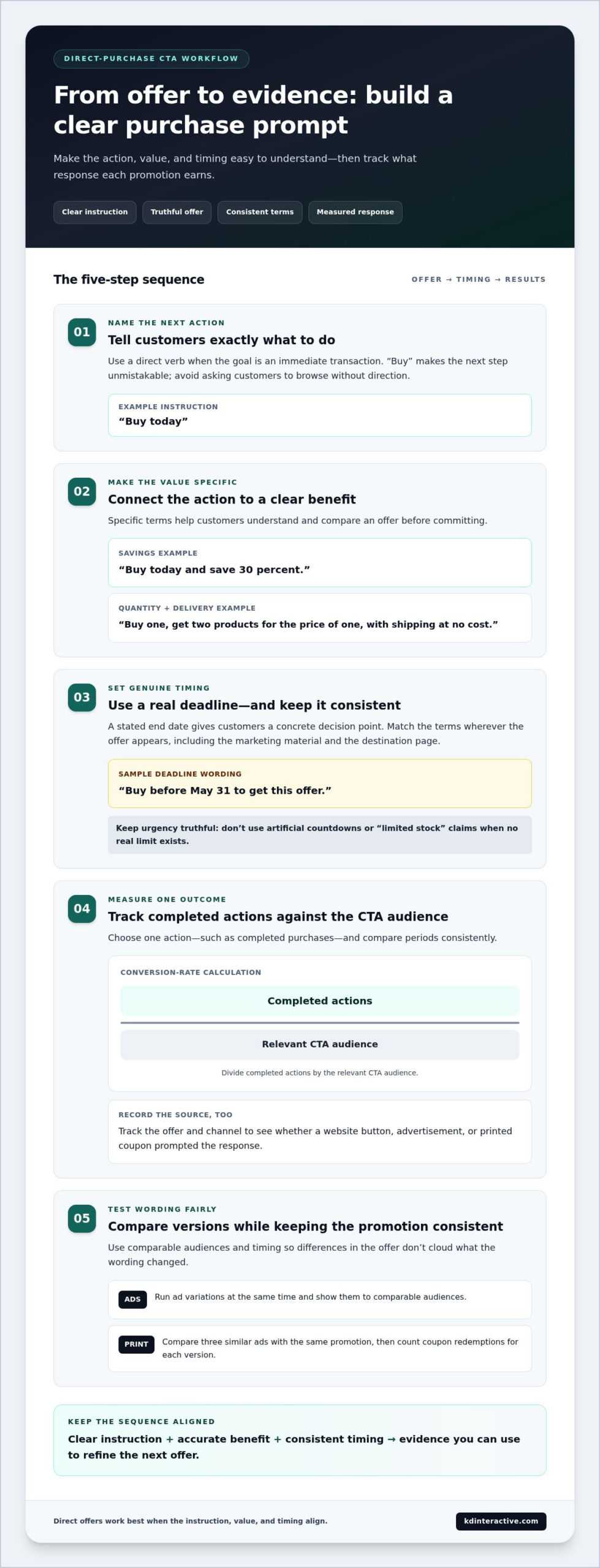
A direct purchase call to action tells customers what to buy and why to act now. For example, a neighborhood shop might write, “Buy today and save 30 percent.” Specific numbers make the offer easier to understand and compare. An effective call connects the benefit to one clear next step, rather than asking customers to browse without direction.
Use a deadline when an offer genuinely ends on a set date. A sample promotion could say, “Buy before May 31 to get this offer.” The date gives customers a concrete decision point. Keep the deadline consistent wherever the offer appears, including marketing materials and the page customers reach after clicking. If the purchase page shows different terms, confusion can interrupt the sale.
Make the deal itself unmistakable. A “Buy one, get two products for the price of one, with shipping at no cost” offer states both the quantity and the delivery benefit. These examples show how specific quantities explain the value before a customer commits to a purchase.
The verb “Buy” fits short-term deals or sales because it asks for an immediate transaction. Pair it with a compelling, accurate benefit, such as a 30 percent savings offer. Avoid artificial countdowns or “limited stock” claims when no real limit exists. Scarcity-based wording belongs only with genuine constraints, such as a sale that ends on a stated date or limited event tickets.
How can local businesses measure CTA conversion rates and results? Choose one action, such as completed purchases, then divide completed actions by the relevant CTA audience and compare periods consistently. Track the offer and channel to see whether a website button, advertisement, or printed coupon prompted the response.
To improve results, test different wording while keeping the promotion consistent. Run ad variations at the same time and show them to comparable audiences. For print, compare three similar ads with the same promotion, then count coupon redemptions for each version. This helps isolate the effect of wording from differences in the offer or timing.
These call to action examples for local business owners work best when the instruction, value, and timing align. Record the response to each promotion, then use that evidence to refine your next direct offer. Clear terms build customer trust and make marketing results easier to assess.
2. Inviting personal connection
A personal invitation gives a consumer a low-pressure way to engage before making a purchase. A neighborhood café might write, “Stop by and tell us what you think of our new lunch menu.” The message feels specific because it names a real experience and a simple next step. That direct tone can help a small business stand out from generic advertising.
Choose an invitation that matches what the customer is ready to do. Someone discovering a home-repair business may not be ready to book, but could feel comfortable asking a question. “Tell us what you’re working on” opens a conversation without demanding an immediate commitment. For a bakery, “Visit us and meet the team behind your next celebration cake” links a visit to a personal reason.
Write to one person, not an abstract audience. Use “Join us” for a community event, “Share your idea” to request feedback, or “See how it works” for a short demonstration. Each phrase tells the reader what happens next. “Share” suits a social-network request, while participation language fits businesses with memberships, subscriptions, or collaborations.
Make the welcome credible by naming the experience customers can expect. A bookstore could invite readers to “Find your next weekend read with our staff picks.” A garden center might say, “Bring us your planting question.” These examples spark curiosity without promising a result. They also give staff a clear starting point for a helpful conversation in person or online.
Connect the invitation to the place and people that make the business distinctive. A local restaurant can mention its patio, neighborhood, or seasonal menu, provided those details are accurate. A service business can explain what customers should bring to an initial conversation. This specificity makes the message more memorable and gives advertising a recognizable local voice.
Make the next step easy to understand. “Come in today” works when a visit is the goal; “Ask us about your project” suits a conversation. If visitors need details first, invite them to view an event schedule or learn about a service. The destination should deliver on the invitation, so customers don’t land on an unrelated page.
Consistent, audience-focused wording helps personal invitations feel natural across a website, social post, and printed sign. Locally tailored messaging can reflect the questions and interests of the community a business serves. Review the response to each invitation, then refine the wording around the actions people actually take.
3. Place testimonials and trust signals near calls to action
A customer deciding whether to book a service often wants proof before taking the next step. Place a relevant testimonial beside the booking prompt, not several screens away. For example, a homeowner reading about a plumbing repair may see a customer’s comment about clear communication beside “Request a repair appointment.” The testimonial supports that specific action with a real customer experience.
Common mistakes include using outdated or exaggerated praise, placing a testimonial far from the action, and making claims the review doesn’t support. Keep social proof genuine and current, and don’t imply that one customer’s experience guarantees the same outcome for everyone.
Match each trust signal to the product or service and the customer’s immediate concern. A salon could place a client comment about a stylist’s careful consultation near “Book a first appointment.” A contractor might feature feedback about a tidy work area beside “Ask about your project.” The detail should address hesitation, not merely decorate the page.
Keep the source clear. Use an actual customer statement with permission, and attribute it accurately, such as “Maya, a recent catering customer.” Don’t invent names, edit a comment until its meaning changes, or present a general compliment as proof of a specific result. Clear attribution makes a testimonial easier to assess.
Trust signals can also answer practical questions before a visitor acts. A local class provider could place the instructor’s relevant experience beside a registration prompt. A repair business might explain its service process next to a request form. If a call to action offers a download, say what the file contains, such as a preparation checklist, and explain this near the download button.
Design the page so the proof and next step work together. Put a concise testimonial near the button, then use a short phrase that names the action. For example, “Customers value our clear project updates” can sit beside “Discuss your renovation.” Avoid crowding the area with competing calls to action; one relevant customer quote can focus attention.
Review testimonials when services, offers, or customer expectations change. Remove praise that no longer reflects the current experience, and choose comments that address visitors’ likely concerns, such as convenience, clear explanations, or a welcoming first visit. These details make calls to action feel supported by real experiences, rather than pressure alone.
4. CTA buttons
A button should tell visitors exactly what happens after they click. “Book an appointment” sets a clearer expectation than “Continue.” For a restaurant, “View today’s menu” leads to a specific destination; for a neighborhood shop, “Browse local gifts” signals what customers will see. Keep the button text simple, direct, and consistent with the page it opens.
Tell people what they’ll receive in return for taking action. A newsletter form might use “Get the weekly menu” instead of a vague “Sign up.” A business offering a free trial could say, “Try a three-month risk-free trial.” Make the button and surrounding explanation consistent, so the audience understands the offer before submitting information.
Avoid using “Submit” as a button label. It describes an administrative step, not the visitor’s benefit. Replace it with an action that fits the form, such as “Request a quote” or “Reserve a table.” The message should also match the form’s purpose. A reservation button shouldn’t lead to a general contact page.
Make buttons easy to find without letting them overwhelm the page. Place a primary action near the main offer, where visitors can see it, then repeat it below longer content. For example, a home-services page could show “Schedule an estimate” near its introduction and again after explaining the service process. Each button should lead to the same relevant next step.
Use contrast to help the button stand out from nearby text and images. A deep blue button on a pale background may be easier to notice than a low-contrast gray one. Choose a size that remains readable on a phone and leave enough space for visitors to tap comfortably. Keep the color and shape consistent across related pages.
Digital calls to action follow the same basic principles as print prompts, but a click lets customers act immediately. Check that a button works on mobile and desktop, and test the full path from click to confirmation. A “Book a table” button should open the booking step, not a page where customers have to search again.
Test one design change at a time, such as wording, color, size, or placement. Compare variations over the same period and with similar audiences, then track the action that matters, such as completed bookings or form requests. A button that gets clicks but few completed actions may need clearer wording or a closer match between its promise and destination.
5. CTA examples
Choose a call to action that matches the customer’s next useful step. A repair company can use “Call to discuss your project” when customers need details. A restaurant can choose “Book a table” for reservations, while a nearby shop might use “Get directions” to encourage an in-person visit. Use “Buy” when the offering is ready for direct purchase.
For local businesses, the choice between “call,” “book,” “buy,” and “get directions” depends on what customers need before deciding. Use “Call” for questions, “Book” for an appointment or table, “Buy” for an immediate purchase, and “Get directions” when the goal is a visit. Make sure the button leads where it promises.
Social media CTAs should name a simple action and connect it to a visit or booking. A salon can write, “Book your next appointment,” while a café might say, “Visit us for today’s special.” To encourage sharing, use “Share this post with a friend.” The message should fit the post and the audience’s likely next step.
For email and text marketing, keep each prompt concise and make the benefit clear. A newsletter message could invite readers to “Try a three-month risk-free trial,” while a text about a local event might say, “View the schedule and plan your visit.” Link the button or message to the exact page where the action can be completed.
Use the offer to demonstrate value before asking for a commitment. An electrician’s example might read, “Save $20 on your next service,” while a 30 percent savings offer can state the discount plainly. A lotion promotion could invite customers to “Add it to your beauty routine for thirty days.” Keep each example tied to its actual terms.
Make the reason for acting visible near the CTA. “Book a table for Friday dinner” gives more context than “Book now.” “Try” suits a free-trial offer, while “Share” works for social-network sharing. Clear wording helps potential customers understand what they’ll do and why the offering may suit them.
Track conversions by action, not just button clicks. Compare completed calls, bookings, purchases, or direction requests with the CTA that prompted them. Test different wording in comparable campaigns, then keep the version that better supports the intended outcome. This shows whether a message attracts interest or generates the action the business needs.
Build clearer local marketing messages with content creation for local businesses, then align each CTA with its destination and purpose.
KD Interactive: Local SEO Services
KD Interactive can help when local customers struggle to find your business or understand what to do next. Its Local SEO Services support visibility in local search, while SEO Keyword Analysis helps identify the terms people use to find businesses like yours. Content Creation can turn those insights into useful pages and clear calls to action.
For example, a business can align a service page’s message with a customer’s search and give visitors a direct next step. Press Release Distribution can help share timely business news. These services are relevant when your calls to action need stronger search visibility, clearer content, or closer alignment with local customer intent.
Contact KD Interactive to discuss how local SEO and content can support your business goals.
Make Your Next Customer Action Easier
Strong call to action examples for local business owners are a starting point, not a finished campaign. Connect the message that attracts attention with a clear path for customers to engage. Review your website and local search presence together, so the information people find supports the action you want them to take.
KD Interactive offers Local SEO Services, Content Creation, and Press Release Distribution to help businesses strengthen that connection. These services can support clearer website messaging, stronger local visibility, and timely business announcements. Choose the area that best fits your current marketing priorities, then build from there.
Contact KD Interactive today to discuss a practical next step for your business. A focused approach can help you make each customer interaction more useful and move forward with confidence.
Frequently Asked Questions
What is a Call to Action?
A call to action is a prompt that guides someone toward a specific next step. It can appear as button text, a link, or a short line in an advertisement. For example, a neighborhood bookstore could invite readers to “Explore staff picks” before choosing a book. The prompt helps turn interest into an observable action, even when that action isn’t an immediate purchase.
Why is a CTA so Important?
A CTA matters because interested visitors may leave without acting if the next step feels unclear. A clear prompt gives them a practical route, such as calling to ask about a repair or booking a salon consultation. It also helps a business assess whether its page supports its goal. Track completed actions, not just visits, to understand whether the prompt is useful.
What are effective call to action examples for local businesses?
Effective wording names an action that fits the customer’s situation. A florist might use “Choose flowers for pickup,” while a music teacher could say “Ask about beginner lessons.” A hardware store might invite shoppers to “Check today’s workshop details.” Treat these prompts as starting points, not scripts to copy blindly. Replace general wording with the product, service, or customer need that matters on the page.
What CTA phrases work best for restaurants, salons, and home service businesses?
Restaurants can use “Reserve a table” or “See the lunch menu.” Salons can try “Choose a stylist” or “Explore haircut services.” Home service businesses might use “Describe your repair” or “Request a project discussion.” The best phrase depends on how customers make decisions. A restaurant visitor may be ready to reserve, while someone comparing repair options may first need to explain the problem.
What are examples of website CTAs that generate local leads?
Website prompts can invite visitors to start a useful conversation or share a project need. A landscaping page might say “Tell us about your yard,” while a tutoring page could use “Discuss your learning goals.” Place the prompt beside information that helps visitors decide, such as the relevant service description. Make the destination specific, so a click opens the right form or contact option.
What are effective Google Business Profile call to action examples?
For a Google Business Profile, use action wording that matches what a searcher wants to do next. A café could encourage “View the menu,” while a repair shop might prompt customers to “Call with a service question.” Someone looking for a physical location could use “Get directions.” Keep business details and destination information consistent so people don’t encounter conflicting instructions after they act.
What CTA button colors, placement, and wording improve conversion rates?
Use button colors that contrast clearly with the surrounding page, then check that the label remains readable on a phone. Place the primary button near information that supports its promise, such as appointment details beside a booking prompt. The wording should name the action, not a vague step. Test one change at a time, then compare completed bookings, calls, or requests rather than clicks alone.