
What if adding locations didn’t mean adding confusion? Learning how to manage a google business profile for 10+ locations starts with one shared system, not a pile of disconnected listings. When business details drift, staff access gets tangled, or review responses vary from one location to another, customers can get mixed messages and your team loses time correcting them.
It’s reasonable to want central control while giving local teams room to handle day-to-day details. Standardize what should stay consistent, such as core business information and approval processes, while keeping each profile accurate and relevant to its community.
This guide explains how to organize profiles and permissions, build repeatable workflows for location data, reviews, and updates, and assess performance across your portfolio. You’ll also see how to use reporting on rankings, website traffic, user behavior, and conversions to spot patterns and identify where a location may need attention. With a clear process in place, managing more profiles can become a practical part of your local SEO strategy rather than a recurring scramble.
Key Takeaways
- Learn how to manage a google business profile for 10+ locations by building a central record of approved details and assigning clear responsibility for profile changes.
- Choose a centralized, location-led, or hybrid workflow based on how your team balances consistency, local knowledge, approval speed, and accountability.
- Create a recurring checklist for profile information, customer feedback, content, and performance checks, with separate steps for time-sensitive changes.
- Use performance reporting to spot location-level patterns and identify where profile or local SEO work may need attention.
- Recognize when profile administration is taking too much internal time and how broader local SEO support can extend beyond routine updates.
Why managing a Google Business Profile across 10+ locations needs a system
Multi-location profile management means keeping each location’s business information accurate, authorized, and locally relevant across a portfolio of Google Business Profiles. The challenge isn’t simply maintaining more listings. Every profile needs to reflect shared brand standards and the details customers need for that specific location.
With one profile, a manager can often make a change and check it directly. With ten or more, ownership, updates, and review oversight span a portfolio. Without agreed procedures, employees may repeat work, use conflicting versions of business details, or assume someone else has handled an update. A customer could see outdated hours on one profile or a phone number that doesn’t reach the right location. These mismatches can create uncertainty and undermine trust.
The solution is consistency with room for legitimate local differences. Set shared standards for the business name, categories, and approval process. Then preserve location-specific details, such as each branch’s address, phone number, hours, services, and community-relevant content. A uniform process should make profiles easier to manage, not make every location look interchangeable.
What changes when your business has ten or more profiles?
At portfolio scale, a routine update becomes a coordination task. A holiday-hours change, for example, needs to reach the right locations, be checked for accuracy, and have a clear owner. Reviews also need oversight: staff should know who responds, how replies stay on-brand, and when an issue needs escalation. A shared procedure reduces duplicate effort while keeping each location’s profile tied to its real-world operations. For niche multi-site operators—such as container businesses that consult with Portable Storage Pro for operational leadership—standardizing these daily workflows between headquarters and individual yards is vital to sustainable scaling.
Which locations and details belong in the management system?
Start with one inventory covering every active location, and give each a stable internal identifier, such as a store code. Keep the identifier alongside the public-facing details so teams can distinguish similar branch names without changing how customers see the business. If profiles still need initial setup, use this Google Business Page setup guide as a starting point.
For each location, record the details staff need to verify and update:
- Shared brand standards: approved business name format, primary category guidance, and brand voice for customer responses.
- Location-specific information: address, phone number, regular and special hours, and services offered at that branch.
- Management notes: internal identifier, responsible contact or team, and the date the details were last checked.
Keep central rules separate from local facts. A corporate team can maintain approved naming conventions, while a location lead confirms whether its hours or services have changed. This makes the record useful for routine checks and unexpected changes, such as a temporary closure. The history of Google Business Profile also helps explain how the platform has evolved, but the operating principle remains practical: each profile should accurately represent its location.
This foundation makes it easier to decide who updates profiles and how changes move through the team. It also gives you a reliable starting point for assessing how to manage a google business profile for 10+ locations without relying on scattered spreadsheets, inboxes, or individual memory.
How to organize Google Business Profiles, access, and location data
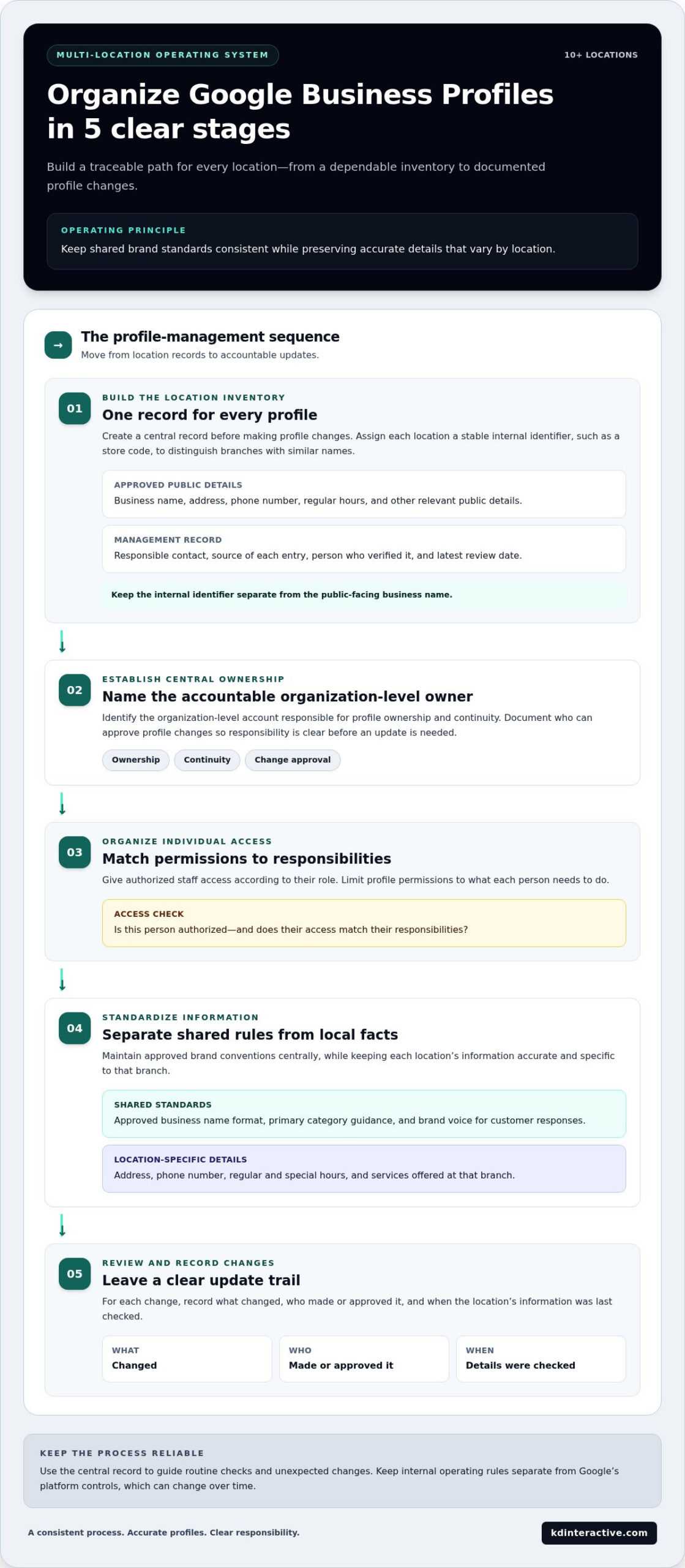
A reliable portfolio starts with a clear sequence: inventory the locations, establish who controls the profiles, grant appropriate access, standardize shared information, and review changes. This gives every update a traceable path instead of leaving accuracy to memory. Keep your internal rules separate from Google’s platform controls, which can change over time.
- Inventory every location. Create one record for each profile, including an internal location identifier, approved public details, responsible contact, and last review date.
- Establish central ownership. Identify the organization-level account responsible for profile ownership and continuity, then document who can approve changes.
- Organize individual access. Give authorized staff access according to their responsibilities, and limit profile permissions to what each person needs to do.
- Standardize information. Maintain approved brand conventions centrally while preserving accurate details that vary by location.
- Review and record changes. Note what changed, who made or approved it, and when the location’s information was last checked.
Create a reliable location inventory before making changes
Build a central record before editing profiles in bulk or one by one. An internal identifier, such as a store code, helps distinguish branches with similar names and connects profile records to internal teams and reports. Keep the public-facing business name separate from this code so the identifier supports management without appearing as part of the customer-facing name.
For each location, capture its approved name, address, phone number, regular hours, and other relevant public details. Add the source of each entry, the person who verified it, and the date of the latest review. When a detail changes, update the central record and profile through a consistent process. This gives staff a reliable reference and makes stale information easier to spot.
Set ownership and permissions without losing accountability
Choose a central owner responsible for organizational control, then assign location-level work to the people who handle it. Google’s current profile access levels include Owner, Manager, and Site Manager; grouped locations can also help organize access across a portfolio. Assign roles based on the work required, and confirm current options in Google’s interface before changing permissions.
Use each person’s own authorized Google account rather than shared credentials. A shared login makes it harder to identify who changed a profile and complicates access when staff responsibilities shift. Record who has access, which locations they can manage, and the reason for that access.
Make staff transitions part of the process. When someone joins, changes roles, or leaves, document the access update and adjust permissions promptly. Internally, define who approves brand-wide changes and who confirms local facts. These governance rules are your organization’s procedures; Google’s controls provide the tools for applying access, but they don’t determine your approval chain.
That separation is central to how to manage a google business profile for 10+ locations: use a dependable internal record for accuracy and accountability, then apply the appropriate platform permissions. For Wisconsin businesses that need broader support connecting profile upkeep with local visibility, KD Interactive’s local SEO support can complement an organized internal workflow.
Centralized or location-led? Choose the right Google profile workflow
The right workflow depends on how much autonomy your locations need, how much capacity central staff have, and how often profile details change. Central control can keep brand standards aligned, while local responsibility can make it easier to catch operational changes. A hybrid model combines both, but it isn’t automatically best for every organization.
Compare the trade-offs before assigning responsibilities:
| Workflow | Consistency | Local knowledge | Approval speed | Accountability |
|---|---|---|---|---|
| Centralized | Strong for shared standards | May depend on local input | Can slow down if all edits need central approval | Clear when one team owns changes |
| Location-led | Needs clear guidelines to stay consistent | Strong, with direct input from local staff | Often faster for local updates | Can blur if roles aren’t documented |
| Hybrid | Central standards with local accuracy | Local teams report location-specific facts | Fast for delegated edits, slower for approvals | Clear when responsibilities are defined |
Use the comparison as a starting point, then test it against your actual workflow. A business with frequent changes to opening hours may need a quick local reporting route. A company with tightly controlled brand language may need central approval for public-facing content. Consider the time available to each team, the decision-making authority of local managers, and the frequency of updates before choosing a model.
When central control makes profile management easier
Central oversight works well for shared brand standards, access policies, and portfolio-wide reporting. A central team can review changes that affect multiple profiles, maintain approved conventions, and reduce duplicated work or conflicting edits. Local teams still need a simple way to flag a branch-specific change, such as a new phone number or temporary schedule, so central control doesn’t become a bottleneck.
When local teams need defined responsibilities
Local staff are well placed to spot changes to hours, services, or day-to-day operations. Give them clear responsibility for reporting those facts, and set approval rules for edits that affect brand-wide information or customer expectations. This balances speed with oversight. Businesses building broader visibility can connect profile workflows with local SEO services for small businesses.
A hybrid workflow is often a useful option: central staff set standards and oversee access, while local teams report changes and handle approved location-level tasks. For example, a regional manager might confirm a holiday-hours update while the central team maintains naming conventions and checks portfolio-wide consistency. Adjust the split as responsibilities or update demands change. The best answer to how to manage a google business profile for 10+ locations is the workflow your team can follow reliably, with a clear owner for each type of decision.
If your team wants to connect profile management with a broader local SEO plan, KD Interactive’s local SEO support can help align profile work with your visibility goals.
Build a repeatable schedule for updates, reviews, and performance checks
A dependable routine combines scheduled checks with event-driven updates. Scheduled reviews help catch information that may have become outdated; event-driven updates respond to changes as they happen, such as a holiday-hours adjustment, a phone number change, or a new service. Set review intervals that fit your business, then assign a clear owner for each task rather than relying on one universal schedule.
Keep a shared log for every location. Record the issue or requested change, who reported it, who approved it, when it was completed, and whether anything remains unresolved. This history helps teams follow up on unfinished work and understand why a profile was changed. Before using a particular Google update or verification process, check Google’s current guidance because platform instructions can change.
Keep location information current as business details change
Make it easy for location teams to report changes through an agreed internal route. A staff member who learns that a branch’s hours, contact details, or services have changed should submit the location, the corrected information, and when the change takes effect. Assign an owner to update the profile and central record, then mark the request complete only after the published information has been reviewed.
For scheduled checks, compare each profile with the approved location record and flag mismatches for correction. Treat urgent changes as event-driven, not something to wait for until the next routine review. If Google requests additional verification or presents a different update flow, follow its current instructions and note the outcome in your log.
Manage reviews and measure location-level performance
Use a consistent review process across the portfolio: monitor new feedback, assign responsibility for responses, follow the brand’s response standards, and route sensitive or unresolved concerns to the right person. Local context matters. A response should address the customer’s specific experience rather than rely on identical wording for every branch.
Compare locations using the same reporting measures, such as rankings, website traffic, user behavior, and conversions. A change in one measure is a signal to investigate, not a complete explanation. Check the location’s recent operational changes, customer feedback, and local context before deciding what action to take. Comparing locations can reveal shared patterns, while branch-level review helps explain differences.
Multi-location profile maintenance checklist:
- Review profile details against the approved location record and flag inaccurate information.
- Process reported changes to hours, contact details, or services, and record ownership and completion.
- Monitor customer feedback, assign responses, and escalate unresolved issues.
- Check profile content and confirm that updates remain accurate and relevant to each location.
- Compare rankings, website traffic, user behavior, and conversions, then investigate location-level patterns.
This repeatable approach to how to manage a google business profile for 10+ locations keeps urgent corrections moving while giving teams a way to measure and improve their work. If you need help connecting review management and performance reporting with your local SEO strategy, KD Interactive’s local SEO support can support that broader work.
When to get help managing 10+ Google Business Profile locations
Managing a growing profile portfolio can start as a straightforward internal task and gradually become a drain on staff time. The signal to get support isn’t one isolated mistake. Look for recurring process problems: inaccurate details that keep resurfacing, reviews waiting too long for attention, unclear ownership of profile tasks, or reports that don’t help you compare locations and decide what to address first.
Signs your current process needs additional support
Repeated data inconsistencies can point to a gap between the information kept internally and the details appearing on profiles. A review backlog may mean response duties aren’t clearly assigned or that the team lacks time to handle feedback consistently. Unclear ownership can leave both issues unresolved because staff aren’t sure who can approve or complete the work.
Reporting gaps create another challenge. If you can’t compare rankings, website traffic, user behavior, and conversions across locations, it’s harder to see where further investigation may be useful. Support can help organize the work and interpret the data, while local context remains essential for understanding what’s happening at an individual branch.
How KD Interactive supports multi-location businesses in Wisconsin
Routine profile administration focuses on keeping information current, managing access, and completing updates. Broader local SEO support connects that upkeep to a wider visibility strategy. KD Interactive’s services include analytics tracking, online reviews and reputation management, keyword research, and content creation. Reporting can help you understand patterns across locations and assess where attention may be needed.
KD Interactive works with small and multi-location businesses in Wisconsin. Its approach is tailored to each business, with transparent communication and local knowledge informing the strategy. For example, a business may need to improve how it tracks location performance, create content that speaks to local audiences, or bring review management into a more consistent process. The appropriate priorities depend on the organization’s goals, existing workflows, and location-level findings.
Understanding how to manage a google business profile for 10+ locations means knowing when a solid internal process is enough and when broader expertise could make the work more manageable. If recurring upkeep is taking time away from other priorities, discuss a tailored Wisconsin multi-location strategy with KD Interactive. Book a consultation to talk through your goals, reporting needs, and local SEO priorities.
Turn your profile process into a growth-ready system
Make profile management part of how your business plans for growth. As locations change, expand, or take on new priorities, revisit whether your process still gives each branch clear ownership and keeps decisions moving. A system that works today should be easy to adapt as your portfolio evolves.
If you’re deciding how to manage a google business profile for 10+ locations, focus on building a process your team can sustain and improve over time. The right support can help connect day-to-day profile work with a broader local visibility strategy, shaped around your business rather than a one-size-fits-all plan.
Book a FREE Consultation with KD Interactive to discuss a tailored strategy for your Wisconsin business. Take the next step with a clear plan and practical guidance for managing growth.
Frequently Asked Questions
Can one Google Business Profile account manage 10 or more locations?
Yes. Businesses with 10 or more locations under the same brand can use Google’s bulk management options, including bulk verification when eligible. A Business Group can organize the profiles so authorized team members can manage access and location records more efficiently. Eligibility and setup requirements matter, so check Google’s current guidance before applying. Organizing multiple profiles in one account doesn’t remove the need to maintain accurate information for each location.
How do I add multiple locations to a Google Business Profile?
For an eligible business with 10 or more locations under the same brand, Google’s bulk process uses a Business Group, a spreadsheet of location information, and a verification request. Review each entry before submitting it, especially addresses and public-facing business details. Google’s review is manual, so approval may take time. For fewer locations or a business that isn’t eligible for bulk verification, use the current options in Google Search or Maps to add and manage profiles.
Do all locations need separate Google Business Profiles?
Each eligible customer-facing location generally needs its own profile so people can find details for the specific place they plan to visit. Don’t create extra profiles simply to represent different cities served from one base. A service-area business operating from a single base generally uses one profile with a defined service area. Google’s rules can depend on how a business operates, so review its current eligibility guidance before creating additional profiles.
How can I give local managers access without sharing a password?
Invite each manager using their own Google account and assign an appropriate profile role, rather than passing around one shared login. For example, a local manager who needs to handle day-to-day profile tasks can receive access suited to that responsibility, while central ownership remains with the organization. Keep an internal record of who can access which locations, and review it when staff duties change. Confirm available roles and controls in Google’s current interface.
How often should I update Google Business Profiles for multiple locations?
There isn’t one schedule that fits every portfolio. Update a profile when a real change occurs, such as a new phone number, changed hours, or a service no longer offered. Add planned reviews to your team’s calendar to catch changes that weren’t reported. For instance, a location manager can flag an upcoming seasonal-hours change as soon as it’s approved, rather than waiting for a routine profile check.
How do I track Google Business Profile performance across locations?
Compare locations using consistent reporting periods and measures, including rankings, website traffic, user behavior, and conversions. Look for changes worth investigating, such as a branch receiving less website traffic while others remain steady. Then check the location’s circumstances before deciding what to adjust. KD Interactive uses analytics tracking to report on these measures, helping businesses connect local search activity with broader website engagement and conversion patterns.
Can KD Interactive help manage SEO for a business with multiple Wisconsin locations?
Yes. KD Interactive supports multi-location businesses operating in Wisconsin with local SEO, analytics tracking, online reviews and reputation management, and content creation. The work can connect location-level visibility needs with wider marketing priorities, rather than treating every branch as identical. KD Interactive emphasizes customized strategies and transparent communication, so the approach can reflect the business’s goals and local context. This support is relevant when internal teams need help extending profile upkeep into broader local SEO work.