
A safe approach to SEO for a business website redesign starts before development: audit current performance, keep valuable URLs and content where possible, and map each changed URL to its closest new destination with a one-to-one 301 redirect. That gives search engines and visitors a clear route when a page moves. It also helps protect the rankings, backlinks, and authority your existing site has earned.
A fresh design can make a business look more professional, but a visual upgrade alone isn’t a reason to risk a website that already serves customers well. Redesign when the site no longer supports your business goals, works poorly on mobile, or makes key information and actions hard to find. A well-planned redesign improves the experience while protecting what already performs.
This guide explains how to decide whether a redesign is worthwhile, audit your current SEO, protect important content and links, and plan redirects before launch. You’ll also learn what to check on the new site and how to monitor performance afterward, so you can manage the change as a business decision, not just a design project.
Key Takeaways
- Decide whether a redesign solves a real business or usability problem before changing a site that already performs well.
- Audit rankings, clicks, conversions, landing pages, and site speed so you have a baseline for measuring the launch.
- Map each changed URL to its closest relevant destination, and test redirects, canonical tags, and sitemaps before launch.
- Check mobile usability, page content, links, forms, and analytics on the new site before it goes live.
- Monitor search performance after launch and keep a rollback plan ready to respond to major problems.
1. Step 4: How do you plan and implement SEO-safe redirects?
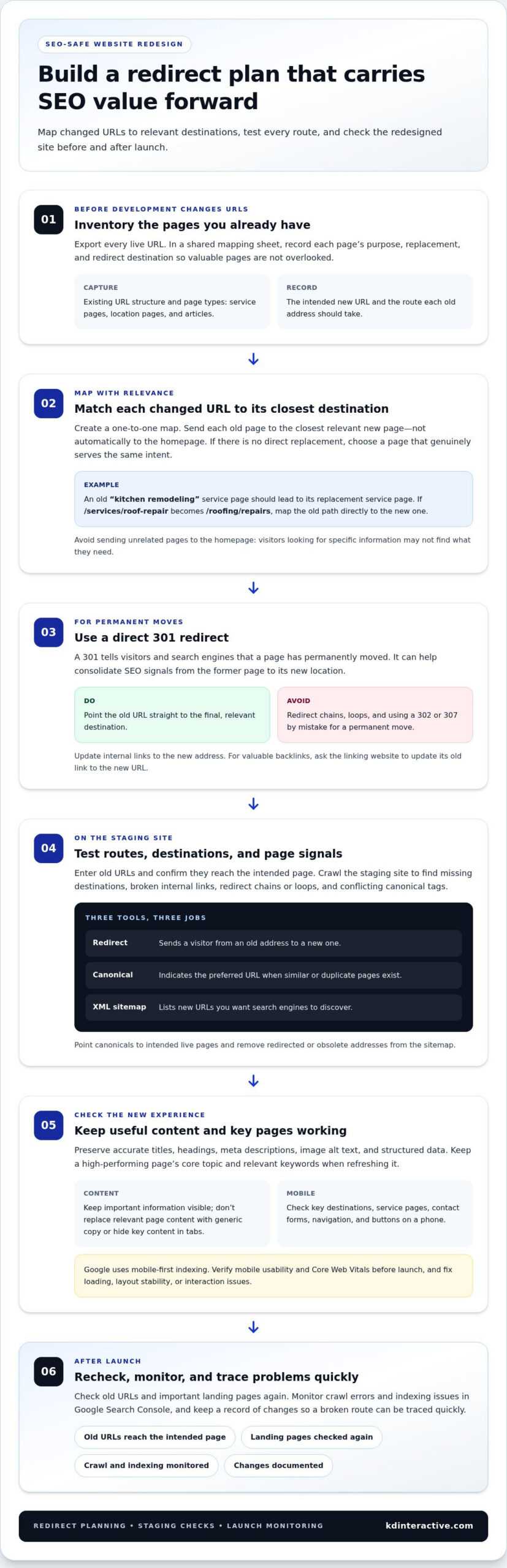
Create a one-to-one URL map before the redesigned site goes live. Match each existing page to its closest relevant new page, not automatically to the homepage. For example, send an old “kitchen remodeling” service page to its replacement service page. This gives visitors and search engines a relevant destination when a URL changes. Changing URLs without a clear map can break bookmarks and confuse crawlers, which may treat a renamed page as new.
Use a 301 redirect when a page has permanently moved. A properly implemented 301 can help consolidate SEO signals from the former page to its new location. Test each redirect by entering the old URL and confirming it reaches the intended page. Avoid redirect chains, where one old address passes through several destinations, and loops, where pages keep sending visitors back and forth. Both make it harder for people and crawlers to reach useful content.
Review each destination for relevance before publishing redirect rules. If a discontinued page has no direct replacement, choose the closest page that genuinely serves the same intent. Redirecting unrelated pages to the homepage can frustrate visitors looking for specific information. For valuable backlinks, contact the linking website and ask it to update the old link to the new URL. That gives visitors a direct route instead of relying on a redirect.
Check the mobile version of every key destination, not just the desktop layout. Google uses mobile-first indexing, so mobile content and usability matter when pages are assessed. Test service pages, contact forms, navigation, and buttons on a phone. A button that works on desktop but sits behind a mobile menu can disrupt the visitor’s next step. Verify mobile usability and Core Web Vitals before launch, then fix issues with loading, layout stability, or interaction.
Keep each new page’s important SEO elements aligned with its purpose. Preserve useful titles, headings, meta descriptions, image alt text, and structured data when they remain accurate. When refreshing a high-performing page, retain its core topic and relevant keywords instead of replacing them with generic copy. A custom design should make the experience clearer without hiding key content in tabs or removing it from the mobile version.
Before launch, test the URL map, redirects, internal links, and updated sitemap on the staging site. After launch, check old URLs and important landing pages again, then monitor crawl errors and indexing issues in Google Search Console. Keep a record of each change so your development partner can trace a broken route quickly. A careful redirect plan connects the redesigned site with the authority and visitor journeys its previous pages earned.
2. How can a redesign create SEO risk?
Use a 301 redirect whenever a page permanently moves to a new URL during a redesign. It sends visitors and search engines to the replacement and can help consolidate SEO signals. A URL change without a redirect can leave bookmarks, internal links, and backlinks pointing to a missing page. That breaks the user experience and may interrupt the value associated with the old address.
Document the existing URL structure before development changes it. Export every live URL, then record its replacement, purpose, and redirect destination in a shared mapping sheet. For example, if /services/roof-repair becomes /roofing/repairs, map the old path directly to the new one. This one-to-one approach makes reviews easier and helps prevent valuable pages from being overlooked.
Keep redirects direct. If an old page points to a second URL that then points to a third, browsers and crawlers must follow a redirect chain. Update the original rule to lead straight to the final page instead. Check for loops, too, where two paths repeatedly redirect to each other. Test sample URLs from every page type, such as service pages, location pages, and articles, before launch.
Redirects, canonical tags, and sitemaps have different purposes. A redirect sends a visitor from an old address to a new one. A canonical tag indicates the preferred URL when similar or duplicate pages exist. An XML sitemap lists the new URLs you want search engines to discover. After launch, update canonical tags to point to the intended live pages, and remove redirected or obsolete addresses from the sitemap.
Review the new URL structure for clear, consistent paths. A short, descriptive path such as /services/window-installation is easier to understand than a string of unrelated folders and parameters. Don’t change URLs solely to make them shorter if the current page performs well and still fits the redesigned site. Where a change is necessary, pair it with the correct 301 mapping and update internal links to the new address.
Incorrect redirect types can add risk. A 302 or 307 used by mistake may signal a temporary move when the page has permanently changed, creating confusion during indexing. Confirm the intended status code for each permanent URL change, then crawl the staging site to find missing destinations, broken internal links, and conflicting canonical tags. Review the sitemap against the final page inventory before launch.
Content changes can compound URL risks. If a service page moves and its replacement also drops the original topic, visitors may land on a page that no longer answers their search. Preserve relevant information while improving clarity and structure. Thoughtful content creation can help keep the replacement page useful as its design and URL change.
3. SEO outcomes from site launches and migrations
A launch can improve a website’s visibility, but migration errors can quickly disrupt search performance. A mismanaged redesign can cause traffic drops of 20–50% or more. That risk makes launch readiness a critical marketing task, not just a development milestone. Compare post-launch results with pre-redesign benchmarks to spot changes in organic visits, rankings, and conversions. A sharp decline across several measures deserves investigation, not an automatic assumption that the new design caused it.
Start by reviewing how the site’s architecture helps crawlers find important pages. For example, a service page linked only from an old menu may become hard to find after navigation changes. Check that priority pages have clear internal links, a logical place in the site structure, and no accidental access barriers. Then review indexing in Google Search Console. Crawl errors or pages missing from the index can reveal launch issues that affect search visibility.
Measure the old site before launch so the new version has a fair comparison. Record keyword rankings, click-through rates, conversion rates, page speed, and top landing pages. For example, if a local service page previously brought in qualified visits, compare its organic traffic and conversions after the redesign. Check results weekly for the first 30 days after launch, then review reporting checkpoints at 30, 60, and 90 days. A baseline helps distinguish a real decline from normal variation.
Site speed matters because Google uses page speed as a ranking factor. Test key landing pages before and after launch, including the homepage and pages that support lead generation. A WordPress redesign can add themes, plugins, scripts, and large media files, so review how each affects loading and page behavior. Remove unused code and features instead of carrying them into the new build by default. Optimized code keeps the experience responsive and easier to maintain.
Code bloat can complicate updates and create more opportunities for technical problems. Review the redesigned site’s scripts and page templates, then remove elements that serve no useful function. Test the final pages on common screen sizes and make sure forms, navigation, and key content still work. This connects technical quality with user experience: visitors need to reach relevant information without waiting for unnecessary features to load.
Keep a launch log with the release date, major changes, and any fixes made afterward. If traffic shifts, the record helps you connect the timing with changes to architecture, content, or technical setup. Monitor Google Search Console for crawl errors and indexing issues, and compare landing-page results with your original benchmarks. Strong SEO outcomes depend on both the launch and follow-through to identify and resolve problems.
4. Step 1: How do you perform a pre-redesign SEO audit?
Build a performance baseline before changing templates, content, or navigation. Record keyword rankings, click-through rates, conversion rates, page speed, and top landing pages. These measures show which pages already attract search traffic and customers. For example, review a service page with strong visits and conversions carefully before changing its content or layout.
In Google Search Console, review indexed pages, search queries, clicks, impressions, and reported crawl errors. Before launch, note important pages and existing indexing issues. After launch, compare the reports and look for new errors or pages that have disappeared from the index. This can help you identify technical problems that might otherwise be mistaken for normal performance changes.
Use the baseline to guide pre-launch testing. Crawl the staging site to find broken links, missing page titles, incorrect canonical tags, and pages blocked from indexing. Test mobile usability and Core Web Vitals on key landing pages, then submit forms and check that confirmation messages work. A staging review can reveal issues before visitors encounter them on the live site.
Prepare a rollback plan before approving the launch. Record who can restore the previous version, where the backup is stored, and which problems would prompt consideration of a rollback. For example, widespread errors blocking important pages from indexing deserve faster attention than a minor visual issue. Keep the launch checklist and decision notes accessible to the people responsible for development and marketing.
How should you measure SEO performance after a website redesign? Compare rankings, organic traffic, click-through rates, conversions, page speed, and top landing pages with the pre-launch baseline. Monitor rankings and traffic weekly for the first 30 days after launch, then use 30-, 60-, and 90-day reporting checkpoints to assess trends.
At each checkpoint, distinguish sitewide movement from page-level problems. If organic traffic falls, compare affected landing pages, queries, indexing reports, and conversions rather than relying on one total. A drop in clicks alongside stable impressions may point to a different issue than pages disappearing from the index. Review successful pages, too, so useful changes can inform future updates.
Keep a monitoring log that connects each change with its result. Record when redirects, templates, analytics code, or content updates go live, then note related traffic and ranking changes. If analytics code is removed from a page, its traffic metrics are lost until the code is restored. Check tracking on the redesigned site before launch and again afterward to keep reports usable.
Consistent checks turn launch data into practical next steps. Fix broken links, investigate crawl errors, and address mobile usability or Core Web Vitals problems as they appear. A clear baseline, staged testing, and scheduled reporting help you distinguish a successful redesign from one that needs technical attention.
5. When to redesign a business website
A redesign makes sense when the current site blocks a clear business goal, not simply because its style feels dated. Start by naming the problem: perhaps mobile visitors struggle to find services, the site no longer reflects what the business offers, or key pages fail to turn visits into inquiries. Compare that problem with analytics, customer feedback, and organic visibility. If those sources show the site still serves customers effectively, targeted improvements may be a better first step.
Look for practical signs that change is needed. A confusing menu can bury high-value pages, while an outdated service page can give prospective customers the wrong impression. Test the main customer journey on a phone, from the homepage to a service detail and contact form. If visitors can’t find essential information or complete a key action, document the obstacle and make it a redesign requirement.
Business changes can also justify a new structure. For example, a company adding services may need clearer navigation and dedicated pages that explain each offering. A small business website with 10 to 20 pages will generally cost less to redesign than a large e-commerce site with hundreds or thousands of pages. That difference also illustrates why the project should be scoped around its content, functions, and customer journeys, rather than visual preferences alone.
Protect organic visibility as you assess the timing. Review which pages attract search traffic, earn conversions, and support local discovery. If an important page performs well, preserve its useful content and search purpose instead of deleting it during a refresh. When the problem is one weak page or a difficult form, improve that part first. A full redesign makes more sense when several connected issues require a coordinated strategy.
What does SEO support for a business website redesign cost? The price depends on the case and is provided after a quote request. Key factors include the number of pages, the scale of URL changes, content needs, technical complexity, and the work required to maintain search visibility through launch.
A practical approach to seo for a business website redesign starts by defining the business outcome the new site must support, such as clearer service discovery or more qualified local inquiries. Measure progress against existing traffic, rankings, and conversion data. If the design problem is narrow, a focused update may fit better than rebuilding the whole site. If the site’s structure, content, and user experience all need coordinated changes, plan the redesign around those priorities.
Treat seo for a business website redesign as an ongoing strategy, not a one-time visual refresh. Plan your redesign SEO strategy around the pages and customer actions that matter most.
KD Interactive: Local SEO Services
KD Interactive can help businesses connect redesign decisions with local search visibility. Its Local SEO Services and SEO Keyword Analysis support a clearer focus on local search priorities and the terms customers use. Content Creation can refresh useful pages while keeping their purpose aligned with the redesigned site. Press Release Distribution is relevant when a business has news to share as part of its wider marketing activity.
Turn to KD Interactive when you need help aligning local SEO and content priorities with your redesign plans. Share your goals and the pages or services you want customers to find. Contact KD Interactive to discuss the next steps for your website.
Make Your Next Website Decision Count
Treat your redesign as a foundation for the next stage of your business, not a finish line. Set a clear priority for the new site, such as helping local customers understand your services or making the next step easier. That goal can guide future updates and keep your investment focused on customers’ needs.
Strong seo for a business website redesign connects the site’s structure and content with the way people search for your business. KD Interactive can support that direction through Local SEO Services, Content Creation, and Press Release Distribution. Choose the support that fits your priorities, whether you’re strengthening local visibility, refreshing key pages, or sharing meaningful business news.
Give your next website decision a clear starting point. Contact KD Interactive to discuss your redesign and explore a practical path forward for your business.
Frequently Asked Questions
How Can You Preserve Rankings, Backlinks, and Authority?
Preserve pages that already earn relevant visits and links, and keep their purpose clear after the redesign. For each valuable page, compare its old and new content, headings, and internal links. If another website links to an old URL, make sure visitors reach the most relevant replacement. A page’s authority depends in part on its usefulness and connections, so avoid replacing a focused resource with generic copy.
How can a redesign create SEO risk?
A redesign creates SEO risk when technical changes make useful pages harder to find, understand, or use. For example, a new navigation menu might remove links to a well-performing service page, or a redesigned template might omit the page’s main heading. Check content, navigation, mobile display, tracking, and indexability together. A polished page can still underperform if visitors can’t find its information or search engines can’t access it.
How does poor redirect mapping lead to ranking drops?
Poor mapping can send an old page to an unrelated destination or leave it returning an error. Imagine a backlink pointing to a specific repair service page that now redirects to a general homepage. Visitors lose the information they expected, and the destination may not preserve the old page’s relevance. Match each changed page to its closest replacement, and review high-value backlink destinations individually.
Step 1: How do you perform a pre-redesign SEO audit?
Begin by identifying the pages and search queries that support the business, then check how each page serves a customer need. Review landing-page performance alongside content, internal links, forms, and mobile display. For example, a page may attract organic visits but offer no clear path to an inquiry. Record that gap before redesign work begins, so the new page addresses it rather than simply copying the old layout.
Step 2: How should you document and map existing URLs?
Create a URL inventory from the current site and include each page’s purpose, status, and planned destination. Add notes for pages with valuable backlinks, strong search visibility, or unique content. Then compare the inventory with the proposed site structure. A spreadsheet makes gaps easy to spot: if an existing location page has no replacement or documented reason for removal, resolve that decision before development is complete.
Step 3: How do you protect existing metadata, schema, and headings?
Capture current page titles, meta descriptions, heading order, and structured data before templates change. Compare those elements with the redesigned versions page by page, keeping accurate information and correcting outdated details. For example, confirm that a service page clearly identifies its subject in the title and main heading. Check structured data against the content users can actually see, rather than carrying over markup that no longer matches the page.
Step 4: How do you plan and implement SEO-safe redirects?
Use a 301 redirect when a URL has permanently changed and a replacement page serves the same purpose. Test the old address and confirm it lands directly on the intended destination. Avoid sending a group of unrelated pages to one generic page. After implementation, check important redirects from bookmarks, internal links, and backlinks, then update internal links so visitors don’t need an extra redirect step.
Step 5: How do you test the staging site for SEO issues?
Crawl the staging site before launch and review page access, titles, headings, canonical tags, internal links, and mobile layouts. Check that test forms complete their expected journey, such as displaying a confirmation after submission. Also verify that temporary staging restrictions won’t block the live site after release. A page-by-page checklist helps the team catch issues in templates and individual pages before customers encounter them.