
A strong Facebook Recommendation won’t replace a Google star rating. When comparing Facebook reviews vs Google reviews, the key difference is where each can influence a customer’s decision: Google uses a one-to-five-star scale, while Meta calls feedback on business Pages Recommendations. The formats and places customers see them aren’t interchangeable.
It’s easy to focus on which platform has the higher score, especially when time is limited. But visibility matters too. Google reviews can appear in Search and Maps, while Facebook Recommendations appear on business Pages. The right priority depends on where customers encounter your business and what feedback helps them decide.
This guide explains how the rating systems differ, where reviews and Recommendations appear, and how to choose a practical focus for your business. You’ll also see how review visibility connects to local search, helping you decide where to build your reputation.
Key Takeaways
- Choose review priorities around where customers discover your business: Google Search and Maps or your Facebook Page.
- Compare Google’s star scale with Facebook’s yes-or-no Recommendations, rather than treating the scores as directly equivalent.
- Make it easy for customers to leave feedback by using the platform’s available review features and a neutral request process.
- Use review visibility as one part of your local search strategy, alongside the content and signals that help customers find your business.
What are the key differences between Google reviews and Facebook reviews?
The comparison of Facebook reviews vs Google reviews starts with where customers encounter feedback. Google reviews can appear in Search and Maps, while Facebook Recommendations appear on business Pages. Google says that more reviews and positive ratings can help a business’s local ranking, so Google feedback connects more directly with local search visibility.
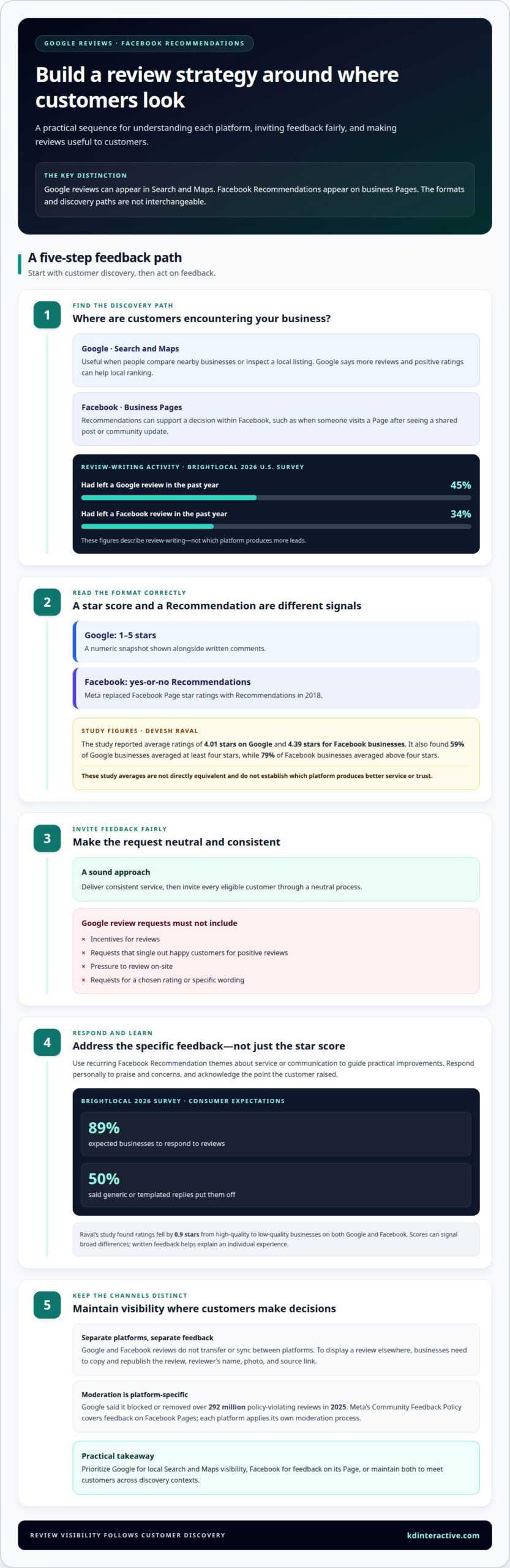
Customer activity also differs by platform. BrightLocal’s 2026 U.S. survey found that 45% of consumers had left a Google review in the past year, compared with 34% for Facebook. These figures describe review-writing, not which source produces more leads. A person searching for a nearby electrician may encounter Google reviews; someone viewing a shared Facebook Page may find Recommendations there.
Which platform do consumers trust more for local business reviews? Neither is universally more trusted. The useful choice depends on where customers look and what helps them evaluate a business. Someone comparing nearby options may value Google feedback, while a Facebook user may rely on Recommendations shared within their community.
| Option | Visibility | Typical decision context |
|---|---|---|
| Google reviews | Search and Maps | Comparing businesses during a local search |
| Facebook Recommendations | Facebook Pages | Reviewing a Page or shared recommendation |
| Both platforms | Separate platform features | Reaching customers across discovery contexts |
How do Facebook and Google moderate or remove reviews? Google said it blocked or removed over 292 million policy-violating reviews in 2025. Meta’s Community Feedback Policy covers feedback on Facebook Pages, and each platform applies its own moderation process.
Can businesses transfer or sync reviews between Facebook and Google? Treat them as separate feedback channels. To display a review elsewhere, businesses need to copy and republish the review, reviewer’s name, photo, and source link.
For businesses weighing Facebook reviews vs Google reviews, the practical choice depends on which discovery path they want to support. Prioritize Google for local Search and Maps visibility, and Facebook for feedback on its Page. Maintaining both gives customers more than one place to encounter feedback.
Google star ratings compared with Facebook Recommendations
The platforms present customer feedback differently, so their scores aren’t direct equivalents. Compare the rating format, the details customers share, and how businesses respond.
Google Star Ratings
Google displays customer ratings on a one-to-five-star scale, giving searchers a numeric snapshot alongside written comments. In Devesh Raval’s study, businesses averaged 4.01 stars on Google, and 59% averaged at least four stars. Improve your profile’s reputation by delivering consistent service, inviting genuine feedback through a neutral process, and responding to specific concerns. Google prohibits incentives, selective positive requests, pressure to review on-site, and requests for a chosen rating or wording.
Facebook Recommendations
Meta replaced Facebook Page star ratings with yes-or-no Recommendations in 2018. Customers can share feedback as a Recommendation, which makes it different from Google’s numeric average. In Raval’s study, Facebook businesses averaged 4.39 stars, and 79% averaged above four stars. Read recommendations for recurring themes about service or communication, then use those patterns to guide practical improvements. A thoughtful response can acknowledge the customer’s feedback and show how the business handles concerns.
The study’s averages don’t establish which platform produces better service or trust. Raval found ratings fell by 0.9 stars from high-quality to low-quality businesses on both Google and Facebook. Scores can signal broad differences, while written feedback helps explain an individual customer’s experience.
Respond to feedback personally. In BrightLocal’s 2026 survey, 89% of consumers expected businesses to respond to reviews, and 50% said generic or templated replies put them off. Address the specific point raised, whether it’s praise for a team member or a concern about scheduling.
How can a business improve its Facebook and Google review ratings? Deliver consistent service, invite every eligible customer through a neutral process, and respond constructively. On Google, don’t offer incentives, single out happy customers, or ask for a particular rating or wording.
Businesses connecting customer feedback with discovery goals can build a more focused local search strategy.
Review visibility on Search, Maps, and Facebook Pages
Google and Facebook place customer feedback along different discovery paths. Someone searching Google for a nearby service may see business profiles and ratings in Search or Maps. Someone visiting a Facebook Page can read its Recommendations there. Location matters: one review may appear beside a local search result, while another supports a decision within Facebook.
On Google Maps, reviews are public, and reviewers can’t post anonymously. Customers can compare feedback while browsing nearby businesses or a specific profile. Search visibility also connects reviews with business details, helping people assess a listing before contacting it. A review’s appearance doesn’t guarantee a customer will choose that business.
Facebook Recommendations serve a different moment. A potential customer may visit a company’s Facebook Page after seeing a community post, a friend’s share, or the business’s own update. Recommendations appear as part of the Page experience, alongside its information and posts. This makes Facebook useful for reinforcing a decision within the platform, rather than replacing Google’s local-search presence.
- Google Search: Helps customers encounter ratings while searching for a service or business name.
- Google Maps: Places public reviews alongside a business location and nearby options.
- Facebook Pages: Shows Recommendations to people viewing a business’s Page or arriving from a shared post.
For example, someone searching “electrician in Madison” may compare Google listings before calling. A neighbor sharing a Facebook Page can lead another customer to its Recommendations. These are different entry points, so track calls and inquiries alongside the platforms customers mention. This gives you a clearer view of which visibility path supports actual leads.
Keep each profile useful for its audience. On Google, maintain accurate business details and respond to review themes. On Facebook, keep the Page active with relevant updates and thoughtful replies. Clear, useful information helps customers understand the business after finding its reviews.
How do customers leave a review on Facebook versus Google?
Customers leave feedback through separate platform features. On Google, they use a business profile to rate and review. On Facebook, they visit a business Page and share a Recommendation. A clear, direct invitation helps customers find the right place without confusing the two.
For Google, businesses can share a review link or QR code. A customer opens it, selects the business profile, chooses a star rating, and can add written feedback. Google Maps reviews are public, and reviewers can’t post anonymously. A link in a follow-up message or a QR code on a receipt makes the steps easy to find.
- Choose a consistent customer milestone, such as completing a service.
- Send the same neutral Google review request to each customer reaching that milestone.
- Share the business’s Google review link or QR code.
- Invite honest feedback without requesting a particular rating or specific wording.
Google permits requests based on genuine customer experiences, but prohibits incentives, selective requests for positive reviews, pressure to review on the premises, and requests for particular ratings or content. A consistent process helps avoid asking only customers expected to leave praise.
For Facebook, direct customers to the business Page and its Recommendations feature. They can say whether they recommend the business and add context about their experience. A Page link in a post-service message gives customers a clear route. Keep the invitation neutral and let customers decide what feedback to share.
Don’t treat a request for one platform as a substitute for the other. A Google link takes customers to Google, not Facebook, and Facebook Page feedback stays there. Align the request channel with the platform you want customers to use, and make both destinations easy to identify.
Build a practical review-request process around your customer journey. Strengthen your local review strategy with clear platform-specific steps.
KD Interactive: Google Map Pack with AI Assistant
KD Interactive helps businesses connect review visibility with a broader local search strategy through its Google Map Pack with AI Assistant. This is a relevant next step when customers find your business through Google, but your local presence and supporting content need a more coordinated approach.
Local SEO Services can address visibility in local search, while Content Creation can give customers useful information to consider alongside reviews. The right focus depends on how customers discover your business and what they need before choosing it. These efforts support a clearer presence across local search and business profiles, without treating Facebook Recommendations and Google ratings as interchangeable.
If you want to strengthen your local search presence, contact KD Interactive to discuss your goals.
Turn review insights into a clear next step
Your approach to Facebook reviews versus Google reviews should reflect how customers find and evaluate your business. Set up a simple process for inviting honest feedback, responding to customers, and spotting recurring themes. Then pay attention to which discovery paths lead to meaningful inquiries. This practical feedback can guide what you improve next, from your local search presence to the information customers need before reaching out.
Review strategy works best as part of a broader visibility plan. KD Interactive offers Local SEO Services, Content Creation, and Press Release Distribution to support businesses strengthening their online presence. The right mix depends on your goals and the gaps you want to address.
Contact KD Interactive to discuss your review strategy. A focused next step can help you build a more consistent presence and make it easier for customers to choose your business.
Frequently Asked Questions
Are Facebook reviews valuable for businesses?
Yes, Facebook Recommendations can help customers assess a business through feedback shared on its Page. They’re especially useful when someone arrives from a community post, a friend’s recommendation, or the business’s own updates. For example, someone considering a local bakery can read what others say about its service before visiting. Keep the Page informative and respond to feedback so Recommendations have useful context.
How do Facebook reviews and Google reviews differ?
Google uses star ratings and written reviews, while Facebook Pages use Recommendations that indicate whether someone recommends a business. The distinction affects how customers interpret feedback: a star rating summarizes an experience numerically, while a Recommendation conveys a yes-or-no opinion and may include comments. Treat each platform as its own feedback channel, and don’t combine their scores as though they use the same scale.
Which platform has more reach for local businesses, Facebook or Google?
Google is often more useful for reaching people actively searching for a nearby service, while Facebook can reach people engaging with Pages, posts, and community recommendations. The stronger channel depends on how customers discover your business. A homeowner searching for a nearby roofer may find it on Google first; someone who sees a neighbor’s Facebook post may discover the same business there.
Can businesses respond to Facebook and Google reviews?
Yes, businesses can respond to feedback on both platforms. A useful reply addresses the customer’s specific point instead of relying on a generic thank-you. For example, a restaurant could acknowledge praise for a staff member or respond calmly to a concern about wait times. Keep replies professional, avoid sharing private customer details, and use recurring feedback to identify service improvements.
Which reviews appear in Google Search and Google Maps?
Google reviews associated with a business profile can appear in Google Search and Google Maps. They’re distinct from Facebook Recommendations, which appear on Facebook Pages rather than becoming Google reviews. A customer comparing local options in Maps can read public feedback connected to each listing. Keep business profile information accurate so people can identify the right location while reading customer comments.