
What if AI could help you reply to Google reviews faster without speaking for your business? Using ai to respond to google reviews can save time on a first draft, but a generic or inaccurate reply can leave customers feeling unheard. Use AI as a writing assistant, not as the final voice behind your response.
It’s understandable to want a faster way to answer reviews while keeping replies personal and accurate. A thoughtful response can support customer relationships, but don’t assume that using AI to write one will improve your rankings.
This guide shows you how to give AI useful context, shape drafts to match your business voice, and check each response before publishing. You’ll also learn how to handle sensitive feedback and assess reply quality separately from search performance. For Wisconsin small businesses, review responses are one part of a broader local reputation effort, alongside learning from recurring customer feedback.
Key Takeaways
- Use a clear workflow to turn review details and accurate business context into a useful first draft, then edit it before publishing.
- When using ai to respond to google reviews, tailor replies to the feedback instead of relying on one template for every customer.
- Measure reply quality and search performance separately. A change in timing alone doesn’t show that AI responses affected rankings.
- Set a different response goal for positive, mixed, and negative feedback, while addressing a specific detail in each reply.
- Give each Wisconsin location clear ownership and room for local context, while keeping your overall response process consistent.
AI for Google Reviews: Pros and Cons
AI-assisted review responses are drafts created from a customer’s review and context supplied by the business. A tool can organize those details into a reply, but it can’t know what happened during a visit, what staff discussed with the customer, or what the business can responsibly promise. The overview of Artificial Intelligence covers the field’s many applications. In review management, AI has a narrower role: help shape the words, not decide what’s true.
An AI draft is a starting point generated from supplied information; a published response is the business’s reviewed, approved answer to a customer. A polished reply can still include an incorrect detail, miss the point of the review, or sound unlike the people behind the business. Using ai to respond to google reviews can make it easier to get started, but the owner or assigned team member must decide what gets posted.
What AI can help with when replying to reviews
AI is most useful for routine writing work. Give it the review text, relevant business context, and clear instructions, and it can produce a first draft. Ask for a brief, warm reply or a more formal response, then edit the draft to fit the situation. This can help when your team answers reviews regularly and needs a repeatable process.
Templates can support consistency without making every reply identical. For example, a prompt can ask the tool to thank the reviewer, address one specific point, and avoid unsupported claims. The prompt guides the structure, while the review supplies the details. A reply to praise about clear communication should acknowledge that point rather than offer only a generic “Thanks for your review.”
Where human judgment still matters
AI only has the context it receives. If a review mentions a delayed appointment but the tool isn’t told what caused it or how the issue was resolved, it may fill the gap with a plausible-sounding explanation. It could also imply a refund, follow-up, or future action that the business never agreed to provide. Check every factual detail and remove claims or promises that haven’t been verified.
A person can add the sincere acknowledgment a draft may lack. If a reviewer praises a particular interaction, name that detail when appropriate. If the feedback is critical, show that you understand the concern before offering a next step. Keep private customer information out of public replies, and move sensitive details to an appropriate private channel.
- Check accuracy: Confirm names, events, services, and any proposed next steps.
- Check relevance: Make sure the reply addresses what the customer actually said.
- Check voice: Edit wording that feels stiff, overly promotional, or unlike your business.
The final decision belongs to the business. AI can save drafting time, but it can’t take responsibility for the message customers see. Treat the draft as editable material, and publish only after a person confirms that it’s accurate, appropriate, and responsive.
How to Draft Google Review Replies with AI
A reliable process keeps the customer’s comment at the center and gives a person the final say. Using ai to respond to google reviews works best when you move deliberately from understanding the feedback to checking the finished reply, rather than publishing the first draft a tool produces.
AI can support business tasks such as drafting and customer communication, as described in IBM’s overview of AI in Business. The quality of a review response depends on what you provide and how carefully you check the result. Use this workflow for each reply:
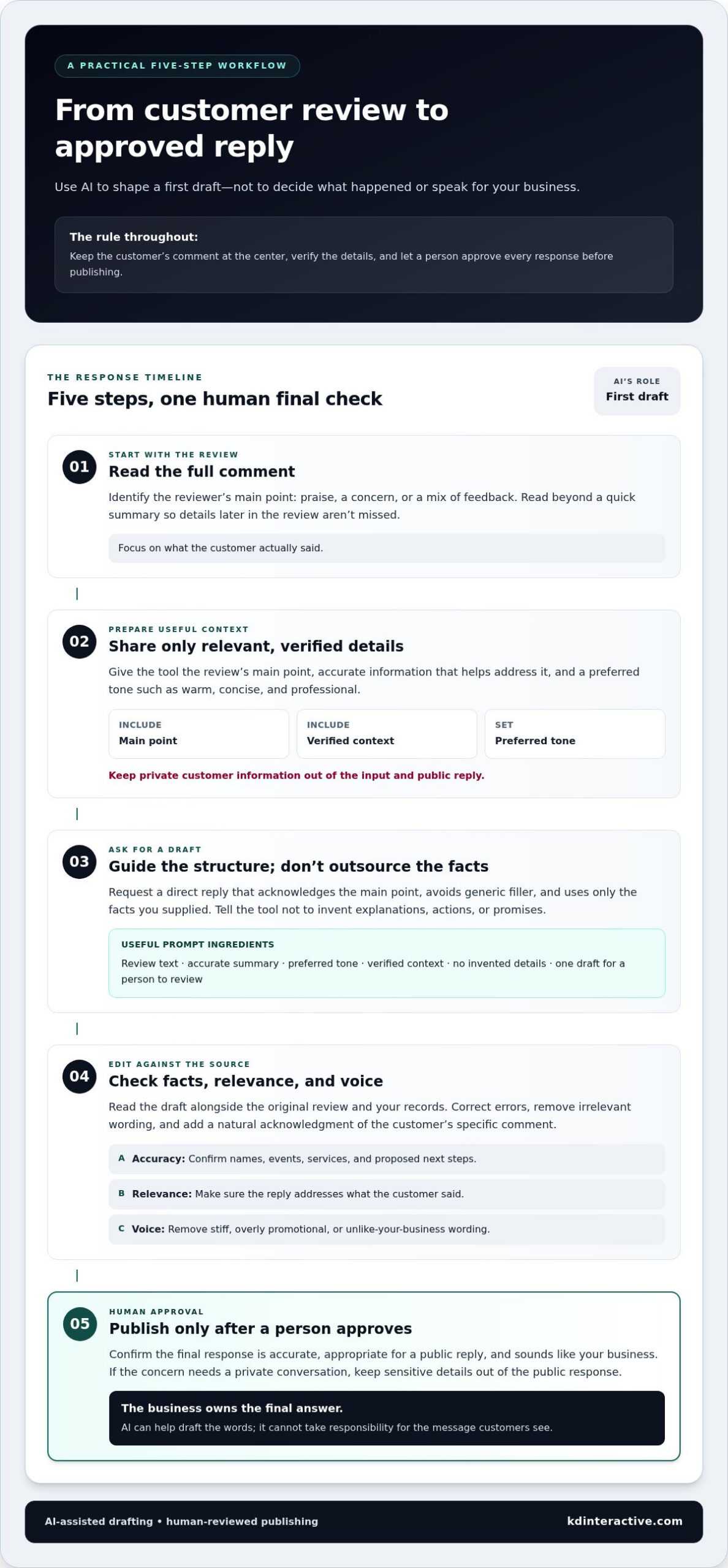
- Read the full review. Identify the reviewer’s main point, whether it’s praise, a concern, or a mix of feedback. Don’t rely on a quick summary if important details appear later in the review.
- Supply relevant context. Share the specific experience described and any verified information that helps address it. Include your preferred tone, such as warm, concise, and professional.
- Request a draft. Ask for a direct reply that acknowledges the main point, avoids generic filler, and doesn’t add facts, explanations, or promises that aren’t in your notes.
- Edit the response. Compare the draft with the review and your records. Correct errors, remove irrelevant wording, and add a natural acknowledgment that reflects the customer’s comment.
- Publish only after approval. Make sure the final text is appropriate for a public response and sounds like your business. If a concern needs a private conversation, keep sensitive details out of the public reply.
Give AI enough context to produce a useful draft
Keep the input focused: include the review’s main point, your preferred tone, and only details you can verify and share appropriately. Avoid private customer information. Ask the tool to address the reviewer’s actual comment rather than write a general thank-you. Clear instructions help guide the draft, but they don’t guarantee accuracy.
Sample prompt: “Draft a concise, specific, courteous reply to this review: [paste review]. The main point is [summarize accurately]. Use a [preferred tone] tone. Address the reviewer’s comment directly. Use only the facts provided here: [verified context]. Don’t invent details, explanations, actions, or promises. Return one draft for a person to review.”
Edit the draft before publishing it
Read the reply alongside the original review. Check names, service details, claims, and suggested next steps against what you know. Cut phrases that could sit unchanged beneath an unrelated review, then make sure the wording sounds like your business rather than a generic script. If the AI misunderstood the feedback, rewrite the response instead of polishing the mistake.
Every AI draft should receive human review before posting. That final check keeps accuracy, tone, and accountability with your team. KD Interactive provides local reputation management support as part of its local SEO services for Wisconsin businesses.
Does AI Impact Google Review Rankings or Trust?
Using ai to respond to google reviews doesn’t, by itself, prove that rankings will rise or fall. A change in traffic or visibility after adopting AI replies is a timing overlap, not proof that the replies caused it. Review quality, customer experience, local competition, website changes, and other factors may also shift during the same period.
Response quality and search performance are different things to assess. A specific, respectful reply may help a customer feel heard, but that customer-facing value is not the same as evidence of a ranking change. Don’t claim Google rewards or penalizes a reply solely because AI helped write it. Check current Google Business Profile guidance and relevant policy updates before making platform-specific claims.
What the available evidence does and doesn’t show
A business owner’s forum post describing lower traffic after beginning to use AI replies is an individual observation. It can raise a question, but it can’t establish cause and effect. A useful assessment needs reliable evidence, a clear comparison period, and attention to other changes that may explain the result. Treat claims about Google’s review policies as claims to verify against current platform guidance, not assumptions based on anecdotes.
How to monitor response quality and business outcomes
Track response quality separately from search performance. A simple review log can help your team spot patterns without assuming that AI caused them:
- Reply quality: Record accuracy, relevance, and whether the response addresses the review’s main point.
- Customer signals: Note reviewer follow-up, recurring feedback themes, and changes in customer sentiment.
- Business performance: Review website traffic, conversions, and local visibility as separate measures.
Compare consistent periods and document changes to your website, promotions, business operations, and review activity. If visibility changes, consider these alongside response practices rather than attributing the movement to AI alone. This gives small businesses a more grounded basis for refining replies and protecting customer trust.
How to Adapt AI Review Replies for Positive, Mixed, and Negative Feedback
A useful reply starts by matching the reviewer’s feedback, not by filling in a standard template. When using ai to respond to google reviews, set a different goal for each type of review: recognize what went well, address both sides of mixed feedback, or respond calmly to a concern. Then check that every detail in the draft comes from the review or information your business can verify.
Draft replies to positive and mixed reviews
For a positive review, thank the customer and mention one genuine detail they shared. If they praise a team member’s helpful explanation, acknowledge that experience without adding claims about other services. Keep the reply warm and brief. Avoid turning a thank-you into an advertisement or inserting promotions that don’t answer the reviewer.
Mixed feedback calls for balance. Recognize the positive point, then acknowledge the concern without minimizing it. For example, if a reviewer appreciates the staff but says communication could have been clearer, a draft might say: “Thank you for recognizing our team. We hear your feedback about communication and appreciate you sharing it.” This reflects only what the hypothetical review states. It doesn’t invent an explanation or claim the issue has been fixed.
Handle negative reviews with care
Keep a response to negative feedback calm, respectful, and focused on the issue raised. Don’t argue publicly, speculate about the reviewer’s motives, or repeat private details. A defensive reply can distract from the concern for anyone reading the exchange later. Instead, acknowledge the experience in neutral language and offer a private channel if more context is needed.
For example, if a review describes an unresolved concern, a draft might read: “Thank you for bringing this to our attention. We’d like to understand more about your experience. Please contact us privately so we can discuss the details.” Use an appropriate contact route your business actually monitors. Don’t include personal information in the public reply, and don’t promise a refund, resolution, or other outcome unless it’s been approved and can be delivered.
- Positive feedback: Thank the reviewer and reflect a specific point they mentioned.
- Mixed feedback: Acknowledge the positive comment and the improvement concern with equal care.
- Negative feedback: Respond respectfully, address the stated issue, and move sensitive discussion offline when appropriate.
Before posting, remove wording that sounds copied across different reviews. A response should show the reviewer that you read their comment, while staying truthful and appropriate for a public business profile.
Thoughtful replies are one part of a broader reputation process. Learn about KD Interactive’s reputation management support for handling customer feedback.
Build a Wisconsin Review Response Process That Keeps AI Accountable
AI is easier to manage when it fits into a clear review process. For a Wisconsin small business, that process can stay simple: decide who owns each step, set a standard for replies, and make sure a person approves every response before it goes public. Using ai to respond to google reviews can help with drafting, but the business remains accountable for what customers see.
Set clear ownership and quality standards
Assign responsibility for reading new reviews, preparing or checking drafts, and publishing approved replies. In a small team, one person may handle all three. In a multi-location business, a central owner can set standards while local staff provide context about each location’s customer experience. Clear ownership helps prevent reviews from being overlooked or replies from being posted without the right context.
Agree on simple standards for every response: accuracy, courtesy, relevance to the review, and consistency with the business’s voice. Keep a shared record of which reviews have been answered and flag concerns that need follow-up. Templates can guide structure, but local details should shape the final wording.
- Assign ownership: Name who monitors reviews and who approves and publishes replies.
- Draft with context: Use the review and verified details from the relevant location.
- Review for quality: Check accuracy, tone, specificity, and any proposed next steps.
- Publish and record: Post the approved response and note any issue that needs internal follow-up.
- Learn from patterns: Review recurring feedback and use it to inform business improvements.
For multiple Wisconsin locations, consistency shouldn’t mean identical replies. A shared voice and approval standard help customers recognize the business, while location-specific context keeps responses relevant. A reply can follow the company’s usual courteous tone and still address the particular experience described at that branch.
Use feedback to strengthen local reputation management
Reviews can reveal recurring praise and concerns that are useful beyond the response itself. If customers repeatedly mention the same positive experience, recognize that theme. If similar concerns appear across reviews, share them with the team responsible for the customer experience. Don’t treat a single comment as proof of a wider problem, but use repeated feedback as a prompt to investigate.
Track response activity alongside broader analytics, including website traffic, visitor behavior, conversions, and local visibility. Review these measures over consistent periods, and note other changes that might help explain shifts. This makes it easier to assess performance without assuming that AI-assisted replies caused every change.
KD Interactive provides Online Reviews & Reputation Management as part of its local SEO services for small and multi-location businesses in Wisconsin. To discuss local SEO and reputation management for your business, learn about a FREE Consultation.
Make Your Review Process Work for the Long Term
Make review responses a dependable part of how your business listens and improves. Start with a process your team can maintain, then refine it as customer feedback reveals what matters most. Using ai to respond to google reviews can support that work, but your business’s judgment and care are what make each reply meaningful.
For Wisconsin businesses, review management fits into a broader local SEO effort. KD Interactive provides Online Reviews & Reputation Management for small and multi-location businesses, with tailored solutions and transparent communication. A conversation can help you consider how review practices fit your business’s priorities without assuming AI will deliver a particular search result.
Request a FREE Consultation with KD Interactive to discuss local SEO and reputation management for your business. Take the next step with a clear plan, and keep building customer trust one thoughtful response at a time.
Frequently Asked Questions
Is it okay to use AI to respond to Google reviews?
Yes, you can use AI to help draft replies, provided the final response is accurate, appropriate, and consistent with current Google Business Profile guidance. Treat the tool as a writing aid, not as a source of facts about a customer or your business. Before posting, check that the reply addresses the review and doesn’t include claims or promises your team can’t support.
Can Google penalize a business for using AI to reply to reviews?
AI use alone isn’t evidence that a business will be penalized or lose visibility. The important distinction is between how a reply was drafted and whether the published content follows current platform policies. Check Google’s latest Business Profile rules before relying on claims about moderation or ranking effects. Avoid replies that are misleading, irrelevant, or written to manipulate search performance, regardless of whether AI was involved.
How do I prompt AI to write a natural Google review response?
Give the tool the review’s main point, only verified context, and a clear direction for tone and length. For example: “Write a brief, warm reply to this review. Acknowledge the customer’s comment about [their stated point]. Use only these verified details: [details]. Don’t invent explanations, outcomes, or promises. Avoid promotional language.” When using ai to respond to google reviews, compare the draft with the original review before deciding what to keep.
Should I automatically publish AI-generated Google review replies?
No. Automatic publishing removes the chance to catch a mistaken detail, an unsuitable tone, or a reply that misses the reviewer’s concern. A practical safeguard is to require approval before a response goes live, especially if it mentions a complaint, a staff member, or a proposed next step. If a draft doesn’t accurately reflect the situation, revise it or write the reply yourself.
Can AI respond differently to positive and negative Google reviews?
Yes. Tell the AI the kind of feedback it’s addressing and set a distinct goal. For praise, ask it to acknowledge the specific point the customer mentioned. For criticism, ask for calm, respectful wording that recognizes the concern without arguing or speculating. Mixed feedback needs both parts addressed. Review the draft carefully so the tone fits the situation rather than making every response sound alike.
What should I avoid sharing with AI when drafting review replies?
Avoid entering private customer information, payment details, account credentials, or internal notes that aren’t appropriate to share with the tool. A public review’s wording and non-sensitive, verified context are usually enough to create a useful draft. Don’t include confidential details just to make a response sound personal. If the issue requires private information to resolve, keep that information out of the prompt and public reply.
How can a Wisconsin small business measure whether its review responses are working?
Start by checking whether replies are accurate, relevant, and completed according to your process. Note customer follow-up and recurring themes, such as praise or concerns appearing across reviews. Separately monitor website visits, conversions, and local visibility over consistent periods. Record other changes, such as updates to the website or business operations, so you don’t assume a shift in performance was caused by review replies alone.