
One outdated detail can cost your business a holiday customer. Someone who finds last year’s hours, an expired promotion, or unclear seasonal information may choose another local option. This holiday local seo checklist starts with the essentials: make sure your business information is accurate wherever customers look.
Holiday SEO can slip down the to-do list when your team is busy and plans are still changing. A clear order of operations helps you decide what to update first, so customers can find useful answers and take the next step, whether they want to call, get directions, or visit your website.
Use this checklist to prioritize updates to your local listings, website, and seasonal content before and during the 2026 holiday rush. You’ll also find a straightforward way to review visibility, inquiries, and customer actions, so you can focus limited time on the updates that help customers make informed choices.
Key Takeaways
- Use a holiday local seo checklist to prioritize listing, website, and seasonal-content updates before the holiday rush.
- Review your Google Business Profile in a clear sequence, including holiday hours and closures wherever profile features allow.
- Match seasonal search questions to useful website pages. Refresh existing content or create a new page only when it serves a distinct need.
- Track reviews, profile interactions, website visits, and inquiries. Respond professionally and protect customer privacy.
- Organize holiday preparation into three manageable stages, with an owner and completion date for each high-priority update.
Why Wisconsin Businesses Need a Holiday Local SEO Checklist
Holiday schedules and customer needs can change quickly for local businesses. A Wisconsin retailer may extend shopping hours, a restaurant may adjust its service or holiday menu, and a service-area business may change which appointments it can take. If those details aren’t reflected online, customers may arrive at a closed door, call with the wrong expectation, or move on to another option.
A holiday local SEO checklist is a practical plan for keeping the information customers use to find and evaluate your business accurate, useful, and consistent. Local search engine optimization helps businesses appear in searches connected to a place, but seasonal preparation is about more than visibility. It helps customers confirm your hours, location, services, availability, and reviews before deciding whether to travel, call, book, or request service.
The goal is to provide reliable information, not to promise rankings or sales. Clear details help customers make informed choices and give your business a stronger foundation for serving them.
What changes in local search during the holidays?
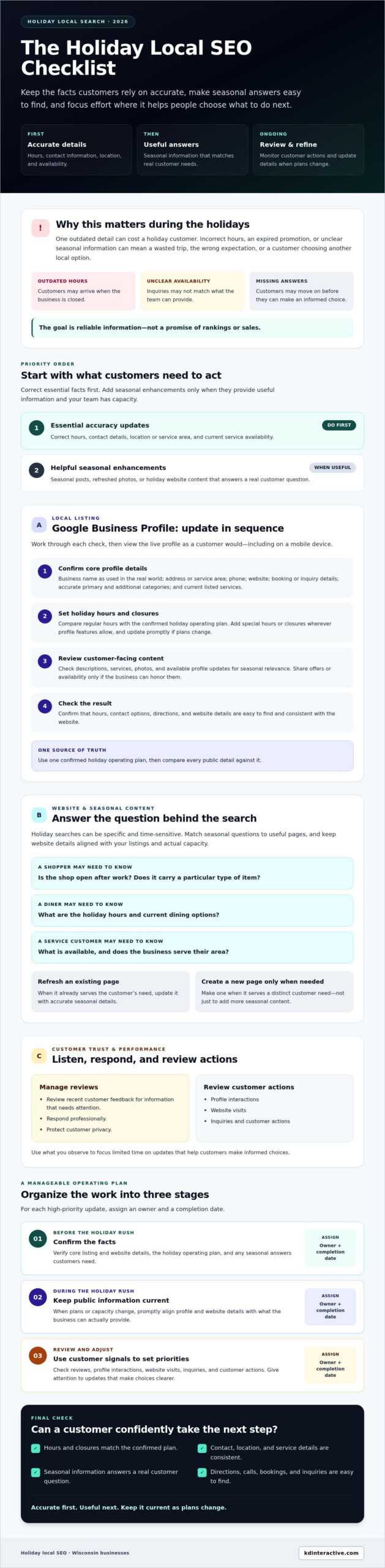
Holiday searches are often more time-sensitive and specific. A shopper might check whether a Wisconsin gift shop is open after work or carries a particular type of item. Diners may look for holiday hours or current dining options. Someone seeking a local repair or home service may want to know what’s available and whether the business serves their area.
These needs can shift as your schedule and capacity change. Outdated hours, service details, or seasonal information can lead to a wasted trip or an inquiry your team can’t fulfill. Keep public details aligned with what your business can actually provide, and update them when plans change.
Which local SEO tasks should come first?
Start with the facts customers need to take the next step. Check your business name, address or service area, phone number, regular and holiday hours, and current services across your key listings and website. Then review directions, booking or inquiry details, and recent customer reviews for information that needs attention.
Holiday local SEO readiness means keeping essential business details accurate and making seasonal information easy for local customers to find.
- Essential accuracy updates: Correct hours, contact details, location or service area, and service availability.
- Helpful enhancements: Seasonal posts, refreshed photos, or holiday-specific website content that answers a real customer question.
Handle accuracy first. Add campaign enhancements only when you have time and they provide useful information. A concise, dependable update is more valuable than seasonal content that distracts from the details customers need to plan a visit or inquiry.
Update Your Google Business Profile for Holiday Local Searches
Your Google Business Profile should match what customers can expect from your business during the holiday period. Work through these updates in order, then check the live profile to confirm your changes. For step-by-step setup help, see this Google Business Profile setup guide.
- Confirm core profile details. Check that your business name matches how it’s identified in the real world. Verify the address or service area, phone number, website, and booking or inquiry details. Make sure the primary and additional categories accurately describe the business, and review listed services for anything that has changed.
- Set holiday hours and closures. Compare regular hours with your confirmed holiday operating plan. Add special hours or closures wherever profile features allow, and check Google’s current guidance before publishing. If your schedule changes, update the profile promptly so customers aren’t relying on outdated hours.
- Review customer-facing content. Check descriptions, services, photos, and any available profile updates for seasonal relevance. A current photo can help customers recognize your location or understand what you offer. Share seasonal offers or availability only if your business can honor them.
- Check the result. View the profile as a customer would, including on a mobile device. Confirm that hours, contact options, directions, and website details are easy to find and consistent with your website.
How should you prepare holiday hours and contact details?
Use one confirmed holiday operating plan as your source of truth, then compare every public detail against it. A shop may need to check special opening days. A restaurant should confirm the hours and service information customers need before visiting. A service-area business should verify its coverage and explain any seasonal changes to availability clearly.
Customers use profile details to decide whether and how to contact you, so consistency matters. If a change affects your operating plan, update the profile and relevant website information together rather than changing just one source.
What seasonal updates help customers choose confidently?
Keep updates practical. Use service descriptions to explain what customers can currently request, and choose recent, representative photos. If you share an offer, state its terms accurately and remove or revise the information when it’s no longer available. The U.S. Small Business Administration’s guidance to develop a marketing plan can help you fit seasonal updates into a broader customer communication plan.
Consistent profile information helps local customers compare options and act with confidence. If keeping listings and website details aligned is a challenge, consider support with local SEO services.
Prepare Holiday Website Content for Local Customer Intent
Your website can answer questions that a business profile can’t fully explain. List the seasonal searches your customers may make, then match each question to the clearest page or section. For example, a customer might want to know whether a Wisconsin restaurant offers holiday dining, whether a local shop provides delivery, or how to request a seasonal service appointment.
A useful holiday local seo checklist focuses on answers customers need, not pages created just to include seasonal keywords. For broader context on how local visibility works across channels, explore this local digital marketing guide.
Should you create a holiday page or update an existing page?
Choose the simplest page structure that serves the customer’s need. If the details belong on an existing service or location page, refresh that page. Create a separate seasonal page only when it covers distinct information that would be difficult to find or understand elsewhere.
Refresh an existing page when: The business, service, and customer need are the same, but hours, dates, availability, or seasonal details have changed. Update the relevant section so visitors can find the current answer without navigating elsewhere.
Create a seasonal page when: The holiday offering has its own details, such as specific dates, eligibility, booking steps, or fulfillment information that doesn’t fit naturally on a general page. Make the page’s purpose clear and link to it from the most relevant page.
Avoid near-duplicate pages that repeat the same offer with only a different Wisconsin city name. A location page should reflect a real difference in service, coverage, or customer information. Whichever format you choose, make dates, availability, eligibility, and the next step easy to find. Remove or revise the information when it’s no longer accurate.
How can local content answer seasonal customer questions?
Use questions customers genuinely ask rather than inserting place names where they don’t belong. A business serving Watertown and nearby communities, for example, can explain its actual service coverage on the relevant page instead of repeating a list of city names throughout its content.
- Holiday services: Which services are available during the season, and what does each include?
- Appointments: How can customers request an appointment, and what availability is confirmed?
- Delivery or pickup: Are these options offered, which areas do they cover, and what dates apply?
- Opening schedules: Which days or hours differ from the usual schedule?
Organize answers under clear headings, keep them concise, and link to relevant service, location, or booking information where it helps visitors continue. Review the page on mobile, too. Customers checking details while planning a visit should be able to spot the answer and next step without searching through unrelated seasonal copy.
Use a Holiday Local SEO Checklist to Manage Reviews and Performance
A simple weekly check helps a busy Wisconsin team spot customer concerns and changes in activity without turning seasonal monitoring into a daily reporting project. Use the same routine each week, assign someone to review the information, and note operational changes that could affect comparisons, such as adjusted hours or limited appointment availability.
How should a small business handle holiday reviews?
Check the review platforms your customers use as part of your regular weekly routine. Respond in your established business voice, acknowledge the specific feedback, and offer a practical next step when appropriate. Avoid copy-and-paste replies that feel impersonal. Invite genuine feedback without offering incentives or pressuring customers to leave a particular rating.
If a review raises a complaint, route it through the appropriate customer-service channel. Keep public replies professional and brief. Don’t disclose order details, appointment information, contact details, or other private customer information in a public response.
Which local SEO results should you track during the season?
Keep the measurement set manageable. In one weekly review, record relevant Google Business Profile interactions, visits to key local or seasonal website pages, calls, bookings, and qualified inquiries. Use available analytics and call or booking records, and apply the same definitions from week to week to make comparisons useful.
- Review customer feedback: Note new reviews, recurring questions, and issues that need follow-up.
- Check profile activity: Record available actions, such as calls, website visits, or direction requests.
- Review website activity: Compare visits to pages intended to answer seasonal questions.
- Connect activity to inquiries: Note calls, bookings, and qualified requests, including how customers say they found you when that information is available.
- Record context: Mark schedule changes, closures, service limits, or seasonal promotions that may affect activity.
Compare results with a suitable baseline, such as a recent period with similar operating conditions, rather than assuming every week is directly comparable. Seasonal demand, changing hours, and available capacity can all affect the numbers.
Profile actions and page visits show measurable engagement; calls, bookings, and inquiries show customer activity. None alone proves that a specific SEO change caused a ranking gain or guarantees sales. Use the findings to decide what to verify or improve next, not to promise an outcome.
Make this review a standing item in your holiday local seo checklist. For help tracking local visibility and reputation, explore KD Interactive’s local SEO services.
Turn the Holiday Local SEO Checklist into a Practical 2026 Plan
A useful plan fits your team’s capacity. A Wisconsin retailer with changing store hours may prioritize listings and seasonal shopping details, while a service-area business may need to clarify coverage and appointment availability. Use the stages below to schedule the work, then adjust them to your operating hours, staffing, service area, and actual seasonal demand.
Prepare early
Start with updates that need coordination. Confirm the holiday operating plan, contact details, core service pages, and seasonal questions your customers need answered. Draft listing or website updates, and decide who will review and publish them. Test the site on a mobile device, including key contact, inquiry, or booking paths, so customers can complete the next step.
Verify before the holiday period
Check that the final information matches your confirmed plans across listings and website pages. Confirm dates, hours, services, and availability, and make sure seasonal content is accurate. Assign an owner and completion date to each high-priority task. A short list with clear responsibility is easier to complete than a long list with no one accountable for updates.
Monitor during the season
Set a recurring time to review customer feedback, profile and website activity, and incoming inquiries. If hours, staffing, or service capacity change, update the relevant information and notify the task owner. Keep monitoring manageable during busy weeks, then record updates or customer questions that should inform future seasonal planning.
2026 holiday local SEO checklist:
- Prepare early: Confirm essential details, identify content needs, and assign owners.
- Verify before the holiday period: Check published information, dates, and customer contact paths.
- Monitor during the season: Review feedback and activity, then correct information when plans change.
How can KD Interactive support a local holiday SEO plan?
If you need help coordinating local visibility work, KD Interactive serves small businesses in Wisconsin and offers local SEO and content creation. Support can help when your team needs to keep business information and seasonal content aligned. Choose the tasks that fit your priorities and capacity; no checklist can guarantee search rankings or a particular number of inquiries.
For an optional next step, explore local SEO support for your business.
Make Holiday Search Readiness Part of Your 2026 Plan
A focused holiday local seo checklist helps you prepare without adding unnecessary work. Start with accurate business details, then make sure your website answers real seasonal questions and gives customers a clear next step. During the holiday period, review customer activity and feedback so you can respond and correct information when plans change.
Consistency matters more than a long list of last-minute optimizations. Assign owners and dates to priority updates, and fit the workload to your team’s capacity. The aim is to make it easier for local customers to find reliable information, not to promise a particular ranking or sales result.
KD Interactive supports small businesses with local SEO, including keyword research, on-page optimization, and analytics tracking, along with content creation and reputation management. If you’d like support coordinating those efforts for the season, explore local SEO support for your business.
Choose the next practical update, assign it, and keep building from there. Your business can enter the holiday season prepared and confident.
Frequently Asked Questions
How early should I start a holiday local SEO checklist?
Start as soon as your holiday hours, services, or seasonal plans begin to take shape. Preparing early gives you time to update listings and website information, review the changes, and assign someone to publish them. Prioritize essential details, then add optional seasonal content if time allows. If plans change, update public information promptly rather than waiting for the full checklist to be complete.
What should I update on my Google Business Profile for the holidays?
Check your business name, address or service area, phone number, website, categories, and services for accuracy. Confirm regular hours and add special hours or closures wherever profile features allow. Review customer-facing descriptions and photos, and update seasonal information only when it reflects what your business can provide. Before publishing special-hour updates, check Google’s current guidance and make sure the profile matches your website.
Can holiday hours affect my local search visibility?
Accurate holiday hours help people decide whether to visit or contact your business, but updating them doesn’t guarantee higher rankings. If a listing shows the wrong hours, a customer may arrive when you’re closed or assume your business isn’t available. Keep special hours consistent across your profile and website, and update them when your operating plan changes. Prioritize clear, reliable information over using hours as a ranking tactic.
How do I get my business ready for the holidays online?
Begin with the information customers need to take action: hours, contact details, location or service area, current services, and seasonal availability. Check that your business listings and website agree. Refresh relevant pages or create a seasonal page only if it answers a distinct customer need. Test key contact or booking paths on a mobile device, then set a regular time to review customer feedback and inquiries during the season.
Do I need a separate holiday landing page for my local business?
No, not necessarily. Update an existing service or location page when the holiday information is a straightforward change to current hours, availability, or services. Create a separate page only if the seasonal offering has distinct details, such as its own dates, eligibility, or booking steps. Avoid near-duplicate pages that repeat the same information for different cities. Keep dates and availability current, and remove or revise outdated details.
What local SEO metrics should I track during the holiday season?
Track relevant profile interactions, visits to seasonal or local website pages, calls, bookings, and qualified inquiries. Review new customer feedback, too, since repeated questions can show where information needs clarification. Compare activity with a suitable baseline and note changes to hours, staffing, or service availability. These measures show engagement and customer actions; by themselves, they don’t prove that an SEO update caused a ranking change or guarantee sales.
How can a Wisconsin small business attract nearby holiday customers online?
Make it easy for nearby customers to confirm what you offer, where you serve, and when you’re available. Keep your local listings accurate, answer seasonal questions on relevant website pages, and describe your Wisconsin service area naturally where it’s genuinely relevant. Use current photos and respond professionally to reviews. For example, a business serving Watertown and nearby communities should clearly state its actual coverage rather than adding city names it doesn’t serve.