
You can’t apply for or buy a Google Knowledge Panel for your business. If you’re wondering how to get a Google Knowledge Panel for your business, focus on building a clear, consistent online presence that helps Google understand your business. If a panel appears and Google offers the option, you can then claim it.
A Knowledge Panel isn’t like a business listing that you create and control. Google generates panels automatically using information from across the web. A Google Business Profile is a separate tool for managing how your business appears on Search and Maps.
This guide explains what a Knowledge Panel may show, how to claim and manage one if eligible, and how to strengthen your business’s online presence. It also compares a panel with a Google Business Profile so you can choose the right next step.
Key Takeaways
- Google creates Knowledge Panels from information it finds across the web, so consistent business details help it connect the right facts to your company.
- If a panel appears for your business, look for the claim option and follow Google’s verification steps to manage eligible details.
- A Knowledge Panel and a Google Business Profile serve different purposes; understanding the distinction helps you choose where to focus your updates.
- Build a clearer online presence with accurate website information, relevant structured data, and credible mentions across the web.
What is a knowledge panel?
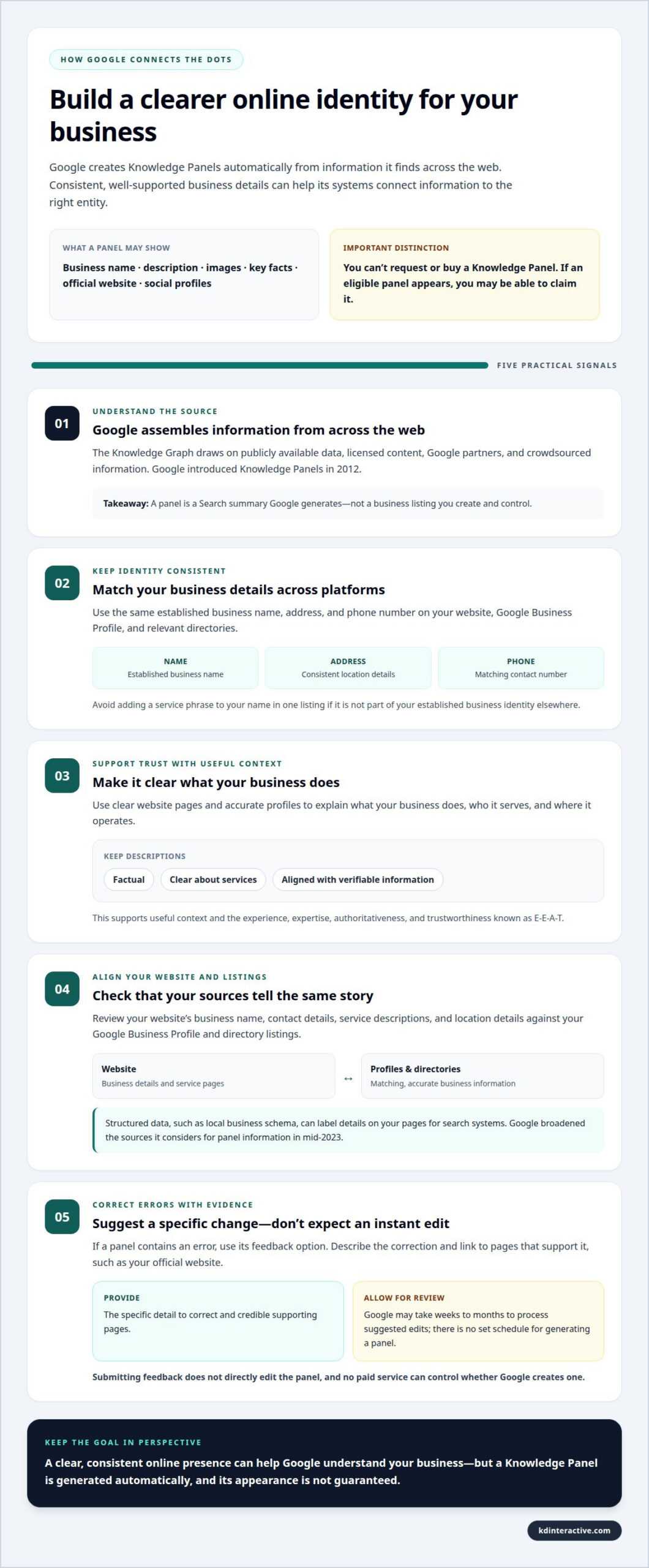
- Understand what Google is assembling. A Knowledge Panel is a Search feature that summarizes information about an entity, such as a local business. Google introduced Knowledge Panels in 2012. Its Knowledge Graph draws on publicly available data, licensed content, Google partners, and crowdsourced information, then combines details from sources across the web. The panel can show a business name, description, images, key facts, official website, and social profiles.
- Keep your business identity consistent across platforms. Use the same established business name, address, and phone number on your website, Google Business Profile, and relevant directories. For example, don’t add a service phrase to your name in one listing if it isn’t part of your established business identity elsewhere. Consistent details help search engines recognize information about the same business rather than treating it as conflicting records.
- Make your online information support trust and E-E-A-T: experience, expertise, authoritativeness, and trustworthiness. Show what your business does, who serves customers, and where it operates through clear website pages and accurate profiles. Keep descriptions factual and aligned with the services customers can verify elsewhere. These signals give people useful context and help clarify your business identity across sources.
- Align your website with your verified business information. Review the business name, contact details, service descriptions, and location details on your site against your Google Business Profile and directory listings. Structured data, such as local business schema, can label details on your pages for search systems. Google broadened the sources it considers for panel information in mid-2023, making consistency across your wider online presence especially relevant.
- If a panel contains an error, use its feedback option to suggest a correction. Describe the specific change and link to pages that support it. Google may take weeks to months to process suggested edits, and there’s no set schedule for generating a panel. Be cautious of services promising to create one: businesses can’t request or purchase a panel, so no paid service can control that outcome.
Claiming and managing a Knowledge Panel
Google doesn’t sell Knowledge Panels, so there’s no purchase price for the panel itself. If a panel is eligible to claim, the process starts with Google’s verification, not a paid placement.
- Search Google for the exact name of the person, organization, or business represented. Make sure the panel describes the right entity, then look for “Claim this knowledge panel” below it or in the “About” section. On mobile, tap Menu and choose the claim option. Not every panel is claimable, so the option may not appear.
- Select the claim option and sign in to the Google account you’ll use to manage the entity’s presence. Follow Google’s prompts to verify your connection to the business. Verification may use an official YouTube, Search Console, Twitter, or Facebook account. Google may request more information if it can’t identify websites associated with the entity.
- Complete the verification steps, then manage access through the verified account. A Knowledge Panel account can have owners, managers, and contributors with different permissions. Assign access based on each person’s role. For example, someone who updates business details may need a different level of access from the person responsible for the organization’s public presence.
- Suggest a change if a panel detail is inaccurate. Verified representatives can claim eligible panels and suggest updates. If you aren’t an official representative, use the feedback link at the panel’s bottom-right corner. Describe the correction and link to supporting pages, such as the organization’s official site. Google reviews suggestions, so submitting one doesn’t directly edit the panel.
Claiming a panel helps you suggest changes, but it doesn’t give you full control over what appears in Search results. If your immediate goal is stronger local visibility, explore the Google Map Pack with AI Assistant as a separate local search option.
Differences between a Knowledge Panel and Google Business Profile
No. Verifying a Google Business Profile confirms control of that profile. It doesn’t guarantee that Google will create a separate Knowledge Panel for the business.
- Use a Google Business Profile to manage a local business listing. It’s designed for businesses serving customers at a physical location or in a designated service area. Small businesses can create a profile for free and manage their details on Google Search and Maps. A service-area business can specify the areas and specialties it serves, even without a storefront.
- A Knowledge Panel is a separate Search feature. Google generates it automatically when its systems recognize an entity in the Knowledge Graph. It summarizes information Google finds across sources, rather than providing a dedicated profile for businesses to build and control. A panel may show a business’s website, description, images, key facts, and social profiles.
- The two features appear in different places. A Google Business Profile can show information in Google Search and Maps, helping nearby customers find business details and places to visit. On desktop, a Knowledge Panel appears on the right side of search results; on mobile, it may appear above or within the results. These placements describe Search, not guaranteed visibility in Google’s AI products.
- Keep verification and visibility in perspective. Verifying a Google Business Profile doesn’t establish that a Knowledge Panel will appear. If a panel can be claimed, Google may use an official YouTube, Search Console, Twitter, or Facebook account to verify an association. An official profile can help confirm identity for that process, but it doesn’t turn a Business Profile into a panel or ensure either feature appears in every search.
- Choose the feature that fits your immediate need. For customer-facing details such as hours, photos, and service areas, update your Google Business Profile. To support a Knowledge Panel, build a clear online presence and claim the panel if Google offers the option. The features can support visibility in different places, but neither replaces the other.
Establishing a business presence for a Knowledge Panel
If you’re researching how to get a Google Knowledge Panel for my business, focus on making your business identity easy for Google to recognize across the web. Google generates panels automatically, so build an accurate, connected online presence rather than looking for an application form.
- Use your established business name consistently on your website, Google Business Profile, and relevant directories. Don’t add keywords or service phrases to the name in selected places. For example, use “Lakeview Plumbing” consistently instead of switching between that and “Lakeview Plumbing, Best Emergency Plumber.”
- Create clear, useful pages on your website. Describe your organization, services, contact details, and service area in plain language. Give each main service its own relevant page with details customers can understand. Local business or organization structured data can label information on those pages, helping search systems interpret the content and connect it with your business.
- Keep your Google Business Profile accurate. Match its name, address or service area, phone number, hours, and website with your official information elsewhere. Update the profile when details change. If your business serves several communities, describe its service area clearly without changing its established business name.
- Build credible mentions beyond your own website. Relevant industry directories, local news coverage, and knowledgeable blogs can provide context about your business. Share accurate details with publishers so public descriptions remain consistent. Wikipedia and Wikidata may be among Google’s sources, but creating an entry there isn’t a shortcut to a Knowledge Panel.
- Review how your business appears in Search on desktop and mobile. Search its exact name and look for outdated details or unrelated results. Correct errors at their original source, then use panel feedback for inaccurate panel facts. A practical answer to how to get a Google Knowledge Panel for my business is to make its identity clear wherever customers and search systems encounter it. To build a stronger local presence, build a clearer online presence with a focused plan.
KD Interactive: Google Map Pack with AI Assistant
KD Interactive can strengthen your local search presence while Google determines whether to generate a Knowledge Panel. Its Google Map Pack with AI Assistant and Local SEO Services support businesses focused on local visibility, a goal distinct from claiming a panel.
Accurate, useful website content helps explain what your business does and where it serves customers. KD Interactive’s Content Creation can support that work, while Press Release Distribution can share business news with a wider audience. These efforts build a clearer online presence, but don’t guarantee a Knowledge Panel. Contact KD Interactive to discuss a practical plan for local visibility and consistent business information across your digital presence.
Contact KD Interactive to discuss your business’s local search goals.
Make your next visibility move count
If you’re still considering how to get a Google Knowledge Panel for your business, turn the question into a broader visibility plan. Decide what you want potential customers to understand first: your expertise, services, or the communities you serve. That priority can guide the content you publish and the local search signals you strengthen.
Choose a practical focus for the next phase of your online presence. You could clarify a service page, publish useful answers to customer questions, or share a meaningful business update. Then assess whether those changes make your business information clearer and easier to find. Steady, accurate communication gives people a stronger understanding of your work, whichever search features appear.
KD Interactive can help you shape that next step around your business goals. Start a conversation about your visibility priorities and explore a practical direction for building your presence. Your next improvement can begin with one clear decision.
Frequently Asked Questions
What is the Google Knowledge Graph?
The Google Knowledge Graph connects facts about people, places, organizations, and other entities. It contains billions of facts gathered from sources across the web, including publicly available data, licensed content, partners, and crowdsourced information. For example, it can connect a business name with its website and other details, helping Google interpret what a search query refers to.
What is a Google Knowledge Panel for a business, and how is it different from a Google Business Profile?
A business Knowledge Panel is a Search feature Google generates to summarize information about a business it recognizes as an entity. A Google Business Profile is a business-managed profile for sharing customer-facing details through Google Search and Maps. Use a Business Profile to update practical listing information; a Knowledge Panel presents Google’s collected understanding and isn’t a separate profile you fill out.
What eligibility criteria does Google use to show a business Knowledge Panel?
Google doesn’t provide a fixed public checklist that guarantees a business panel. A panel may appear when Google’s systems recognize a business as a distinct entity and can gather relevant information from online sources. A clear business identity, consistent details, and credible mentions can help Google understand the entity, but no single directory entry, website update, or profile verification guarantees a panel.
How can I claim or verify an existing Google Knowledge Panel for my business?
Search Google for your business’s exact name and look for the claim option in the panel or its “About” section. Select “Claim this knowledge panel,” sign in, and follow Google’s verification prompts. Google may use an official account or profile, such as Search Console or YouTube, to verify your connection. If the claim option isn’t shown, the panel may not be claimable at that time.
How can I request changes to a business Knowledge Panel on Google?
If you manage a claimed panel, suggest a change through its available controls. Otherwise, use the panel’s feedback link. Identify the inaccurate detail, explain the requested correction, and provide supporting pages, such as an official business page. Google reviews suggestions before changing panel information, and processing can take weeks to months. Submit clear evidence rather than repeated requests.
What business information and sources help Google create a Knowledge Panel?
Useful information includes your business’s established name, website, contact details, services, location or service area, and official social profiles. Google may draw from public data, licensed content, partners, and other web sources. For example, a detailed service page and matching details in relevant directories can reinforce the same identity. Wikipedia and Wikidata may also be among Google’s sources.