
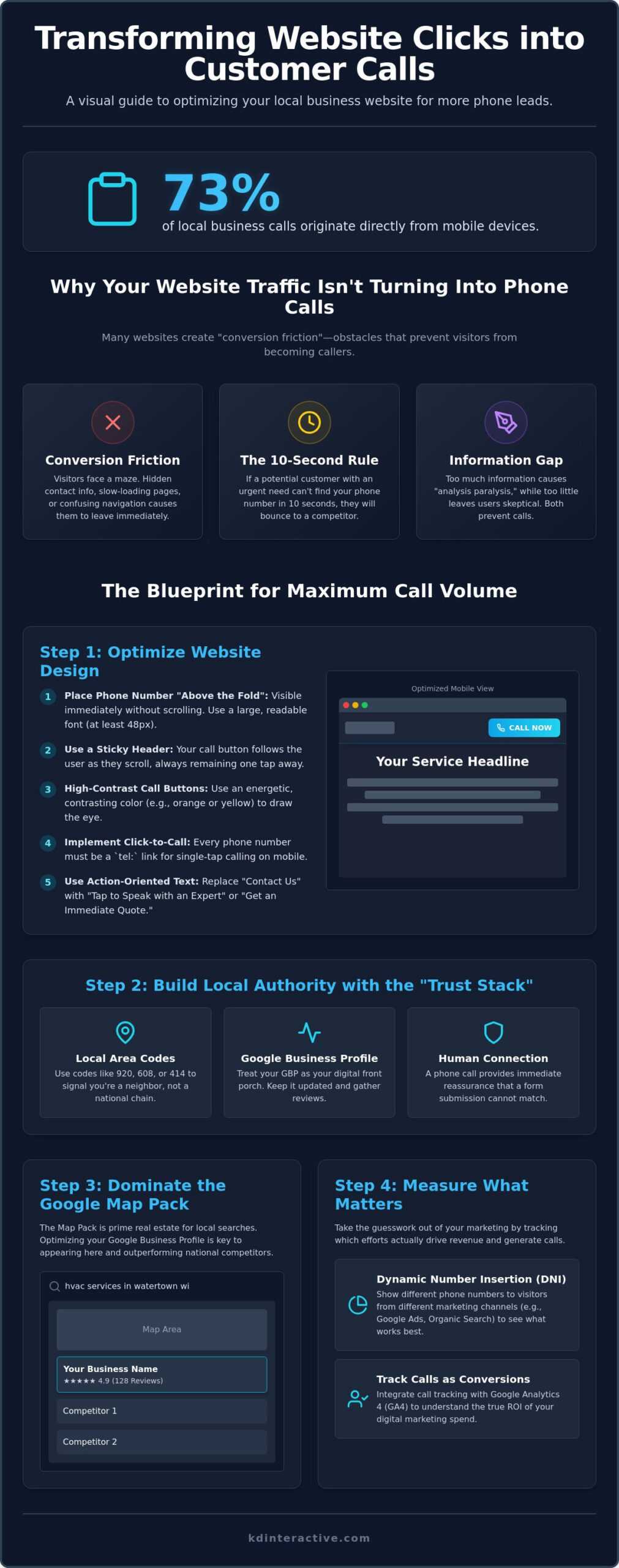
Did you know that 73% of local business calls now originate directly from mobile devices? If you’re wondering how to get more phone calls from my website while staring at a silent phone, you aren’t alone. Many Wisconsin business owners feel the frustration of spending hard-earned money on digital marketing only to receive confusing technical jargon instead of actual leads. It’s exhausting to lose local customers to competitors simply because their Google Map visibility is stronger or their site is harder to navigate on a smartphone.
We understand that you need results, not just reports. You deserve a digital presence that works as hard as you do. This guide outlines the exact website optimizations and local SEO tactics that turn passive visitors into active phone leads for your business. We will cover the 2026 strategies for mastering the Google Map Pack, implementing frictionless click-to-call features, and using clear data to track which efforts actually drive your revenue. You will learn how to transform your site into a 24/7 salesperson that generates a consistent stream of qualified local leads.
Key Takeaways
- Identify why visitors leave your site without calling and how to fix conversion friction using the 10-second rule.
- Learn how to get more phone calls from my website by placing contact information above the fold and using sticky call headers.
- Build immediate local authority with the Trust Stack, turning your Google Business Profile into a powerful front porch for your brand.
- Take the guesswork out of your marketing by implementing Dynamic Number Insertion and tracking calls as conversions in GA4.
- Discover how to leverage the Google Map Pack with AI Assistant to outperform national competitors in the local Wisconsin market.
Why Your Website Traffic Isn’t Turning Into Phone Calls
Many Wisconsin business owners look at their analytics and see plenty of visitors, but their office phone remains silent. This disconnect is usually caused by “conversion friction.” In the world of local services, friction is any obstacle that slows down a user’s journey from finding your site to dialing your number. If your website feels like a maze or a textbook, potential customers will simply turn back. They aren’t looking for a research project; they’re looking for a solution to a problem.
The “10-second rule” is more critical in 2026 than ever before. When a homeowner in Watertown has a leaking pipe or a business owner in Madison needs urgent legal advice, they don’t have the patience to dig through navigation menus. They want a solution immediately. If they can’t find a prominent phone number within ten seconds of landing on your page, they’ll bounce back to the search results. This is why a firm grasp of local SEO is vital. It ensures your site is built for these high-intent moments where every second counts.
We often see businesses struggle with the “Information Gap.” This happens when you either provide too little information, leaving the user skeptical, or too much information, causing analysis paralysis. When you give a visitor fifteen different services to choose from without a clear next step, they often choose nothing at all. Learning how to get more phone calls from my website starts with simplifying the user experience and removing the burden of choice from the customer.
The “Invisible” Friction Points for Small Businesses
Small technical details often cause the biggest leaks in your lead funnel. Many sites hide their phone numbers in the footer or bury them on a deep contact page. In Wisconsin, we also face the reality of varying internet speeds in rural areas. If your site is bloated with heavy video files or unoptimized images, it won’t load fast enough for a user on a mobile device in a patch of weak signal. A slow site is a dead site. You also need a singular, urgent call-to-action. Don’t ask them to email you, follow you on social media, and read your blog. Tell them exactly what to do: Call Now.
The Psychology of the Local Caller
Optimizing Your Website Design for Maximum Call Volume
Why stop at the top of the page? As users explore your service descriptions, implement a sticky header. This ensures your call button follows the user as they scroll, keeping the solution to their problem just one tap away. Use high-contrast colors to make these buttons stand out. If your brand palette is primarily cool blues, an energetic orange or warm yellow button creates a psychological trigger that draws the eye and encourages action.
The language you use on these buttons matters. Instead of a generic “Contact Us,” try more descriptive, high-converting text like “Tap to Speak with a Local Expert” or “Get an Immediate Quote.” This reassures the user that they’ll reach a real person quickly. For those refining their overall digital strategy, reviewing resources like this guide on SEO for Small Business can help align your design with broader marketing goals.
Designing Click-to-Call Buttons for 2026 Mobile Users
With 73% of local business calls originating from mobile devices, your mobile design is your primary design. Every phone number must use the tel: link protocol, allowing users to initiate a call with a single tap. Position these buttons within the “thumb-reach zone” at the bottom or center of the screen to accommodate larger modern devices. Our web and seo services focus on these technical stabilities to ensure your site performs perfectly across all Wisconsin networks.
Desktop Optimization: The Power of Visual Cues
Desktop users respond well to directional cues. Use subtle arrows or photos of your team looking toward the phone number to guide the visitor’s gaze. We advocate for the “Big Bold Number” strategy on high-intent landing pages to remove all doubt. Always ensure your number is text-based rather than an image. This allows search engines to index it and screen readers to access it, which is essential for both accessibility and local search performance. If you want to see how your current site measures up, you can request a professional assessment of your layout today.
Building Local Authority: Trust Signals That Drive Calls
A website without trust signals is like a storefront with the lights off. Even if your design is perfect, visitors won’t pick up the phone if they don’t believe you’re a reputable local expert. We call this the “Trust Stack.” It’s a combination of Google reviews, industry certifications, and local affiliations that proves you are a legitimate Wisconsin business. When homeowners in Watertown or business owners in Milwaukee see that you belong to the local Chamber of Commerce or have won a local award, their hesitation vanishes. This is a core part of understanding how to get more phone calls from my website; you must prove you’re the real deal before they dial.
Your Google Business Profile serves as the “front porch” of your digital presence. In 2026, most local searches lead directly to this profile before a user ever clicks your website link. If your profile is complete, active, and filled with positive feedback, it sets the stage for a high-converting visit to your site. Reputation management isn’t just about PR; it’s a data-driven strategy that directly correlates to your phone call conversion rates. A business with a 4.8-star rating and 100 reviews will always out-convert a competitor with a 3.0-star rating. The confidence a strong reputation provides is the ultimate conversion tool.
Integrating Google Reviews Directly Into Your Site
Don’t make people leave your site to find your reviews. Place live review widgets strategically near your primary phone number and call-to-action buttons. Seeing a 5-star testimonial from a neighbor in Oconomowoc right next to your “Call Now” button provides the final push a visitor needs. If you receive a negative review, respond pragmatically and professionally. This shows potential callers that you’re accountable and supportive even when things aren’t perfect. For a baseline on building this authority, you can follow our guide on how to set up a Google Business page to ensure your foundation is solid.
The Map Pack Connection: From Search to Call
The Google Map Pack is a powerful tool for driving direct phone leads. When you appear in the top three map results, users see a prominent “Call” button before they even see your website link. This visibility makes your website feel more authoritative when they finally click through. You must ensure your Name, Address, and Phone (NAP) information is identical across the entire web. Inconsistencies confuse search engines and erode trust with users. Our Google Map Pack with AI Assistant service helps bridge this gap, ensuring your local presence is optimized for every query. This integrated approach is the most effective way to turn searchers into callers.
Measuring Success: Call Tracking and Data-Driven Growth
Measurement is the bridge between spending money and making money. If you’ve implemented the design and trust signals discussed earlier, you’re likely seeing an uptick in volume. However, without tracking, you won’t know how to get more phone calls from my website efficiently. You need to see which specific page or search term triggered the dial. Data takes the guesswork out of your growth strategy.
Dynamic Number Insertion (DNI) is the gold standard for this. It replaces your phone number with a unique tracking number based on how the visitor found you. This allows you to attribute calls to specific campaigns with high accuracy. Once DNI is active, you should set up “Call as Conversion” goals in Google Analytics 4 (GA4). This transforms your analytics from a list of clicks into a clear roadmap for your business. Don’t just count every ring; analyze call duration to filter out spam or wrong numbers. Genuine leads usually stay on the line for more than 60 seconds. Use call recordings to review how your team handles these leads. A great marketing strategy fails if the person answering the phone isn’t prepared to close the deal. Finally, correlate your local digital marketing spend to actual revenue. This transparency ensures you aren’t just buying traffic; you’re buying customers.
Is Call Tracking Worth It for Small Businesses?
Some national agencies claim call tracking is a luxury reserved for massive budgets. We disagree. For a small business in Watertown or Jefferson, every dollar counts. Knowing that a specific blog post generated three high-value calls justifies your investment. With entry-level software plans starting around $50 per month, the data you gain far outweighs the cost. You can calculate your exact cost-per-call and compare it directly to your cost-per-click to see where your money works hardest. This level of detail is what separates growing businesses from those that stay stagnant.
Advanced Analytics: Understanding the User Journey
Advanced analytics reveal patterns you might otherwise miss. Are your callers mostly first-time leads or repeat customers? Identifying “Peak Call Times” allows you to optimize your staffing so no lead ever goes to voicemail. This data helps you refine your seo agency strategy by doubling down on the keywords that actually ring the bell. Ready to see the data behind your dials? Request a professional call tracking assessment to see exactly which marketing efforts are driving your revenue.
Partnering with KD Interactive: Your Wisconsin Call Generation Expert
We believe that a website is only as good as the revenue it generates. At KD Interactive, we take a pragmatic, results-oriented approach to local SEO that focuses on your bottom line. Based in Watertown, we’ve seen too many Wisconsin business owners get lost in the sea of technical jargon provided by national agencies. Our mission is to bridge the gap between “ranking” and “revenue” by ensuring your digital presence actually makes the phone ring. We don’t just want you to appear on page one; we want to show you how to get more phone calls from my website through proven, data-driven tactics.
Our unique 2026 edge is the Google Map Pack with AI Assistant. This service is specifically designed to handle the shift toward AI-powered search summaries and voice queries. We ensure your business isn’t just a dot on a map but the primary recommendation for local searchers. Transparency is the cornerstone of our partnership. You will receive monthly reports that you can actually understand, focusing on tangible metrics like call volume and lead quality rather than vanity rankings. We treat your marketing budget with the same respect you do; every dollar must work toward your growth.
Why Local Expertise Matters for Wisconsin Businesses
Success in the Milwaukee and Madison markets requires more than a one-size-fits-all strategy. We understand the regional nuances of how Wisconsin customers search. A homeowner in Waukesha looks for services differently than a business owner in downtown Madison. We’ve spent years refining our local SEO services to account for these geographic preferences. Our case studies show that when you align your website with local search intent, the results are immediate. We’ve helped local service providers transform their quiet websites into active hubs of customer activity by leaning into their community roots.
Get Your Free Website Call Generation Audit
You don’t have to guess why your phone isn’t ringing. Our experts provide a comprehensive local SEO assessment to identify exactly where you’re losing potential leads. We look at your mobile load speeds, the visibility of your contact information, and the strength of your local trust signals. This audit provides a clear roadmap for how to get more phone calls from my website and outpace your local competitors. We’ll show you the technical fixes and content strategies needed to turn your site into a 24/7 lead-generating machine. Ready to start getting more calls? Contact KD Interactive today!
Turn Your Digital Presence Into a Lead-Generating Engine
Your website should be more than a static brochure. It needs to be a high-performing tool that drives revenue. By eliminating conversion friction, implementing strategic design elements, and leveraging the authority of your Google Business Profile, you create a clear path for local customers to reach you. Learning how to get more phone calls from my website isn’t about guesswork; it’s about using methodical tracking to see exactly what works. We focus on bridging the gap between simple rankings and actual business growth.
KD Interactive specializes in Wisconsin small business growth. We use advanced tools like our Google Map Pack with AI Assistant to ensure you dominate local searches in Watertown and surrounding communities. Our team provides clear, data-driven results reporting so you always understand your marketing ROI. Stop losing local leads to competitors with better visibility. It’s time to make your website work as hard as you do for your business.
Schedule Your Free Local SEO Audit with KD Interactive today. We are ready to help your business reach its next level of success.
Frequently Asked Questions
How do I make my phone number clickable on my mobile website?
You make your phone number clickable by using the “tel:” link protocol in your website’s HTML code. Wrap your phone number in an anchor tag like <a href=”tel:9205550123″>920-555-0123</a>. This allows mobile users to initiate a call with a single tap. It is a fundamental technical step for anyone learning how to get more phone calls from my website because it removes the manual effort of dialing.
Should my phone number be visible on every single page?
Yes, your phone number should be present on every page to ensure your customers never have to search for a way to contact you. Most successful Wisconsin businesses place their number in a global header or a sticky navigation bar. This consistent placement builds trust and ensures that a visitor can transition from reading your content to calling your office the moment they feel ready.
What is the best place to put my phone number on my website?
The top right corner of your website header is the most effective location for your phone number. Web users have been conditioned to look at the top of the screen for contact details when they have high intent. For the best results, ensure this number is at least 48px in size and uses a high-contrast color that stands out against your background. This simple design choice is a proven way to increase your lead volume.
How many phone calls should a small business website generate monthly?
Call volume varies based on your specific industry and the population of your service area. A niche service provider in Watertown might receive fewer calls than a high-demand contractor in Milwaukee, but those leads are often more qualified. Instead of chasing a generic number, focus on your conversion rate. A healthy website should show a steady month-over-month increase in calls as your local authority grows.
Do I need a separate phone number for call tracking software?
Yes, call tracking software uses unique, virtual phone numbers to identify exactly which marketing source drove a lead. These tracking numbers automatically forward to your main office line, so your daily operations don’t change. This technology is essential for understanding how to get more phone calls from my website while identifying which specific blog posts or local search terms are actually generating revenue for your business.
Will adding more phone numbers to my site hurt my SEO?
Using multiple numbers will not hurt your SEO if you implement Dynamic Number Insertion (DNI) correctly. DNI shows tracking numbers to human visitors while ensuring search engine crawlers still see your consistent primary business number. This protects your local search rankings while giving you the granular data needed to make smart marketing decisions. Consistency in your public Name, Address, and Phone data remains the priority.
How long does it take to see an increase in calls after optimizing my site?
You can often see an increase in call volume within 30 to 90 days after implementing design and technical optimizations. While broad SEO rankings take time to build, fixing immediate friction points like non-clickable numbers or poor mobile layouts produces faster results. Methodical updates to your Google Business Profile and local trust signals will further accelerate this growth as your brand becomes more visible in the community.
Can I track calls that come from my Google Business Profile separately?
You can track these calls by placing a dedicated tracking number in the primary phone field of your Google Business Profile. This allows you to distinguish between users who called directly from a map search and those who clicked through to your website first. Distinguishing these lead sources is vital for local businesses that want to see the true impact of their Map Pack visibility versus their organic website traffic.