
What if a review damaging your reputation is negative but still doesn’t qualify for removal? Knowing how to report fake reviews on google starts with distinguishing a genuine customer complaint from content that violates Google’s policies. A low rating alone isn’t enough. Your report should point to a specific concern, such as fake content, spam, or a conflict of interest.
A suspicious review can shake customer trust, especially when you’re unsure what information Google needs or what happens after you flag it. A clear, factual report gives Google a concrete issue to assess. A calm public response also shows potential customers that you’re paying attention.
This guide explains which reviews may breach Google’s rules, how to report one, and how to track a decision or appeal if your report is denied. You’ll also learn what to document and how to keep reputation management moving while you wait. For Wisconsin businesses, consistent review monitoring and professional responses can support a broader local SEO strategy, whatever Google decides about an individual review.
Key Takeaways
- A low rating or critical opinion isn’t proof of a policy violation. Look for specific signs of fake content or other prohibited activity.
- When learning how to report fake reviews on google, choose the closest accurate policy reason and keep your report focused on evidence.
- Keep a record of the review and relevant details so you can follow the decision and provide context if an appeal is available.
- While Google assesses the report, reply calmly and professionally without sharing private customer or transaction information.
- Make review monitoring, policy checks, documentation, reporting, and thoughtful responses part of a consistent reputation-management routine.
How to Tell Whether a Google Review Is Fake or Policy-Violating
A review can feel suspicious without giving you enough evidence to report it as fake. Google’s policies focus on prohibited content and behavior, including reviews that aren’t based on a genuine experience, spam, conflicts of interest, or content intended to manipulate a business’s rating. A reviewer’s identity may be unclear, but uncertainty alone doesn’t establish a violation.
Reviews help people share experiences and inform other customers, as outlined in the concept of online reviews. That purpose matters when you assess a difficult comment: Google doesn’t remove a review simply because a business disagrees with it or dislikes its impact. Report a review for a policy reason, not merely because it’s unfavorable.
Which review patterns may justify a report?
Look for details that point to a specific policy issue, and assess the review itself before drawing conclusions about the reviewer. Google’s prohibited-content categories include fake or spam content, conflicts of interest, off-topic content, harassment or hate speech, and deceptive or misrepresented content. A review that appears unrelated to a real customer experience or designed to distort a business’s rating is a clearer reason for concern.
Patterns can be useful clues, but they aren’t proof. For example, several reviews posted close together with nearly identical wording may warrant a closer look. So might a review that discusses a different business, promotes unrelated content, or appears to come from someone with a clear interest in manipulating a competitor’s reputation.
- Compare repeated wording or timing across reviews, but don’t assume the reviewers coordinated.
- Check whether the text describes an experience with your business or addresses an unrelated subject.
- Consider whether the content suggests a conflict of interest, spam, harassment, or another specific prohibited category.
Before deciding how to report fake reviews on google, match what you can observe to Google’s current policy language. A pattern may justify documenting a concern, but it doesn’t establish who posted a review or their motive.
What is not enough to call a review fake?
A one-star rating, blunt criticism, or account of a frustrating experience isn’t automatically a policy violation. Customers can have genuine experiences that a business remembers differently, and their opinions may be strongly negative. If a reviewer says service was slow or a product didn’t meet expectations, disagreement with that description alone doesn’t show the review is fake.
Not finding a reviewer in your customer records isn’t conclusive, either. The person may have visited under a different name, made a purchase through another channel, or interacted with the business in a way that isn’t easy to identify. Treat the mismatch as a reason to review available records, not as proof of dishonesty.
Keep your assessment neutral. Note what the review says, what you can verify, and which policy category may apply. Avoid public accusations or reports based only on a low rating. If there’s no clear policy issue, a measured response may be more appropriate than claiming the reviewer fabricated their experience.
How to Submit a Policy-Based Report for Fake Reviews
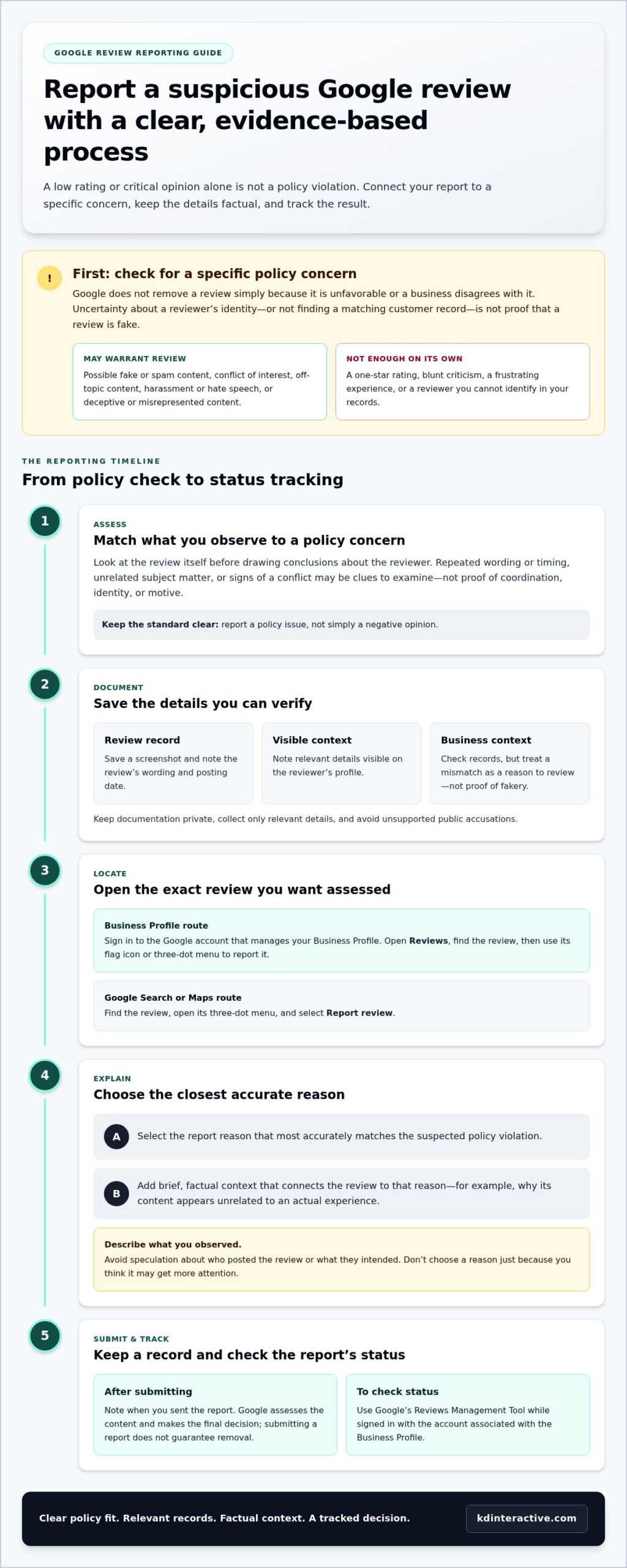
A clear report connects the review to a specific Google policy concern. Before submitting, identify the exact review and gather concise, factual details that explain why you believe it may violate policy. Avoid speculation about who posted it or what they intended. Google assesses the content and makes the final decision, so a report doesn’t guarantee removal.
Prepare the review details before submitting
Save a screenshot for your records and note the review’s wording, posting date, and any relevant details visible on the reviewer’s profile. Check business records for context, but remember that not finding a matching customer doesn’t prove the review is fake. Keep documentation private, collect only what’s relevant, and don’t publicly accuse a named person without substantiated evidence.
Submit the report and check its status
For a direct route as a business owner, sign in to the Google account that manages your Business Profile. Open the profile’s Reviews section, find the specific review, and use its flag icon or three-dot menu to report it. You can also find the review in Google Search or Maps, open its three-dot menu, and select Report review.
- Choose the specific review you want Google to assess.
- Select the report reason that most accurately matches the suspected policy violation.
- Provide brief, factual context that connects the review to that reason, such as why its content appears unrelated to an actual experience.
- Submit the report and note when you sent it.
Don’t select a reason just because it seems more likely to get attention. If the available options don’t clearly fit, revisit Google’s current prohibited-content policies and report only when you can explain the connection. Keep your wording measured: describe what you observed rather than labeling the reviewer a fraud or assigning a motive.
Checklist: Record the review, identify the relevant policy concern, choose the closest accurate reason, submit concise context, and track the result.
To check a report, use Google’s Reviews Management Tool, which lets business owners review the status of reported reviews. Sign in with the account associated with the Business Profile and locate the report. Submitting a report asks Google to assess the review; it doesn’t determine the outcome. If the review remains visible, continue with a professional response while you consider the next steps in this guide.
For Wisconsin businesses, consistent review tracking can keep reporting and responses organized. Review monitoring and reputation management support can also fit into a broader local SEO approach.
What to Do If Google Keeps the Review or Rejects Your Report
A report doesn’t automatically remove a review. Google assesses the content and decides whether it violates policy, so a review may remain visible after assessment. A report requests a review, but Google decides whether the content violates its policy. If the decision is disappointing, keep your next step factual and use the options Google makes available for that report.
Start by checking the report’s status in Google’s Reviews Management Tool. If Google denies the request, the tool may offer a one-time appeal for that decision. Follow the appeal option shown there and add relevant evidence that clarifies the policy concern. Availability depends on the decision, so don’t assume every report can be appealed or that the process is the same in every case.
Make a stronger follow-up without overstating the evidence
Organize your supporting details in chronological order: the review’s posting date, what the content says, what you can verify, and why those facts relate to a specific policy. Keep the appeal focused. If the concern is that the review appears to promote unrelated content, explain that connection rather than introducing a different accusation.
Use the appeal route presented for the decision. Don’t change the report reason to one that doesn’t fit, repeat the same submission in hopes of a different outcome, or ask others to flag the review without their own independent policy grounds. Keep customer or transaction information private, and describe suspicions as suspicions unless you can substantiate them.
If an appeal is unsuccessful, Google Business Profile support may be another channel for explaining the concern. For a review involving a potentially defamatory statement, Google also provides a separate legal removal request process. These routes don’t guarantee removal. Keep your account of events accurate and don’t treat a disputed statement as legally established.
When several suspicious reviews appear together
Handle each review as a separate item. Record its visible posting date, wording, status, and the particular policy concern you believe applies. A cluster of reviews may reveal a pattern worth documenting, but timing or similar language alone doesn’t establish that one person, competitor, or coordinated group is responsible.
A simple tracking log can make follow-up more consistent. Include the review link or identifying details, the date you reported it, the reason selected, and any response from Google. Don’t submit duplicate reports for the same content or encourage a group to flag reviews merely to increase report volume. Report each review only when you can identify an independent, policy-based concern.
While a decision is pending, keep reputation work moving: monitor the reviews, preserve relevant records, and respond calmly to customers who may read the exchange. For Wisconsin businesses, a consistent review-management process helps organize reporting and responses without assuming every critical comment should be removed.
How to Respond to a Suspicious Google Review While You Wait
A public response gives potential customers another view of the situation. Keep it calm, brief, and focused on the people reading, not on winning an argument with the reviewer. A professional reply can show that your business takes concerns seriously. Accusations, threats, or sarcastic comments can make the exchange look less credible and draw more attention to the dispute.
Responding is separate from reporting. Your reply doesn’t determine whether Google removes a review, and it doesn’t replace the policy review process. If you’re learning how to report fake reviews on google, handle the report through Google’s tools and use your public response to communicate responsibly with future customers.
Write a professional reply without escalating the dispute
A useful response acknowledges the concern without confirming details you can’t verify. Don’t name, shame, threaten, or accuse the reviewer. Keep personal, financial, and service information out of the public reply, even if you believe you recognize the person. If an offline conversation could help, offer a direct contact route your business uses.
For example: “Thank you for sharing your feedback. We take concerns seriously and would welcome the chance to understand more. Please contact our team directly so we can discuss this privately.”
This wording doesn’t concede that every claim is accurate or label the review fake. It signals attentiveness and invites a private conversation. Adjust the reply to fit your business, and don’t include a phone number or other contact detail unless it’s an appropriate channel for customers to use.
Keep reputation management consistent after reporting
One suspicious review shouldn’t disrupt how you treat everyone else. Continue monitoring new feedback and respond consistently to genuine customer concerns. Invite customers to leave honest feedback based on their experience, but don’t offer incentives for positive sentiment or pressure anyone to change a rating. A steady approach helps keep your public presence credible.
- Use a consistent tone across positive, neutral, and critical reviews.
- Track recurring concerns so you can identify service issues worth addressing.
- Keep notes on review responses and reported content for an organized follow-up process.
Pay attention to patterns in customer feedback without treating every criticism as a removal candidate. A complaint may point to a real operational issue, even if you disagree with the wording. Addressing a recurring concern internally can improve the customer experience. The separate report process is for assessing whether a particular review violates Google’s policies.
For Wisconsin businesses, review monitoring and professional replies can fit into a broader reputation-management routine. KD Interactive provides tailored support for tracking reviews and responses as part of local SEO. Learn about reputation-management support as part of a practical approach for your business.
Build a Practical Google Review Management Process for Your Wisconsin Business
Handling one suspicious review is easier when it fits into a routine. A consistent process helps Wisconsin businesses notice new feedback, assess potential policy concerns, keep useful records, and respond professionally. It also keeps one disputed review from overshadowing the everyday work of listening to customers and improving their experience.
Set a repeatable review-monitoring routine
Assign someone to check the business’s Google reviews regularly and record what needs follow-up. Set a schedule that fits your team’s capacity, and make responsibilities clear: who reviews new feedback, who responds, and who documents a potential policy report. For businesses with multiple locations, keep location-specific notes so each review is assessed in the right context.
Apply the same criteria to each review. A critical opinion or low rating may deserve a thoughtful business response, while content that appears to breach a specific Google policy may warrant a report. If you’re unsure how to report fake reviews on google, return to the policy-based steps earlier in this guide rather than treating an unfavorable rating as proof of misconduct.
- Record the review date, location, and follow-up action.
- Separate policy concerns from service feedback that calls for a response.
- Track recurring customer concerns and discuss practical improvements with your team.
Review the log periodically. If customers repeatedly mention unclear communication or long wait times, that pattern may point to an opportunity to improve operations. Consistent monitoring supports trust because customers can see that feedback receives attention. It doesn’t mean every critical review should be removed or that every report will result in removal.
A well-maintained Google Business Profile is another part of local visibility. Use this Google Business Page setup guide as a reference for profile-management basics. Reviews also work alongside other local search efforts, including the practices described in local SEO services for small businesses.
How KD Interactive supports Wisconsin businesses
KD Interactive provides Online Reviews & Reputation Management as part of its local SEO services for small and multi-location businesses in Wisconsin. This work includes monitoring online reviews and responding to feedback, with tailored support and transparent communication. The goal is to help businesses keep review activity organized and respond professionally, not to promise that a particular review will be removed.
With a consistent process in place, business owners can make measured decisions, keep customer feedback in view, and continue managing their local presence while Google assesses a report. If your Wisconsin business could use support with review monitoring and reputation management, learn about KD Interactive’s services.
Make Review Management Part of Your Next Growth Step
A single review shouldn’t dictate how you show up for customers. Treat each concern as one part of a larger picture: how your business communicates, earns trust, and stays visible in its community. A measured approach to how to report fake reviews on google helps you act with purpose while keeping attention on the customer experience you can shape.
If review monitoring is difficult to manage alongside daily operations, a consistent process can help your team stay responsive and keep feedback organized. KD Interactive’s Online Reviews & Reputation Management includes monitoring reviews and responding to feedback, with tailored local SEO solutions and transparent communication for Wisconsin businesses.
Schedule a free consultation with KD Interactive to discuss review management for your Wisconsin business and build a thoughtful approach to managing feedback.
Frequently Asked Questions
Can Google remove fake reviews from a Business Profile?
Yes. Google may remove a Business Profile review if its assessment finds that it violates policy. Reporting asks Google to assess the content, but it doesn’t guarantee removal. To report a concern, identify the specific policy that may apply and use the current reporting option in your profile or Google’s products. A negative opinion or disagreement about what happened isn’t, by itself, a policy violation.
Can I report a Google review if I cannot identify the customer?
Yes, you can report a review you can’t match to a customer if you have a specific, good-faith reason to believe it violates Google’s policies. Not recognizing the reviewer doesn’t prove the review is fake; records may be incomplete or the person may have used a different name. Review the content against Google’s current rules, keep relevant notes, and avoid publicly accusing someone based only on unfamiliarity.
How long does Google take to review a reported review?
Google’s decision time can vary, so don’t rely on a fixed deadline unless Google publishes an estimate that applies to your report. Keep the submission date and any case details in your records, then use Google’s current status-check process if it’s available for that report. While waiting, continue monitoring feedback and responding professionally. A pending review isn’t confirmation that Google will remove the content.
Will Google tell the reviewer who reported their review?
Don’t assume that a report is anonymous or that Google will disclose who submitted it. How report information is handled depends on Google’s current privacy and reporting practices, which may change. Review Google’s latest help information for details before submitting. Whatever the process, avoid contacting or confronting a reviewer about your report. Keep your communication focused on customer service and handle concerns through appropriate business channels.
Can I report a review from Google Maps if I do not manage the business?
Google may provide users with a way to flag review content in Maps, even if they don’t manage the Business Profile. The available controls can change, so check the review’s menu in Google Maps or consult Google’s current review-help guidance. Report only a specific policy concern. Don’t use a flag to challenge an opinion you dislike or interfere with a competitor’s reputation.
Can a business offer a reward for removing a negative Google review?
No. Don’t offer a reward or pressure a customer in exchange for changing or removing feedback. Instead, respond respectfully and address any service concern through your usual business channels. If you ask customers for reviews, invite honest feedback without tying a benefit to a positive rating or a changed review. Check Google’s current policies before setting up a review-request practice, since platform guidance may change.
Should I reply to a suspicious Google review before reporting it?
You can report a review and decide separately whether a public reply would help reassure potential customers. If you respond, keep it brief, calm, and free of personal or transaction details. For example, acknowledge the concern and invite the reviewer to discuss it privately through an appropriate business contact channel. A public reply doesn’t submit a policy report or influence Google’s assessment, so use the reporting process separately when warranted.