
A crisis announcement isn’t complete when you publish it once. If customers still find outdated hours, availability, or contact details elsewhere, they may act on information that’s no longer accurate. Managing online listings during a crisis calls for a verified update-and-recovery process, not a one-time post.
It’s natural to focus first on the channel where you communicate most. But customers may also check your website, Google Business Profile, Facebook Page, Apple Maps, Yelp, or Bing Places, and each can show different details. Clear, consistent updates help people make informed decisions and protect the trust you’ve built.
This guide explains what to update first, how to verify information before it goes live, and how to keep messages aligned across the platforms customers rely on. You’ll also learn how to monitor listings and reviews during a disruption, then restore normal business details methodically when circumstances change. For small businesses, a straightforward process supported by local SEO and reputation monitoring can make urgent updates easier to coordinate and recovery easier to track.
Key Takeaways
- Managing online listings during a crisis starts with a clear verification process, so urgent edits are based on trusted information.
- Prioritize platforms according to where customers look for business details, and account for each platform’s editing and verification steps.
- Assign an update owner and backup to coordinate listing changes, customer questions, and scheduled checks.
- Track which updates are published, then review customer-facing details to catch inconsistencies that could undermine trust.
- Before removing temporary notices, confirm normal operations have resumed, then audit priority listings for accuracy.
Why managing online listings during a crisis matters to local customers
An online listing is a public business profile that helps customers find essential operating information, such as hours, location, phone number, and available services. During a disruption, managing online listings during a crisis means making sure those details reflect what customers can rely on now, not what was true before circumstances changed.
Accurate listings give customers a dependable next step when normal operations are disrupted. If a profile says a shop is open but the entrance is inaccessible, someone may make an unnecessary trip. An outdated phone number can leave a customer unable to confirm an appointment, while incorrect hours can lead to missed service. These frustrations are avoidable, especially when people are already dealing with uncertainty.
Crisis updates are different from a full reputation-management or marketing campaign. The immediate task is to share verified operational facts clearly, not promote the business, launch a broad campaign, or respond to every public comment. Reputation monitoring can help identify questions and inaccurate reports, while coordinated updates keep customers focused on what they need to know. Understanding Crisis Management provides broader context for how communication fits into a response.
Which business changes deserve an immediate listing update?
Update a listing when confirmed circumstances affect a customer’s ability to visit or receive service. This may include a closure, reduced hours, temporary relocation, interrupted services, or changed entrance and access instructions. Don’t publish rumors or unverified reports as fact. Confirm the operational change with the appropriate business decision-maker, then share only what’s known. If details are still developing, say they’re being reviewed rather than guessing at an outcome.
What customers need to know first
Put the practical answer first: Is the business open? Can customers reach it? Can it serve them? Add the most reliable contact method and a realistic expectation for the next update, such as when customers should check back. Keep the wording direct and calm. Avoid speculating about the cause or promising a recovery date the business can’t support.
A listing update may need support from a notice on the business website or direct communication with affected customers. Use the website as a clear reference point when customers need fuller instructions, such as a temporary entrance or a changed appointment process. Directly notify customers whose bookings or planned visits are affected through an appropriate existing contact channel. Keep the core facts consistent so no channel creates a different impression.
- Lead with the current status: open, closed, operating with reduced hours, or temporarily unable to provide a service.
- Give a useful action: explain where to go, how to reach the business, or when to look for another update.
- Keep the message factual: share confirmed details and revise them when operations change.
For local businesses, clear updates support trust without turning a disruption into a marketing message. A concise, accurate notice helps customers decide what to do next, while consistent facts across public profiles reduce confusion as the situation evolves.
How to verify crisis information before changing business listings
Fast updates help only when the details are right. A simple approval process prevents a rumor, an outdated internal note, or an unclear message from becoming conflicting public information. For small businesses, managing online listings during a crisis is easier when everyone knows which facts to confirm, who can approve them, and where the approved version lives.
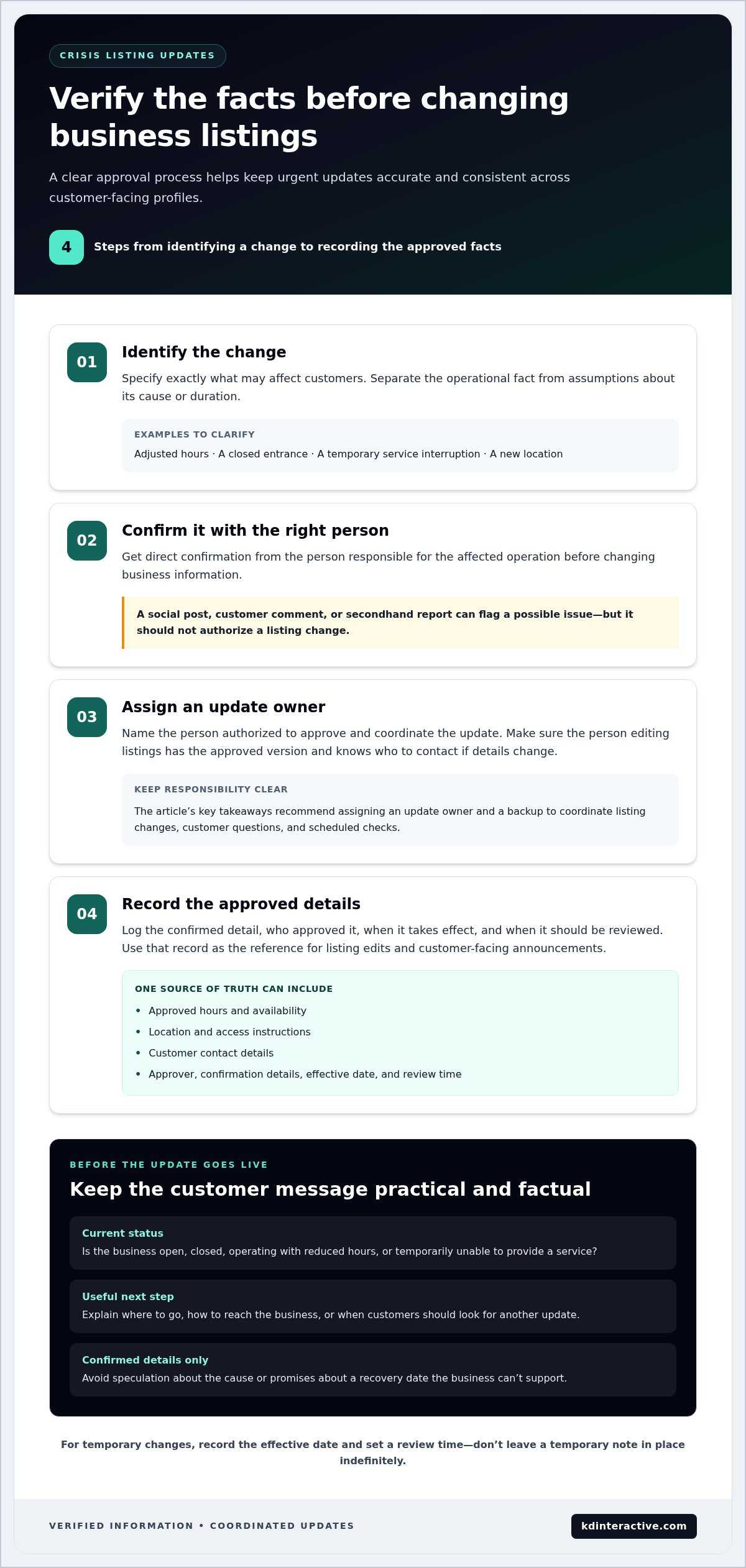
- Identify the change. Specify exactly what may affect customers, such as adjusted hours, a closed entrance, a temporary service interruption, or a new location. Separate the operational fact from assumptions about its cause or duration.
- Confirm it. Get direct confirmation from the person responsible for the affected operation. A social post, customer comment, or secondhand report can flag a possible issue, but it shouldn’t authorize a change to business information.
- Assign an owner. Name the person authorized to approve and coordinate the update. Make sure the person editing listings has the approved version and knows who to contact if details change.
- Record the source. Log the confirmed detail, who approved it, when it takes effect, and when it should be reviewed. This gives staff a clear reference when updating multiple profiles or correcting a message.
Build a reliable source of truth for business updates
Keep one dated record of approved hours, availability, location, access instructions, and customer contact details. Include the approver and when the information was confirmed. For a temporary change, record its effective date and set a review time. Don’t leave a temporary note in place indefinitely just because no one has revisited it.
Use this record to guide listing edits and customer-facing announcements. A crisis communications plan can help define roles and keep messages coordinated; Ready.gov’s crisis communications guidance offers a framework for preparing that process. The business’s decision-maker must still confirm operational facts before they’re published.
Label each change as temporary or permanent. A temporary closure or altered entrance needs a review date and a clear condition for removing the notice. A permanent relocation or lasting change to business hours should be handled as a core business-information update, not a short-term alert. This distinction helps prevent temporary details from becoming inaccurate defaults.
Avoid inaccurate or conflicting crisis messages
Don’t promise a reopening date, service availability, or explanation unless it’s confirmed. If the timing is unknown, say the business will share an update when details are verified. Check each message against the approved record and the business website so customers don’t see one set of instructions on a listing and another on the site.
If new facts change an earlier update, revise the source record first, then correct the affected messages. Note what changed and when, and have the responsible owner check that the new wording is consistent. Trustworthy crisis communication starts with verified facts, one accountable approver, and a clear record of what customers have been told. Local SEO and reputation monitoring can help businesses audit listing accuracy and track whether updates stay aligned. Learn how local SEO supports listing consistency as part of a practical update process.
Which online listings should a business update first during a crisis?
Start where customers are most likely to find, contact, or review your business. For many local businesses, that means the website and the listing with the strongest local search or map visibility, followed by other map services and review platforms customers actively use. Managing online listings during a crisis doesn’t require a long announcement everywhere. It requires prioritizing useful channels and keeping essential facts aligned.
How to prioritize Google, map, and directory listings
Set the order according to customer behavior and visibility, rather than trying to edit every directory at once. Begin with the primary local search profile, then address Apple Maps and Bing Places if customers use those channels to find you. Include review platforms and industry directories when they influence customer decisions. The priorities below are a starting point. Check where your customers actually engage, too.
| Platform | Customer purpose | Update priority | Verification considerations |
|---|---|---|---|
| Google Business Profile | Find local businesses and check key operating details in search and maps. | High when it’s a primary source of local discovery or customer interaction. | Check Google’s current guidance for editing, verification, and any profile restrictions before making changes. |
| Apple Business Connect | Manage business information shown in Apple Maps. | High if customers use Apple Maps to locate or navigate to the business. | Confirm the correct business profile and review Apple’s current instructions for submitting changes. |
| Bing Places | Help customers discover a business through Bing search and maps. | Set priority according to customer use and local visibility. | Check current editing and verification guidance, and confirm the information on the correct listing. |
| Yelp and relevant directories | Research businesses, read reviews, or find industry-specific details. | Prioritize platforms that influence customer choice or receive active customer attention. | Review the platform’s current rules and make sure the update applies to the correct location. |
Platform features, editing steps, verification requirements, and update timelines can change. Review each platform’s current guidance before publishing, and don’t assume an edit is visible until you’ve checked the public-facing profile.
Keep listings consistent without copying every message everywhere
Keep the facts consistent, but adapt the level of detail to each channel. A concise profile update can state the operating change and direct customers to a website notice for full instructions. Make sure the essential details agree wherever they appear:
| Operational detail | What should match |
|---|---|
| Hours and availability | Current opening status, adjusted hours, and service availability. |
| Location and access | Current address, temporary location, entrance, or access instructions. |
| Contact information | The reliable phone number or other customer contact method. |
| Update expectations | Any stated time or condition for the next update. |
Avoid pasting a lengthy announcement into every profile. Keep each listing scannable, link to a fuller website notice when appropriate, and check that the link and core details remain accurate. This helps customers act on the information without creating extra versions to maintain.
How to update and monitor online listings during a crisis
A reliable workflow keeps urgent edits organized after the facts are confirmed. For small businesses, managing online listings during a crisis means more than submitting changes. Someone must own the work, confirm what customers can see, and follow up when platforms or circumstances change.
A practical sequence for publishing urgent listing changes
Before editing, gather the approved operating details and prepare concise wording. Assign a primary owner and a backup so listing edits, customer questions, and scheduled rechecks don’t depend on one person being available. Then work through the platforms in priority order and record progress as you go.
- Document the change. Record the confirmed operational detail, its effective date, the approving decision-maker, and when it should be reviewed.
- Prepare the message. Draft a short update that states the customer impact and next useful action. Keep it factual and aligned with the approved information.
- Assign responsibility. Identify who will edit each profile, respond to listing questions, and cover those tasks if the primary owner is unavailable.
- Update priority profiles. Submit changes to the business’s most important search, map, and review listings first. Follow each platform’s current editing and review guidance.
- Check what customers see. Open each public-facing profile and confirm the displayed hours, access details, contact information, and message are accurate.
- Log pending edits and rechecks. Note submissions that aren’t visible yet, their status, and when someone will check again. Don’t promise an approval or publication time controlled by a platform.
A shared tracker can be a simple document. Include the platform, detail changed, submission date, current status, person responsible, and next verification time. That record helps the backup pick up the work and shows which profiles still need attention.
How to monitor customer response and listing accuracy
Monitoring turns a one-time update into an active process. Check priority profiles on a schedule suited to the situation. Look for outdated details, new questions, visible reviews, or customer reports that suggest instructions are unclear. Keep the website notice aligned with listing updates, and route customer questions to the person authorized to answer them.
- Review feedback for patterns. Repeated questions about access or availability can signal that an update needs clearer wording or more detail.
- Use analytics as a prompt. Changes in profile activity can help identify where customers may still be seeking information. Interpret those signals alongside direct feedback, not as proof of a specific problem.
- Coordinate reputation monitoring. Track relevant reviews and public questions through the business’s established reputation-management process, and share confirmed corrections with the listing owner.
Consistent tracking helps small businesses spot gaps and adjust customer-facing information as conditions evolve. For tailored local SEO support with listing accuracy and recovery tracking, connect with KD Interactive about local SEO support.
How to restore accurate listings after the crisis
Recovery isn’t complete when the disruption ends. Temporary notices can confuse customers if they remain visible after normal operations resume, or if a profile still shows altered hours or access details. Before changing anything, confirm the business is ready to return to its regular schedule and services. Then use the crisis change log to restore information across the same priority platforms that carried the temporary updates.
A post-crisis checklist for restoring listing accuracy
Get confirmation from the responsible decision-maker before removing a closure notice or restoring normal hours. If the business is reopening in stages, keep the details that still apply and revise only what has changed. Work through the change log so recovery edits don’t miss a profile that took longer to update during the disruption.
- Confirm normal operations. Verify current hours, services, location, access instructions, and the best customer contact details with the person responsible.
- Review every priority platform. Remove or revise temporary notices on the website, search and map listings, review profiles, and relevant directories recorded in the log.
- Audit the full profile. Check hours, services, contact details, location, and other customer-facing updates. Don’t assume restoring one field automatically corrects the rest.
- Check the public view. Confirm each profile displays the intended details. Record edits that are pending, incorrect, or unavailable for follow-up.
- Close the loop. Update the change log with the completion status and schedule another check for any unresolved listing edits.
This final audit matters because a business can be operating normally while its public profiles still show crisis-era instructions. Treat each platform as a separate customer touchpoint, and make sure any website notice agrees with the restored listing details.
When ongoing local SEO support can help
Recovery can reveal gaps in profile ownership, consistency, or customer feedback. Ongoing reputation monitoring helps organize reviews and questions that may point to lingering confusion. Local SEO support can also help audit listing consistency and track visibility over time, giving a business a clearer view of its digital presence after conditions stabilize.
For businesses reviewing their Google profile as part of this cleanup, the guide to setting up a Google Business Page can help with profile fundamentals. Keep performance measurement practical: compare relevant local visibility and customer engagement indicators over time, and use feedback to identify information customers still need. This makes recovery a useful checkpoint for future listing maintenance, rather than a task that ends when temporary notices come down.
Wisconsin businesses ready to improve listing consistency and track local visibility can explore local SEO support from KD Interactive. A methodical audit helps keep customer-facing details aligned as operations return to normal.
Make listing readiness part of everyday operations
A disruption is easier to manage when the next update doesn’t depend on someone rebuilding the process from memory. Turn what you’ve learned into a simple readiness routine: keep profile access current, maintain an up-to-date change log, and make sure the people responsible know where approved business details live. That preparation can help your team act clearly when circumstances change again.
Use each recovery as a chance to strengthen your digital visibility, not just close out an urgent task. A regular listing review can surface inconsistencies before customers encounter them, while a clear record makes future updates easier to coordinate. That’s the practical value of managing online listings during a crisis: it builds a more dependable process for the next unexpected change.
KD Interactive supports small businesses across Wisconsin with local SEO services that include reputation management and analytics tracking. Get practical local SEO support for your business and take the next step toward a more prepared, consistent online presence.
Frequently Asked Questions
What should I update first on my business listings during a crisis?
Update details that could change a customer’s immediate decision: whether to visit, where to go, and how to reach the business. If customers are arriving at a closed location, correct the listing most likely to send them there first. Then update other discovery and review platforms customers use. Keep a dated note of what changed so staff answering calls or messages can give the same current information.
Can I temporarily change my Google Business Profile hours during an emergency?
Yes, you can update hours to reflect a temporary operational change, provided the change is accurate and follows Google’s current profile guidance. Use the platform’s appropriate hours controls rather than replacing regular hours with a temporary schedule indefinitely. If the business is closed for a period or reopening in stages, clearly distinguish that temporary status from regular hours, then check the public profile after submitting the edit.
How do I keep business listings consistent across different platforms?
Use a shared update record with the approved facts, then tailor the message to each platform’s format. For example, a map profile may need a brief access note, while the website can explain appointment changes in more detail. Compare key fields side by side, including business name, address, phone number, hours, and service status. Using a consistent format for dates and time ranges also helps prevent avoidable discrepancies.
What should I do if a listing edit is pending or rejected?
Check the platform’s status message and current guidance before trying again. Confirm that the edit applies to the correct profile and that the submitted information is clear and supported by the business’s own records. Record the issue and any reference details, then assign someone to follow up. If customers need the information before the listing changes, publish the confirmed update on a channel the business controls.
Should I remove temporary updates as soon as normal operations resume?
Remove or revise them only after the business has confirmed that the affected services, access, and schedule have returned to normal. A partial reopening may mean some temporary instructions still apply. For instance, regular hours may resume while a service remains unavailable. Review each notice against current operations, then remove outdated wording and check that customers aren’t still being directed to temporary arrangements.
How often should I check online listings during a crisis?
Set a check schedule that matches how quickly the situation is changing. After submitting an edit, review the public profile to see whether the change appears. Check again whenever operating details shift or customers report conflicting information. During a fast-moving disruption, a business might assign checks at the start and end of each operating day. Adjust the cadence as conditions stabilize, and log outstanding edits.
Can incorrect business listings hurt customer trust or local visibility?
Yes. Incorrect hours, contact details, or service information can send customers to a closed location or leave them unsure where to get help. That experience can weaken confidence in the business, even if the underlying issue is temporary. Conflicting profiles may also make it harder for customers to identify which information is current. Accurate details support a more reliable local presence, though no listing change guarantees a particular search position.